

Beta
Chatting with Qodo makes pull request reviews interactive. Start a conversation by mentioning @qodo, qodo, or /qodo at the beginning of a PR comment, review comment, or inline code comment. You can also address Qodo with a greeting such as Hey qodo.
When chatting with Qodo, you can:
-
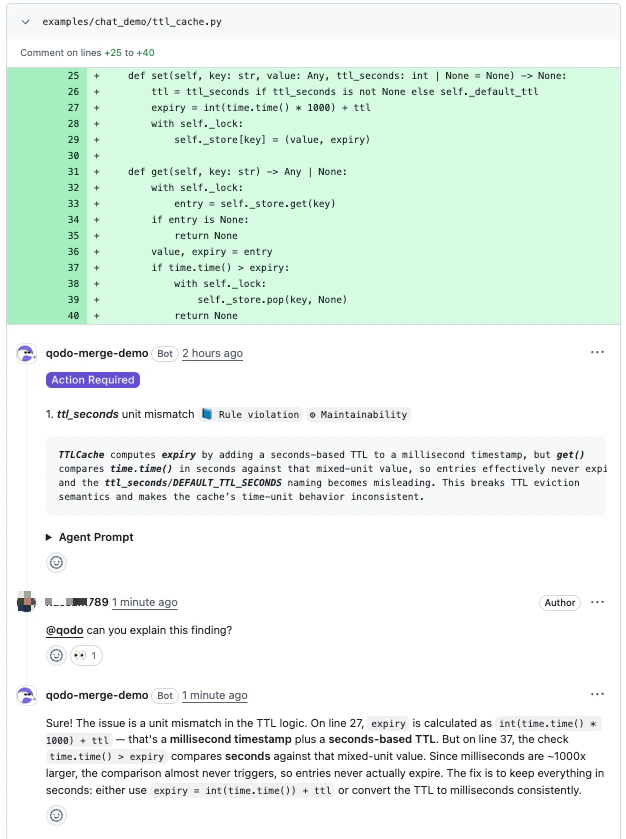
Ask Qodo to explain a finding.
-
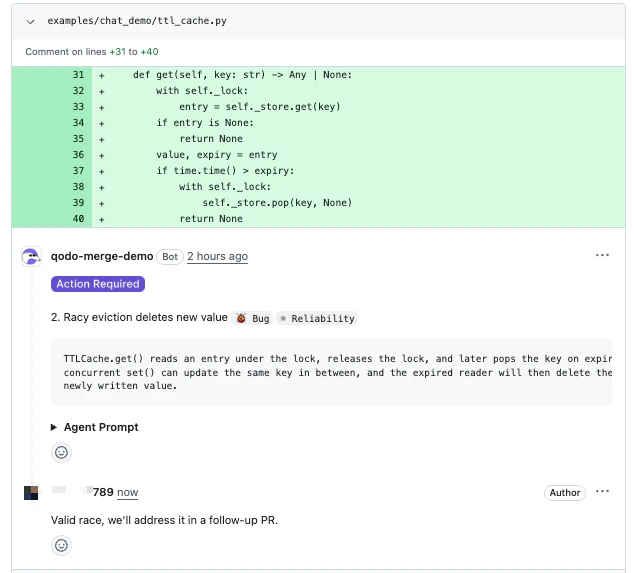
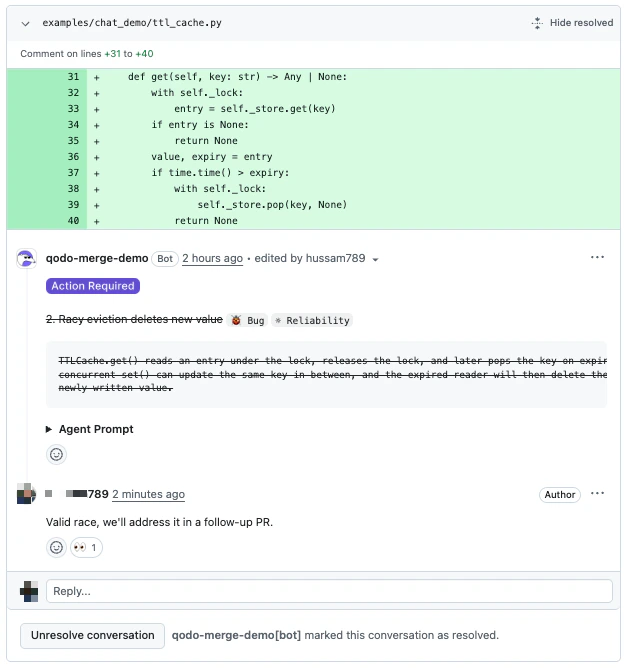
Dismiss a finding with a reason.
-
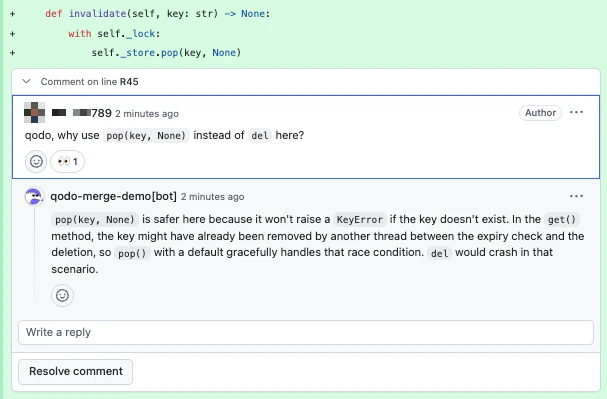
Discuss a suggestion or ask follow-up questions in natural language.
Start the chat
Mention@qodo in any PR comment, review comment, or inline code comment. Place @qodo, qodo, or /qodo at the beginning of the comment, or precede it with a greeting such as Hey qodo.
Mention @qodo (or /qodo / qodo) each time you want Qodo to respond, including follow-up replies in a thread it has already participated in. Qodo replies only to messages that explicitly address it, so reviewer-to-reviewer discussion in a thread is never interrupted.
Conversation context
Qodo uses the chat location to understand context for:- Inline code finding: Scoped to the specific finding.
- Inline code comment: Scoped to the specific line.
- PR comment: Scoped to the entire PR and all findings.
What you can ask Qodo to do
-
Explain a finding
Ask why a finding was raised or how the suggested fix works. Qodo replies in natural language. -
Dismiss a finding
Tell Qodo a finding does not apply. Qodo marks it as dismissed with one of three reasons:- Rejected: The finding is incorrect or invalid.
- Deferred: The finding is acknowledged, but will be handled outside this PR.
- Intentional: The flagged behavior is intended (e.g., kept for backwards compatibility).
- The PR summary comment strikes the finding through and tags it
✗ Dismissed, so the open-vs-closed split is visible without scrolling through every thread. - The inline review thread is marked resolved and collapsed. It can be reopened at any time via Unresolve conversation.
- The inline finding comment itself is rendered with strikethrough, signalling that the suggestion was acknowledged and closed without requiring a code change.
-
Discuss in natural language
Ask follow-up questions, request more detail, or push back on a suggestion. Qodo responds conversationally with the PR diff and thread as context.
Triggering Qodo
There are no fixed sub-commands inside the Chat. Qodo interprets your message in natural language. To address Qodo, start a message with any of:
Address Qodo in every message you want it to act on, including follow-ups in a thread it has already replied to. Untagged replies are treated as reviewer discussion and left alone.
To dismiss a finding, just tell Qodo in plain language (e.g., “@qodo this is intentional, we want to keep the legacy behavior”). Qodo will record the dismissal with the appropriate reason.
Example conversations
Asking for clarification
Asking for clarification
DeveloperQodo
Dismissing a finding (intentional)
Dismissing a finding (intentional)
DeveloperQodo
Dismissing a finding (deferred)
Dismissing a finding (deferred)
DeveloperQodo
Dismissing a finding (rejected)
Dismissing a finding (rejected)
DeveloperQodo
Guidelines for GitHub users
GitHub does not always update bot responses in real time. After posting a message:- Refresh the page if you do not see the Qodo response indicator.
- Refresh again after a few seconds if the full response does not appear.
Disable Chat with Qodo
Chat with Qodo is enabled by default. To turn it off:Disable using the Qodo portal (Recommended)
Navigate to Configurations > Workflow > Chat agent and disable the Chat with Qodo toggle. See Configure Qodo using the portal.Disable using .pr_agent.toml
true.
Related resources
- Remediate findings in your pull request: Fix findings directly from the chat using the Remediation agent.
- Configure Qodo using the portal: Manage code review settings centrally from the Qodo portal Configurations page.