

BetaGitHubGitLab
The Relevance section highlights related pull requests with similar findings from past reviews. This provides historical context by linking to previous pull requests where a similar issue was discussed, accepted, or rejected, so you can judge whether a finding is worth acting on without digging through history yourself.
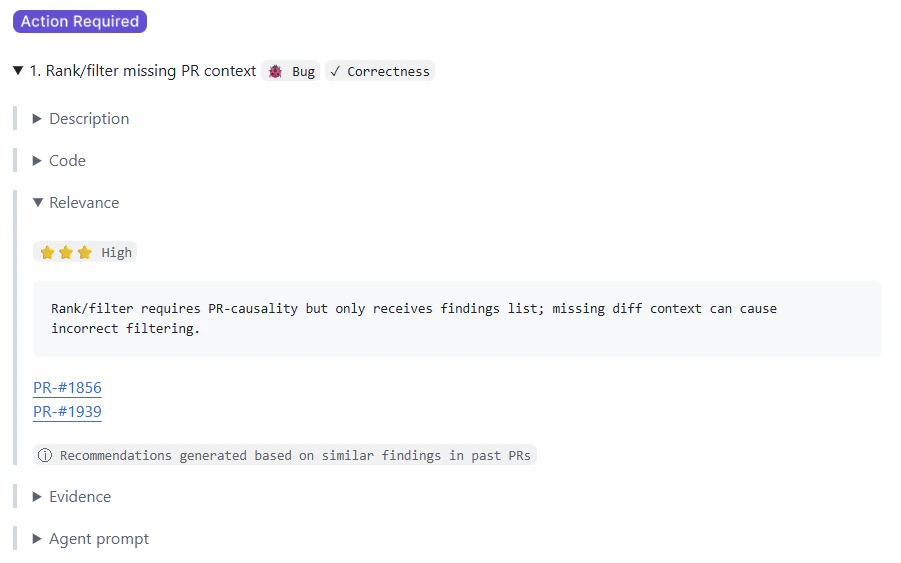
How relevance is classified
Each finding gets a relevance classification based on how similar findings were handled in past pull requests:- ⭐⭐⭐ High: Similar findings were typically accepted or fixed.
- ⭐⭐ Medium: Mixed or inconclusive history.
- ⭐ Low: Similar findings were typically ignored.
What’s in an entry
Each Relevance entry includes:- A relevance classification (High, Medium, or Low)
- A brief explanation of the historical pattern
- Links to relevant past pull requests
- An indicator that the insight was generated from similar findings
How relevance is calculated
Relevance is powered by PR history indexing, Qodo’s mechanism for analyzing your team’s pull request activity. This isn’t a one-time score: as your team merges new pull requests and makes new review decisions, Qodo keeps learning, so relevance classifications stay aligned with how your standards evolve rather than reflecting a stale snapshot.Get started
To view Relevance on a finding:1
Ensure your repository is integrated with Qodo (GitHub or GitLab).
2
Open a pull request reviewed by Qodo.
3
Expand an issue finding to view the Relevance section, which includes links and context from similar past pull requests.
Related resources
- Anatomy of a Qodo Code Review: The parts of the review comment and how to read them.
- Understanding PR history indexing: How Qodo builds the history behind Relevance.
- Dismiss a code review finding: Close a finding without fixing it and record why.
- Rule Miner or Relevance isn’t producing results: What to check when Relevance doesn’t appear.