Qodo 2.10
Released 15 September 2026View your Software Map across repositories (Beta)
Software Map gives you a live view of your software system across repositories. Qodo automatically discovers your repositories and maps the dependencies and connections between them, including service relationships, contracts, and the potential blast radius of changes. The map updates with every pull request, so it reflects your current code without requiring you to create or maintain diagrams. Use Software Map to understand your system, assess the impact of changes, and identify areas where code review findings, risk, and technical debt are concentrated. Software Map also provides the system-level context that Qodo’s agents use to understand your codebase. See Gain insight with Software Map.Cross-repo auto-discovery across your organization (Beta)
Qodo now maps relationships across your entire organization automatically, instead of one repository at a time. Repositories connected using a Qodo 2.10 Git provider installation wizard get their cross-repository relationships discovered automatically, with no manual setup, whether selected during installation or added later. See Manage cross-repository relationships.Qodo 2.9
Released 7 September 2026Get Agentic Toolbox from leading marketplaces
Agentic Toolbox is now available as verified plugins and a Power in leading marketplaces, and is now generally available (GA). Bring Qodo’s review capabilities directly into your coding agent, with access to code understanding and coding standards: For more information, see Agentic Toolbox.Install Qodo on Bitbucket Data Center (on-premises)
A new guided installation wizard for Bitbucket Data Center on-premises deployments connects your self-hosted server to Qodo in a few easy steps. Configure selected projects or your entire server, typically in around 5 minutes. For more information, see Install Qodo on Bitbucket Data Center (on-premises).Assess code change risk using blast radius (Research Preview)
GitHubGitLabAzure DevOps
Qodo classifies the risk of a code change based on its scope and sensitivity, and can publish it as a native pull request label (a tag on Azure DevOps), helping teams triage which pull requests need the closest review directly from the pull request list. Each pull request receives one of three risk levels: Large, Medium, or Small blast radius.
For more information, see Assess code change risk using blast radius.
Apply a code review configuration preset that matches your needs
Easily select a code review configuration preset to match your needs, without having to set each Display option individually. Choose Minimal for a lean, low-noise review, Comprehensive for every label and group visible, Standard for the default balance, or Custom to configure each setting yourself. For more information, see Configure Qodo using the portal.Visualize cross-repository relationships (Beta)
Now you can get a visual representation of the state of your cross-repository relationships. Explore how your repositories connect, identify the repositories at the center of your architecture, and group related repositories into clusters. Switch between Map for exploring repository relationships and Monitor (Alpha) for seeing code review findings across related repositories, with filters for severity, category, and pull request state.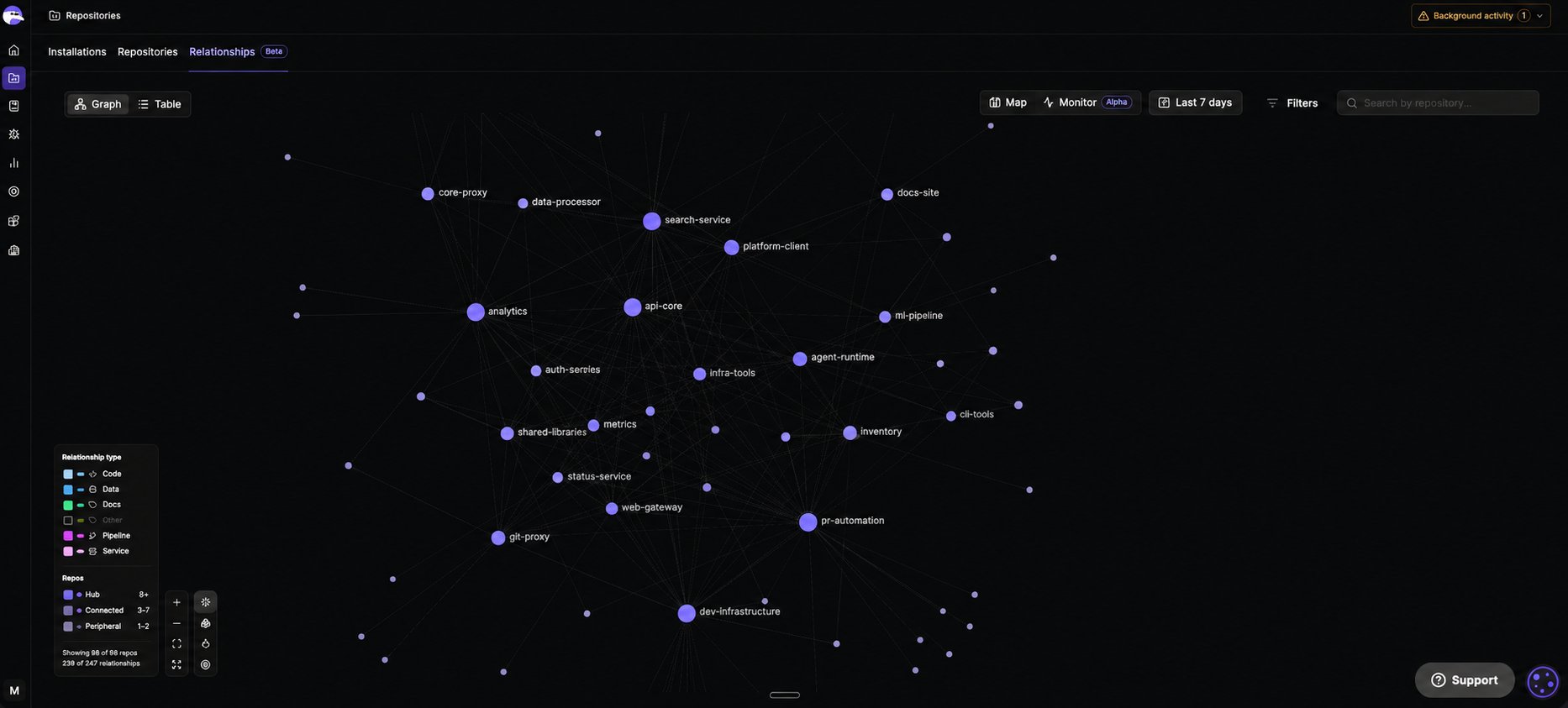
Monitor background activity from anywhere in the portal
Connecting a repository to Qodo automatically kicks off background processes, including repository sync, PR history indexing, cross-repo discovery, and rules import. Background activity, in the top navigation, shows these processes as they happen from anywhere in the portal. Each row is clickable, taking you straight to the relevant page.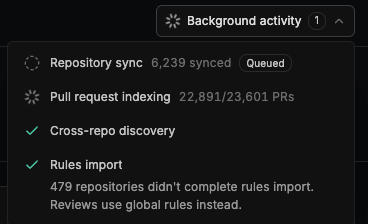
Sunsetting legacy v1 commands
Selected legacy v1 commands are being deprecated starting September 1, 2026, and will be permanently removed on October 1, 2026. See Sunsetting legacy v1 commands for affected commands, timelines, and recommended alternatives.Qodo 2.8
Released 16 August 2026Qodo’s Agentic Toolbox (Beta)
Bring Qodo’s code understanding, coding standards, review, and finding resolution directly into your coding agent workflow. The Agentic Toolbox extends your existing coding agent with Qodo tools it can use throughout development:- Codebase Wisdom: Understand your codebase, dependencies, relationships, and recent changes.
- Get Rules: Retrieve the rules that apply to the current task before writing code.
- Review: Review local changes using Qodo Review before creating a pull request.
- Review Resolver: Retrieve and resolve Qodo Review findings from your agent workflow.
- Manage Standards: Manage your organization’s Review Standards directly from your agent.
Advanced Git configurations
GitHubGitLabAzure DevOps
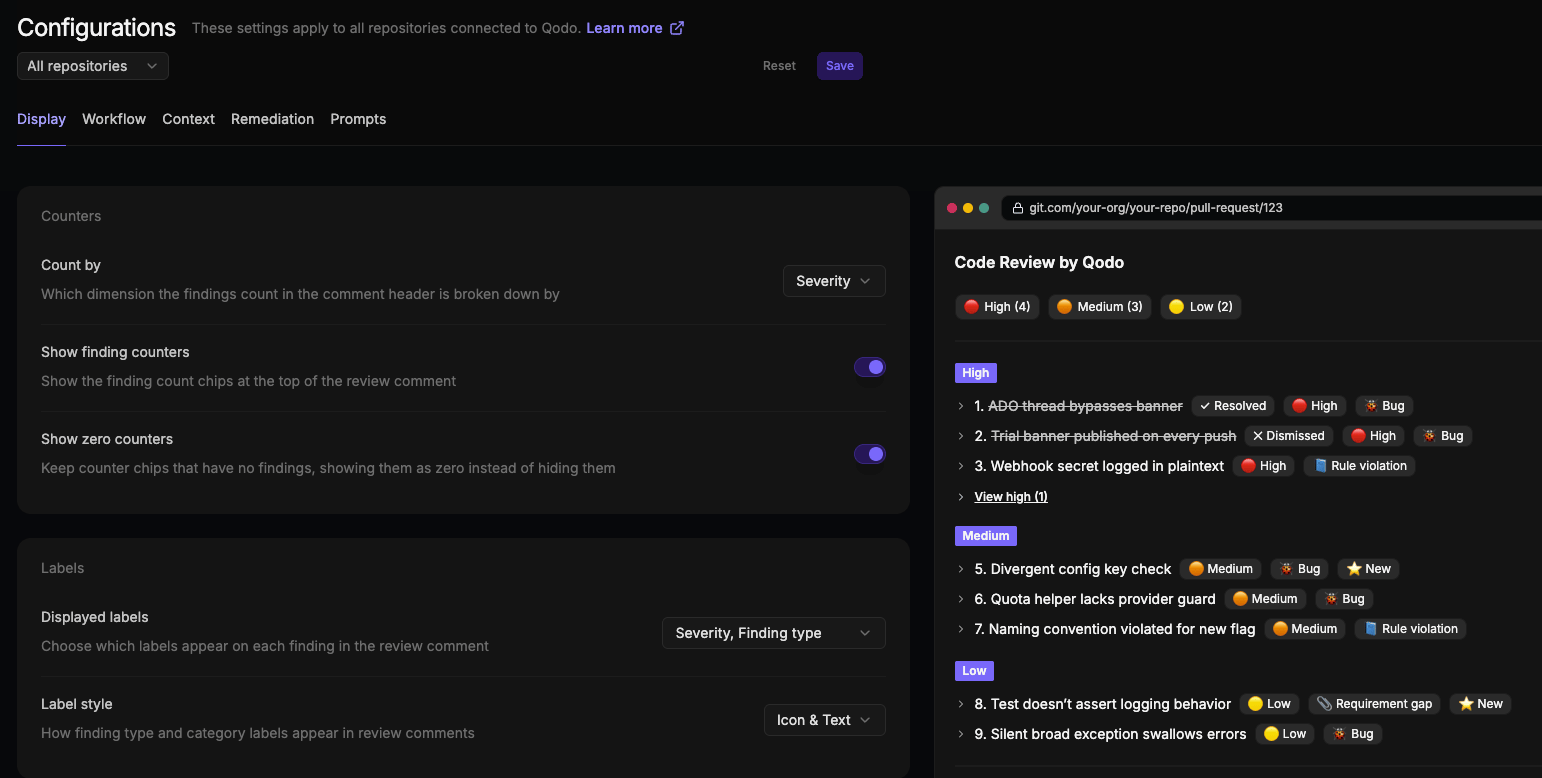
The Configurations page in the Qodo portal has been reworked with more intuitive categories organized around what each setting affects: Display, Workflow, Context, Remediation, and Prompts.
You now have more control over how review results are organized, including the ability to group, order, count, and label findings by any finding dimension. Display settings are also more granular, with dedicated controls for counters, labels, grouping, ordering, overflow, finding content, and comment structure, each with a live preview of how changes appear in review comments. Severity terminology has also been updated for greater consistency.
Gerrit integration for on-premises deployments
Qodo now supports native integration with Gerrit for on-premises deployments, bringing AI-powered code review directly into your self-hosted development environment. Qodo connects securely to your Gerrit instance using a dedicated Qodo user and webhooks, allowing it to receive change events and publish review findings directly in Gerrit. With this integration, Qodo:- Publishes AI-powered reviews and findings directly on Gerrit changes
- Automatically analyzes changes when configured Gerrit events occur
- Supports repository-level or global webhook configuration for flexible deployment
- Lets you control which imported projects have code review enabled
Web search for dependency context (Research Preview)
Qodo can search the web for current documentation, specifications, and release notes for third-party dependencies, helping produce more accurate review findings. Sources used by the review agent are shown in the Context sources section. For more information, see Enrich context with up-to-date dependencies.Daily tips in pull requests
Discover more Qodo features and configurations directly from your pull requests with a rotating daily tip. Each tip links to relevant documentation and configuration pages, making it easier to find and use capabilities you may not know about. For more information, see Qodo’s daily tips.Qodo 2.7
Released 29 July 2026Review effort mode (Research Preview)
Optimize AI code review effort by automatically matching review depth to the risk of each code change. Review effort mode analyzes each change and routes reviews to the appropriate level of analysis, helping reduce review time for low-risk updates while applying deeper scrutiny to higher-impact changes. You can also configure a fixed review mode for a repository. For more information, see Optimize AI effort with Review effort mode.PR history indexing
PR history indexing is a core capability of Qodo’s Context Engine: it indexes your team’s pull request activity, turning your repositories into an evolving record of how you actually review and ship code. That process has always run quietly in the background. Now it’s exposed directly in the Qodo portal. A new PR history indexing column in the repository table shows this status for every repository, tracking indexing from the first pull request through ongoing updates. Open any repository’s sidebar for the full detail: how many pull requests have been indexed, how many findings Qodo has learned from that history, and exactly which learning features, Rule Miner and Relevance, it has unlocked for that repository.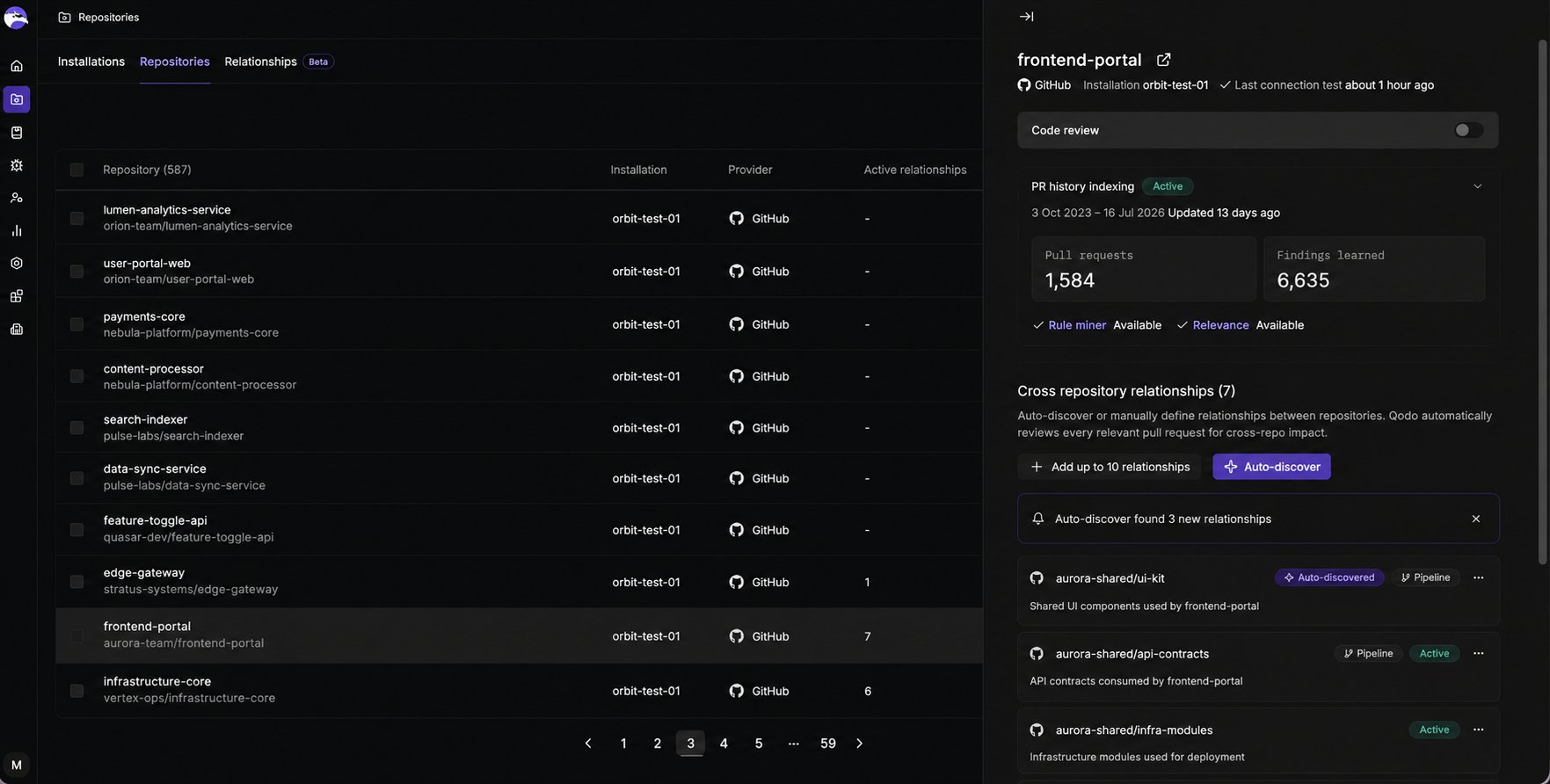
Qodo 2.6
Released 15 July 2026Support for IdP-initiated SSO login
Qodo now supports Identity Provider (IdP)-initiated login for Single Sign-On (SSO). Users can launch the Qodo application directly from their identity provider portal, such as Microsoft Entra ID or Okta, without first navigating to the Qodo sign-in page. This feature complements the existing Service Provider (SP)-initiated login flow, giving organizations the flexibility to choose the authentication experience that best fits their environment. For more information, see Configure Single Sign-on (SSO).Repository-specific review guidance with REVIEW.md (Research Preview)
Customize Qodo code reviews by defining repository-specific instructions in aREVIEW.md file. Qodo uses these guidelines to tailor review feedback, prioritize important findings, reduce noise, and enforce your team’s engineering standards across pull requests.
For more information, see Apply REVIEW.md instructions to code review.
Qodo 2.5
Released 30 June 2026Automatic discovery of cross-repository relationships (Beta)
Mapping how your repositories depend on one another just got automatic. For any repository, Qodo can discover its related repositories for you, instead of you defining every relationship by hand. Open a repository’s cross-repository relationships, select Auto-discover, and Qodo surfaces the repositories it connects to. From there, it automatically reviews every relevant pull request for cross-repository impact. Prefer to map them yourself? Manual relationships are still fully supported.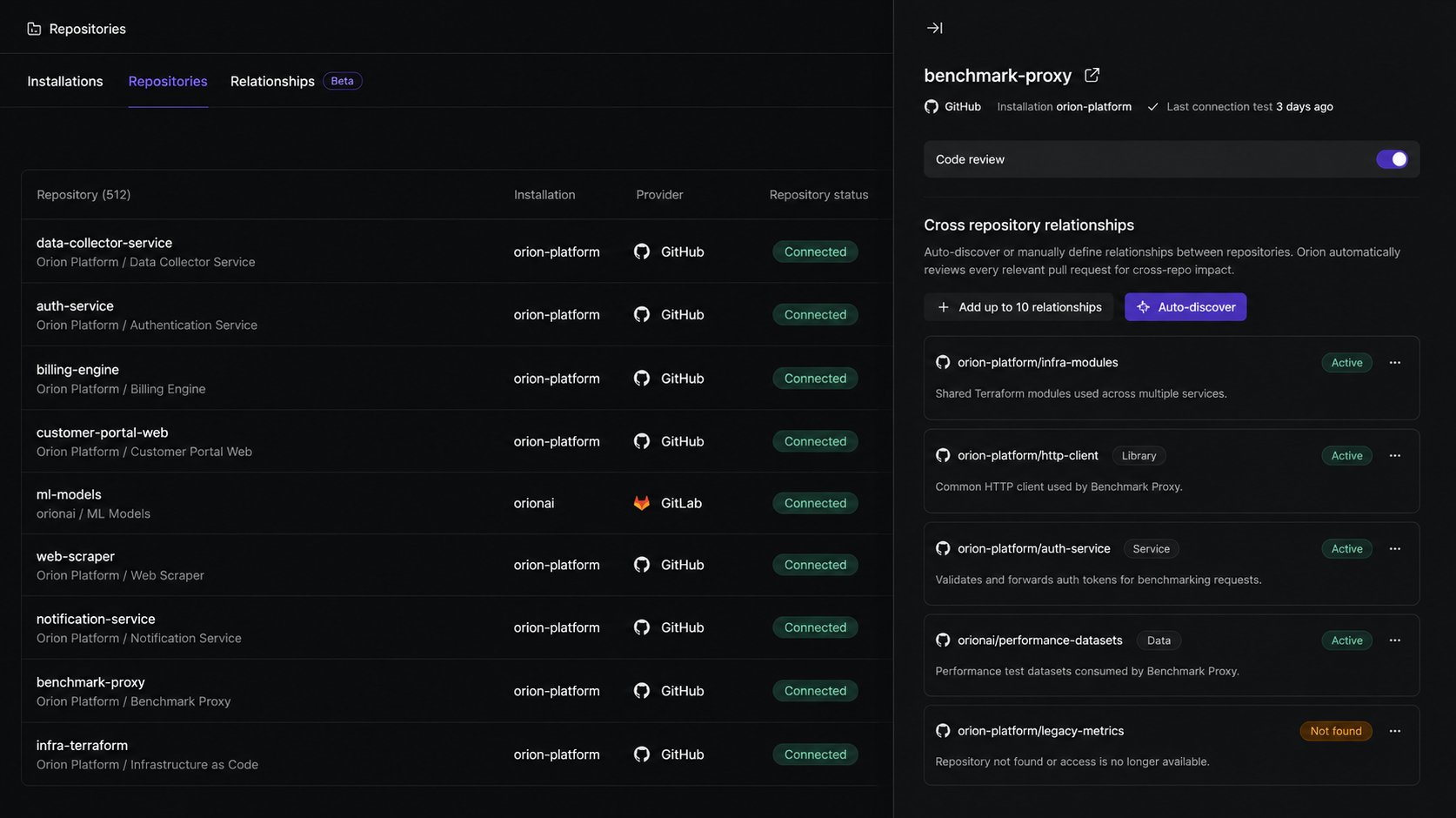
Spec agents (Research Preview)
Reviews pull requests against linked specification documents to verify that implementation matches documented requirements. It identifies missing requirements, incomplete implementations, and deviations from the intended design before code is merged. For more information, see View requirement gaps in findings.Design review agent (Research Preview)
Reviews pull requests against linked Figma designs and design system components to verify that UI implementations match approved designs. It helps identify UX deviations, missing design requirements, and design system inconsistencies before code is merged. For more information, see View UX deviations in findings.Qodo 2.4
Released 16 June 2026Catch breaking changes across repositories (Beta)
Breaking changes that cross repository boundaries are the hardest to catch in review. A function signature shifts in a shared library, an API contract changes, or a schema evolves. Each passes single-repository review cleanly, and the breakage only shows up in production. Cross-repository code review closes that gap. You define the relationships between repositories, and Qodo automatically reviews every relevant pull request for cross-repository impact, across providers.
With cross-repository code review you can:
- Detect breaking changes before they reach production, across repository boundaries.
- See cross-repo findings directly in the pull request, tagged
Cross-repo, with a link to the affected lines. - Audit every relationship across your organization in List and Graph views.
- Manage relationships across Git providers from a single location.
- Define relationships between repositories manually.
Generate rules from pull request history with Rule Miner (Beta)
Your best review standards aren’t in any document. They’re in the comments senior engineers leave on every pull request: the same patterns flagged again and again, never formally written down. Rule Miner analyzes your organization’s pull request history to surface these patterns and generate rules from them automatically, turning repeated feedback into enforceable standards without manual rule creation.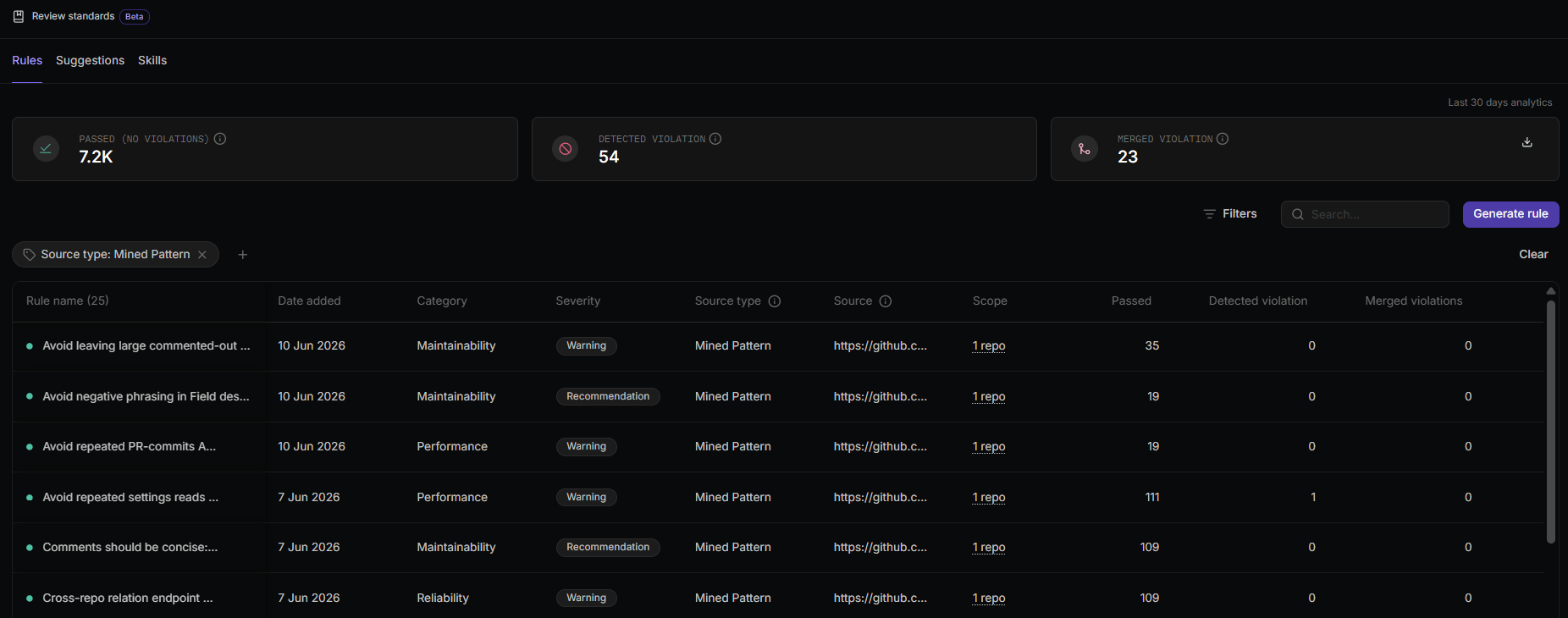
- Automatically discover recurring review patterns from accepted pull request comments across your repositories.
- Generate up to 10 rules per repository on the first run, then continue building the rule set every two weeks as new patterns emerge.
- Review generated rules before activation, or auto-approve and enforce them immediately.
- Trace each generated rule back to the pull request it came from using the source link.
Centrally manage rule-related skills across repositories (Beta)
Strengthen code review governance across your organization with centralized visibility into rule-related skills and their repository coverage.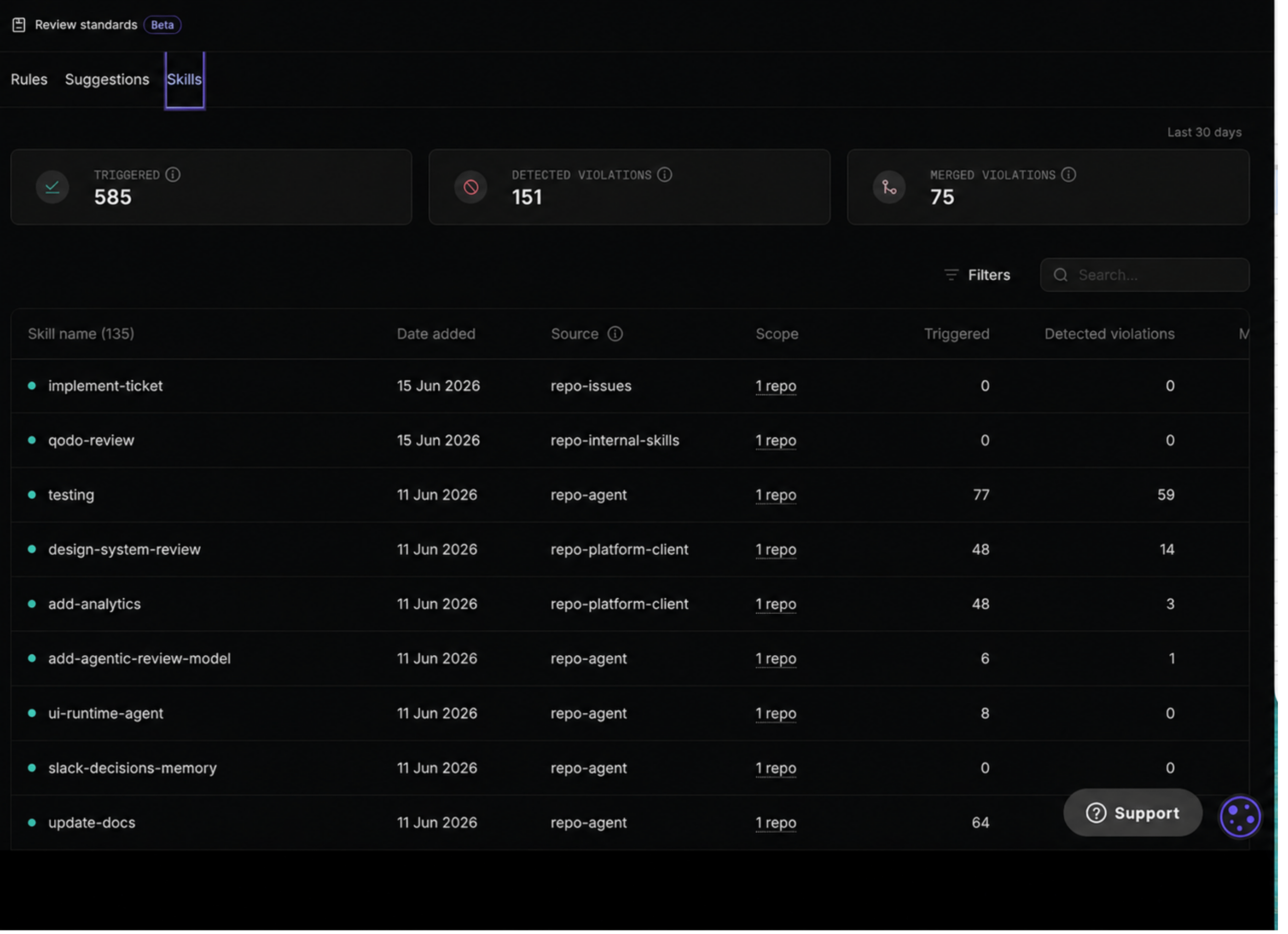
Chat with Qodo in pull requests (Beta)
Interacting with Qodo in pull requests is now more powerful, flexible, and natural. You can have contextual conversations with Qodo anywhere in your pull request by addressing it with the keywordqodo. Any variation works, such as @qodo, /qodo, or qodo, in comments, review threads, or inline code discussions.
We’ve taken the legacy /ask experience to the next level with chatting with Qodo in your pull requests. Instead of a single-purpose command, Qodo can now participate in richer, context-aware discussions directly within your review workflow.
When you chat with Qodo, you can:
- Ask for explanations: Understand why a finding was raised or how a suggested fix works.
- Dismiss findings: Tell Qodo when a finding is incorrect, intentional, or should be addressed later, and Qodo updates the review accordingly.
- Discuss suggestions: Ask follow-up questions, request more context, or challenge a recommendation in natural language.
Introducing the Research Preview program
The Research Preview program is intended for exploring features that are under active development. These features let you try new capabilities and share feedback before broader release, and are clearly identified throughout the documentation. Features leave the program once they advance to Beta or General Availability. For more information, see Qodo Research Preview program.Remediation agent (Research Preview)
Automatically resolve code review findings at scale without leaving your pull request workflow. The Remediation agent applies fixes for findings that match your configured severity threshold, creates a new branch from the pull request under review, and opens a separate remediation pull request with the proposed changes for your review. For more information, see Remediate findings in your pull request.Remediation agent (Research Preview)
Automatically resolve code review findings at scale without leaving your pull request workflow. The Remediation agent applies fixes for findings that match your configured severity threshold, creates a new branch from the pull request under review, and opens a separate remediation pull request with the proposed changes for your review. For more information, see Remediate findings in your pull request.Qodo 2.3
Released 13 May 2026View and analyze cross-organization PR findings (Beta)
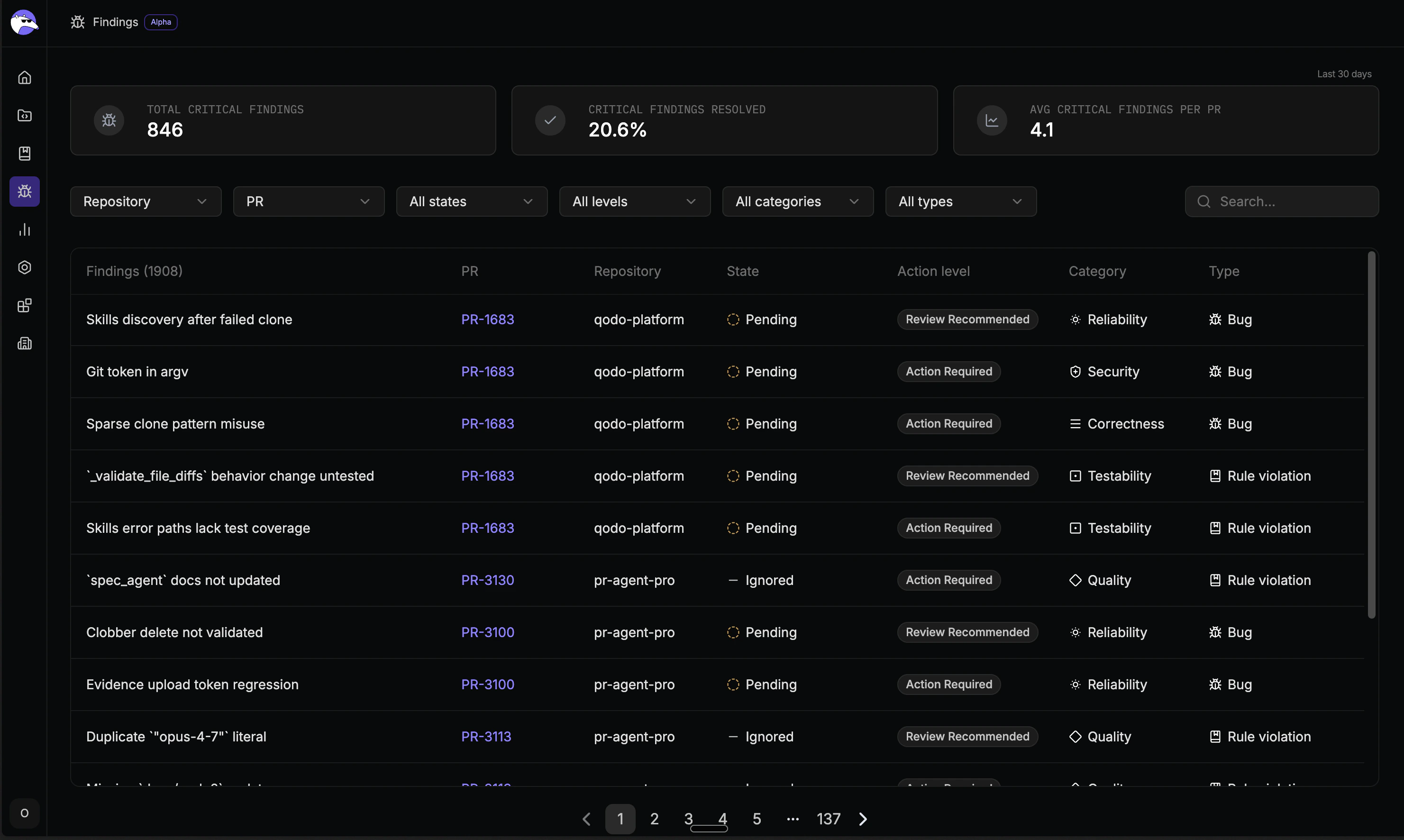
Qodo 2.3 introduces the Findings page, bringing code review findings from across all your organization’s repositories together in one place. Previously only visible inside individual pull requests, findings are now available to team leads and engineering managers to understand code quality trends, monitor whether critical issues are being resolved, and measure the impact of Qodo’s reviews over time. From the Findings page you can:- See all critical findings across every repository without opening individual PRs
- Find findings from any pull request without navigating into it
- Know whether critical issues are being fixed or bypassed before merge
- Measure the impact of your review standards with 30-day analytics
Qodo 2.2
Released 11 March 2026Central configuration page in the Qodo portal
Qodo 2.2 introduces a new Configuration page, providing a centralized way to manage how Qodo performs AI-powered code reviews across your organization. Instead of relying only on repository configuration files, you can now control review behavior directly from the Qodo portal, including how reviews run, how findings are surfaced, and how feedback appears in pull requests. These settings allow you to shape the review experience to match your workflow. For example, you can configure a lean review that surfaces only the most critical issues and minimizes noise. Alternatively, you can configure a more verbose review that provides broader coverage and richer context. The portal works alongside existing repository and organization-level configuration methods, allowing you to define shared defaults while still supporting repository-specific overrides.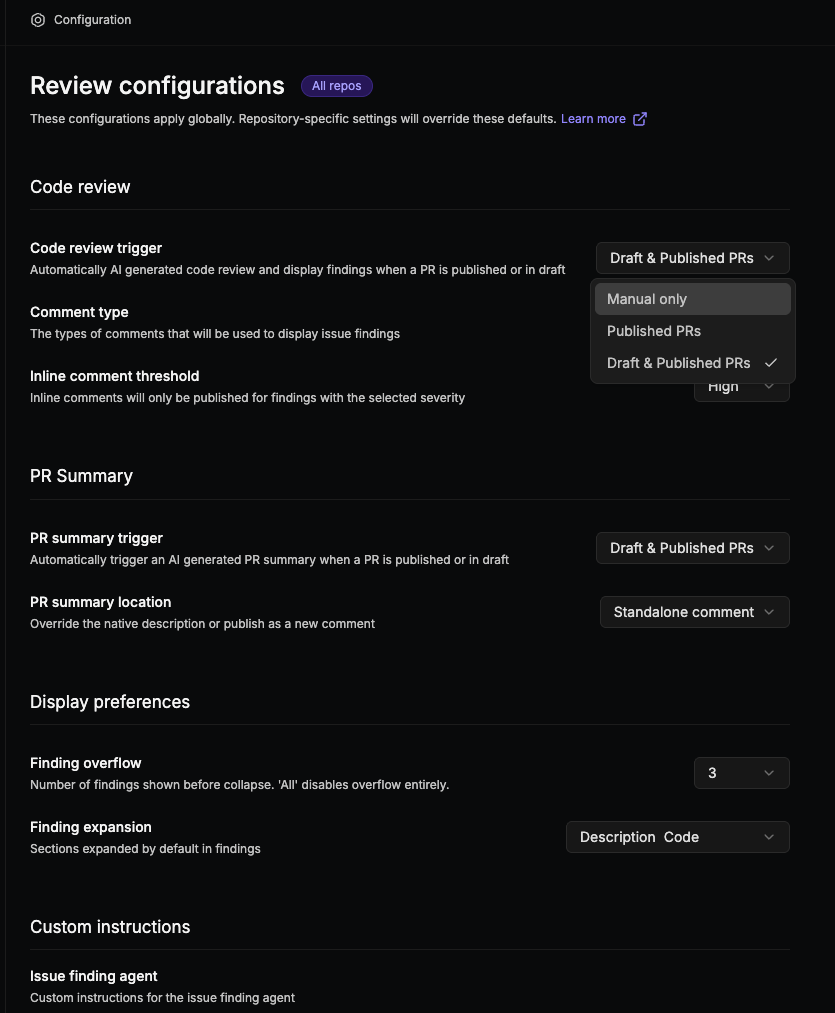
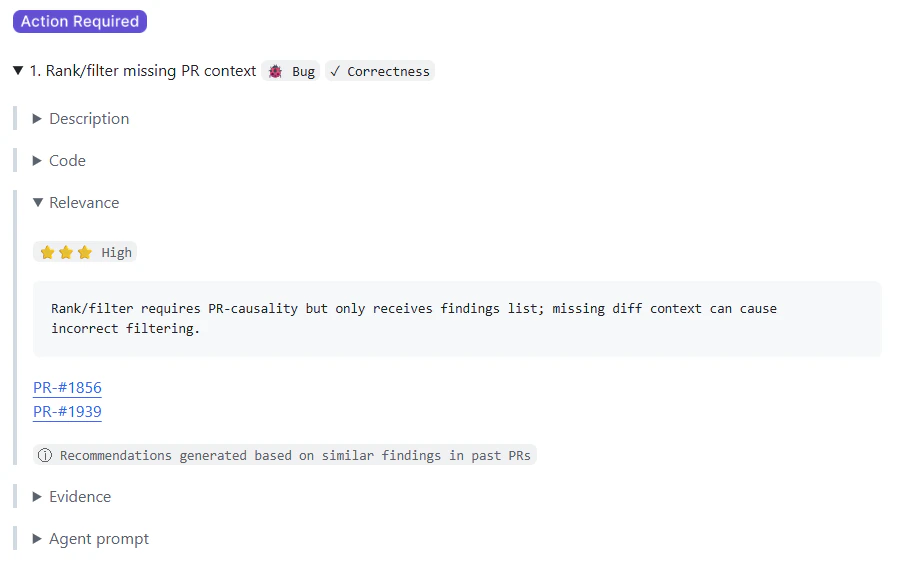
PR history–based relevance for code review findings (beta) (Enterprise) (Single-tenant)
This feature is currently in beta and available on GitHub, with support for additional Git providers coming soon.
Qodo 2.1
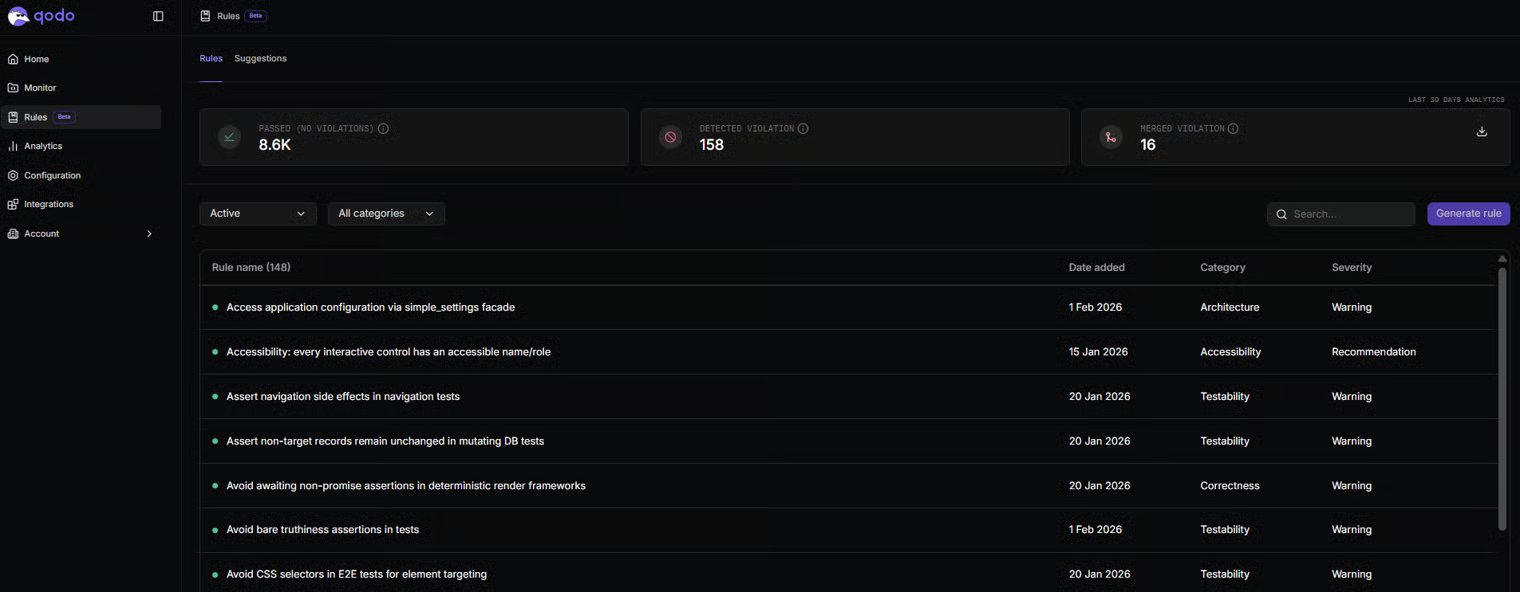
Released 17 February 2026Introducing Qodo’s Rule System (beta)
Currently supported for GitHub single- and multi-tenant.
- Converting existing rules into structured, enforceable standards
- Generating structured rules from natural language
- Discovering implicit standards from codebase patterns and PR history
- Identifying duplicate, conflicting, or outdated rules to maintain rule health
- Measuring rule adoption and violations to track effectiveness over time
Azure DevOps integration
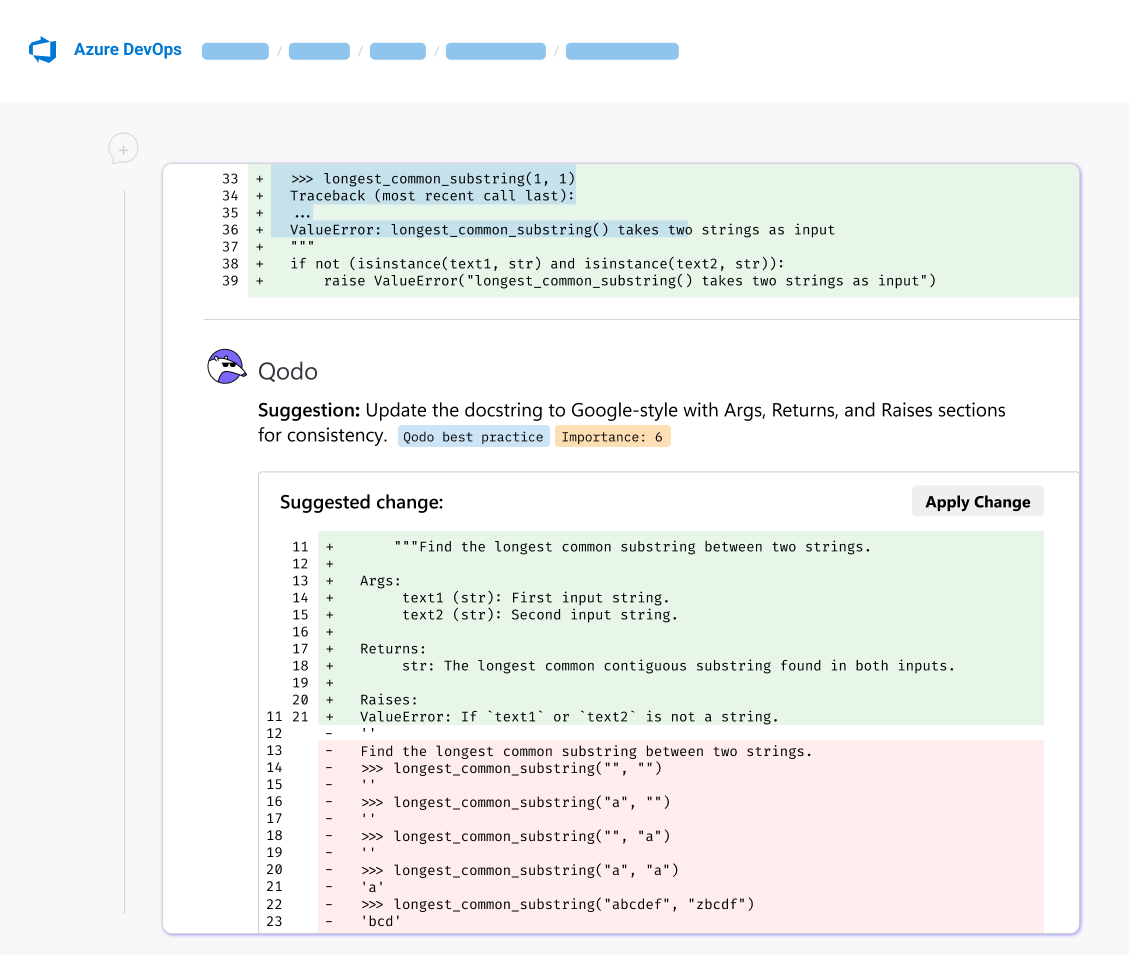
Qodo now integrates natively with Azure DevOps for Enterprise customers, bringing advanced AI powered code review directly into Microsoft based development environments. Using Microsoft Entra ID authentication and Azure DevOps service hooks, Qodo connects securely to your repositories and pull request workflows without requiring additional tools or process changes. With this integration, Qodo:- Publishes AI powered reviews directly inside Azure DevOps pull requests
- Uses Azure Boards work items and associated tickets for added context and compliance checks
- Supports repository level or project level configuration for flexible deployment
Qodo 2.0
Released 4 February 2026Qodo 2.0 is available for GitHub single- and multi-tenant.
Next generation agentic PR review
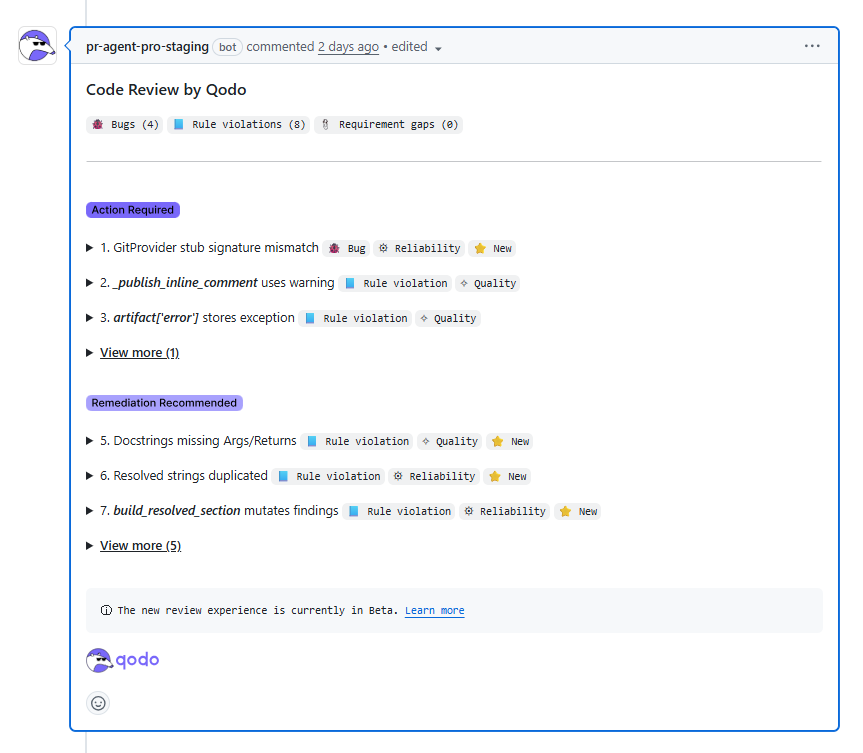
This feature is now generally available (GA). Qodo 2.0 introduces a major upgrade to AI-powered code review with a next-generation agentic PR review experience designed for shipping increasing volumes of AI-generated code. Instead of a single review pass, Qodo uses a multi agent system where specialized agents collaborate using multi step reasoning. Each agent focuses on specific responsibilities including:- Critical issue detection
- Duplicated logic
- Ticket compliance
- Standards enforcement
Qodo 1.7
Released 21 October 2025Qodo 1.7 is available for GitHub single- and multi-tenant.
Code review, reinvented - meet Local Review
We’re thrilled to introduce Qodo Gen version 1.7.0, bringing a smarter way to review your code before you commit. This release puts quality and clarity front and center, helping you keep every branch clean, consistent, and ready for fast PRs.Review your local changes before you commit
Meet the Local review workflow, your new pre-commit review companion. Before you push your code, get a complete understanding of what’s changed and why. Here’s what it does for you:- Holistic review: Scans all local changes before commit, summarizing updates across files and themes.
- Thematic walkthrough: Groups modified files by topic (features, fixes, refactors, etc.) for easier navigation.
- Intelligent insights: Surfaces potential issues and suggestions by category (correctness, style, performance, best practices).
- Instant fixes: With one click, resolve detected issues or apply suggestions, no context switching needed.
- Project alignment: Validates that agent-written code follows your team’s conventions and rules, ensuring smoother PR reviews.
Farewell to standard mode
We’ve removed the Standard mode. It’s officially deprecated, and our smarter workflows now cover everything it used to do, and more.A new welcome experience
Start strong with the new Welcome Screen, featuring quick access to your top quality-focused workflows:- Local Review
- Unit Test
- Cleanup
- Fix