GitHub GitLab Bitbucket
Git Integration (formerly Qodo Merge) – AI code review agents for pull requests. This documentation describes the Qodo v1 experience. For the Qodo v2 documentation, click here.
The review tool scans the PR code changes, and generates a list of feedbacks about the PR, aiming to aid the reviewing process. Note that the main purpose of the review tool is to provide the PR reviewer with useful feedbacks and insights. The PR author may prefer to focus on the output of the improve tool, which provides actionable code suggestions.

Example usage

Manual triggering

Run the tool manually by commenting /review on any PR:
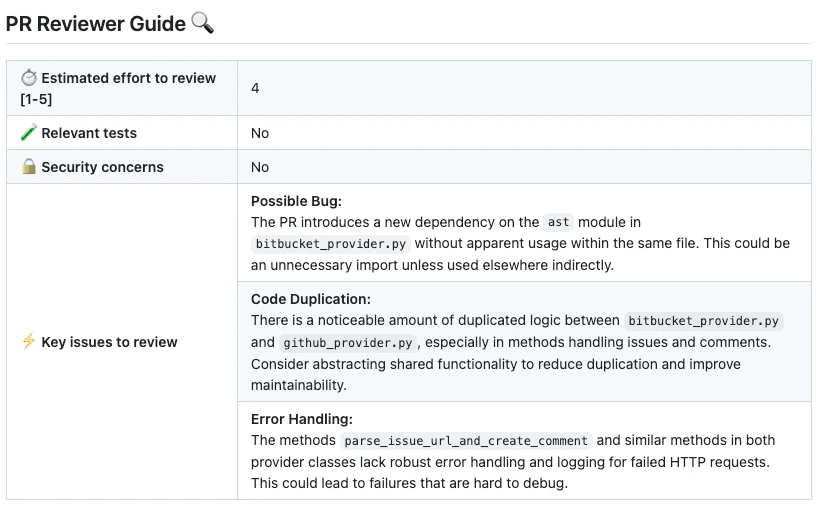
The tool will generate a review for the PR:

How to use the review tool

Manual usage Comment on the PR:
/review
You can also add configuration flags to the command to customize behavior:
/review --pr_reviewer.some_config1=... --pr_reviewer.some_config2=...
Automatic usage To run the tool automatically when a PR is opened, add it to your configuration file:
[github_app]
pr_commands = [
    "/review",
    ...
]

[pr_reviewer] # Edit this field to enable/disable the tool, or to change the configurations used.
extra_instructions = "..."
...

Learn more about automatic usage of tools.

When you first install Qodo app, the default mode for the review tool is:
pr_commands = ["/review", ...]
Meaning the review tool will run automatically on every PR, without any additional configurations. Edit this field to enable/disable the tool, or to change the configurations used.

Configuration options

Configuration options table

Configure the review tool by setting configurations under the pr_reviewer part in your configuration file.

General options

Possible configurationsDefault valueWhat they do
persistent_commenttrueIf set to true, the review comment will be persistent, meaning that every new review request will edit the previous one.
final_update_messagetrueIf set to true, updating a persistent review comment will automatically add a short comment to the PR with a link to the updated review.
extra_instructionsnoneOptional extra instructions for the tool. For example: “focus on the changes in the file X”, “Ignore changes in …”
enable_help_texttrueIf set to true, Qodo will display a help text in the comment.

Enable\disable specific sub-sections

Possible configurationsDefault valueWhat they do
require_score_reviewfalseIf set to true, Qodo will add a section that scores the PR.
require_tests_reviewtrueIf set to true, Qodo will add a section that checks if the PR contains tests.
require_estimate_effort_to_reviewtrueIf set to true, Qodo will add a section that estimates the effort needed to review the PR.
require_can_be_split_reviewfalseIf set to true, Qodo will add a section that checks if the PR contains several themes, and can be split into smaller PRs.
require_security_reviewtrueIf set to true, Qodo will add a section that checks if the PR contains a possible security or vulnerability issue.
require_ticket_analysis_reviewtrueIf set to true, and the PR contains a GitHub or Jira ticket link, Qodo will add a section that checks if the PR fulfilled the ticket requirements.

Adding PR labels

You can enable the review tool to add specific labels to the PR:
Possible configurationsDefault valueWhat they do
enable_review_labels_securitytrueIf set to true, Qodo will publish a possible security issue label if it detects a security issue.
enable_review_labels_efforttrueIf set to true, Qodo will publish a Review effort label, with a score from 1 to 5.

Extra instructions

Extra instructions are important. The review tool can be configured with extra instructions, which can be used to guide Qodo to a feedback tailored to the needs of your project. Be specific, clear, and concise in the instructions. With extra instructions, you are the prompter. Specify the relevant sub-tool, and the relevant aspects of the PR that you want to emphasize. Examples of extra instructions:
[pr_reviewer]
extra_instructions="""\
In the code feedback section, emphasize the following:
- Does the code logic cover relevant edge cases?
- Is the code logic clear and easy to understand?
- Is the code logic efficient?
...
"""
Use triple quotes to write multi-line instructions.

Labels

The review tool can auto-generate two specific types of labels for a PR:
  • A possible security issue label that detects if a possible security issue exists in the PR code (enable_review_labels_security flag)
  • A Review effort [1-5]: x label, where x is the estimated effort to review the PR (enable_review_labels_effort flag)
Both modes are useful, and we recommended to enable them.