

Note: The Rule import feature is available only in workspaces that use manual (agentic) rule import. New workspaces use manual import by default. Workspaces configured for automatic rule import don’t display this section.
Configure rule import
1
Log in to the Qodo portal
2
Navigate to the Rule import section
Select Configurations > Context > Review standards > Rule import.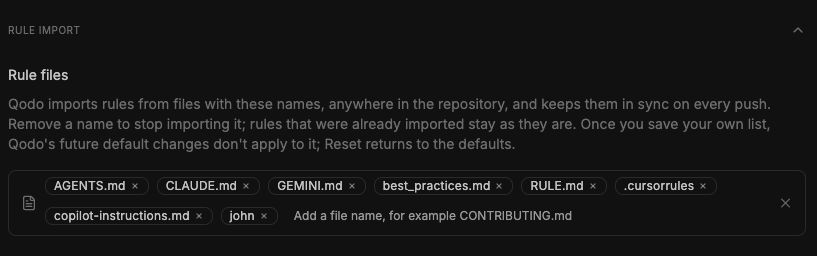
3
Configure rule files
Under Rule files, Qodo shows the list of supported file names it imports rules from, wherever those files appear in the repository. The default list includes:
AGENTS.mdCLAUDE.mdGEMINI.mdbest_practices.mdRULE.md.cursorrulescopilot-instructions.mdpr_compliance_checklist.yaml
4
Configure rule folders
Under Rule folders, every file in the listed folders is treated as a rule source, wherever the folder appears in the repository. Start with 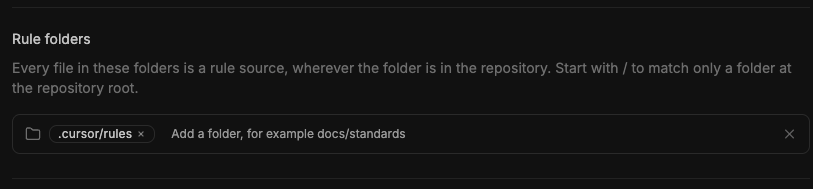
/ to match only a folder at the repository root.Select the Add a folder field, type a folder name, and press Enter. The folder is added to the list. You can add multiple folders.5
Add rule import instructions
Under Rule import instructions, enter free-text instructions to guide which rules Qodo extracts and where they apply within each source repository. Instructions apply to rules only, not skills.You can configure instructions at the workspace level and override them for a Git organization or repository. Instructions apply to future imports and syncs and do not change existing rules.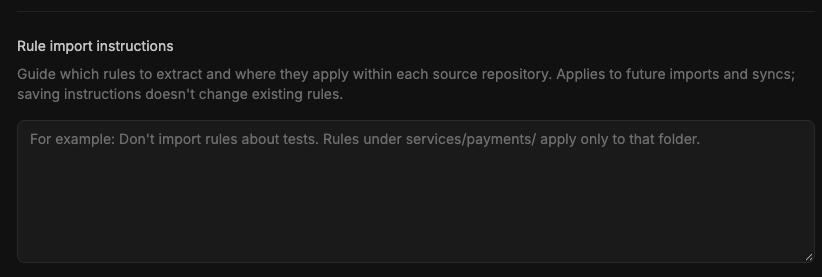
6
Save your changes
Click Save changes to apply your configuration.
What happens after the rules are imported
- Until you save your own list, Qodo uses its default files and folders. Once you save a list, Qodo imports and syncs rules only from the files and folders on it.
- Qodo keeps rules imported from those sources in sync on every push.
- Removing a file name or folder stops importing rules from that source. Rules already imported remain unchanged.
- Changes to rule import instructions apply to future imports and synchronization. They do not change existing rules.
- After saving a custom list of rule file names, future changes to Qodo’s defaults do not apply. Select Reset to restore the defaults.
Related resources
- Generate and manage rules: Create rules from natural-language descriptions and manage existing ones.
- How Qodo builds your Review Standards: Learn how Qodo builds Review Standards from your repositories.