

BetaGitHubGitLabBitbucket CloudAzure DevOps
Suggested rules help you formalize standards that already exist in your codebase and review process. They are not enforced until explicitly reviewed and approved by an admin. Qodo surfaces them as recommendations, giving you visibility into recurring review feedback and best practices, while leaving the decision to review, adjust, and activate each rule in your hands.
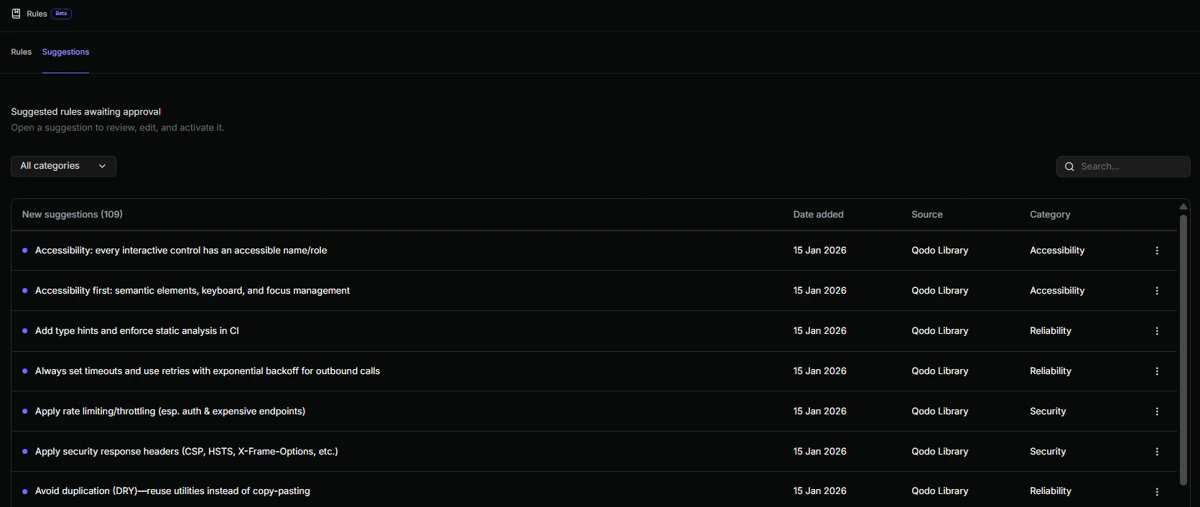
What are pending rules?
They appear under the Pending rules tab and act as a recommendation layer between informal practices and enforced standards. Suggested rules help teams:- Capture repeated review feedback as formal rules
- Align enforcement with real codebase behavior
- Reduce reliance on tribal knowledge and reviewer memory
What you see in the Pending rules table
Each suggested rule appears as a pending rule in the Pending rules table, along with the key details you need to evaluate it. This information helps you quickly assess context, relevance, and priority before deciding whether to activate the rule.Sources of pending rules
Suggested rules are generated from your organization’s pull request history in two ways:Reviewing and activating pending rules
To review suggested rules:1
Navigate to Review Standards > Pending rules.
2
Open a pending rule.
3
Review the rule content, examples, and source.
4
Set the scope of the rule. See Rule scope for the available options.
5
Edit the rule if needed.
6
Click Accept & activate or Dismiss.
Accept or dismiss pending rules in bulk
Select the checkbox next to each pending rule in the Pending rules table, then choose Accept & activate or Dismiss to process them all at once. To select every pending rule at once, select the checkbox in the table’s top row. When you dismiss pending rules, you must confirm the action in a dialog before it is applied.
Next steps
- Rule Miner: Understand how suggested rules are generated automatically.
- Generate and manage rules: Create rules manually and manage active rules.