

BetaGitHubGitLabBitbucket CloudAzure DevOps
Every time Qodo reviews a pull request, it generates findings: issues identified in the code such as bugs, cross-repo findings, rule violations, and requirement gaps. The Findings page in the Qodo portal tracks these centrally across all your repositories, giving team leads and engineering managers visibility beyond individual reviews.
The Findings page displays findings across open, merged, and post-merge pull requests.
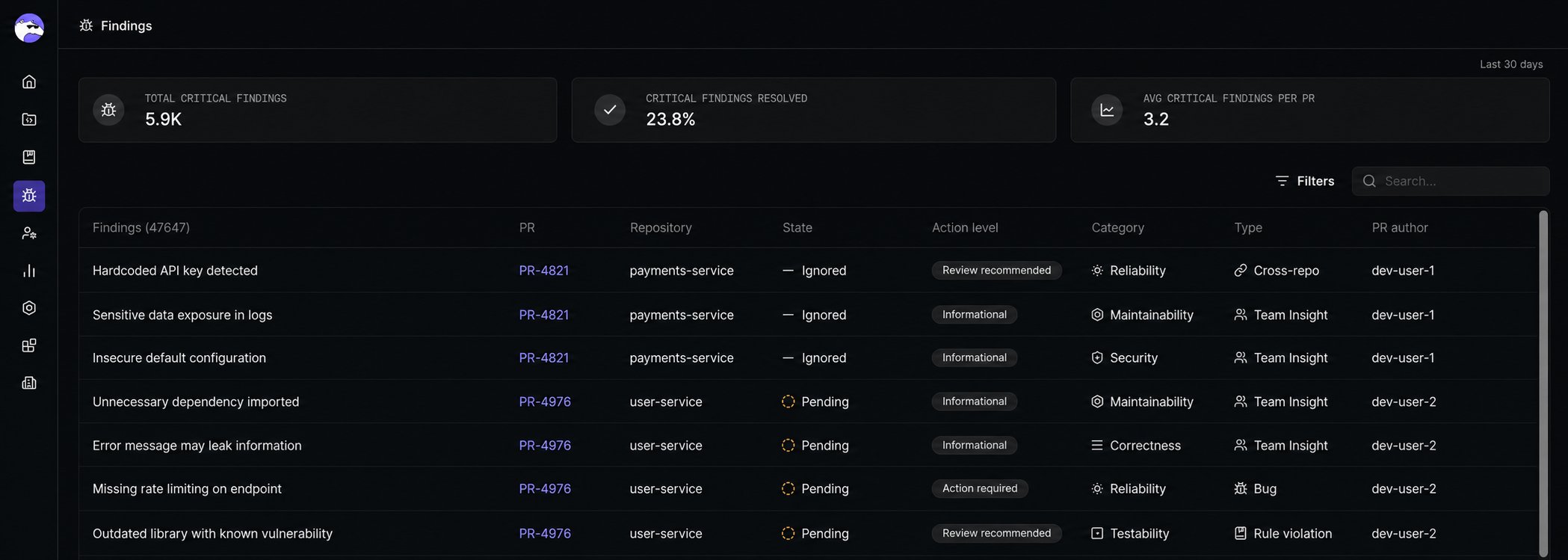
Key metrics
At the top of the page, Qodo displays aggregated metrics for the last 30 days:- Total critical findings: Total number of action-required findings identified across all pull requests.
- Critical findings resolved %: Percentage of action-required findings that were resolved before merge.
- Average critical findings per PR: Average number of action-required findings per reviewed pull request.
How to interpret findings
Start with the analytics cards to get a picture of trends over the last 30 days, then use the findings table to drill down by repository, PR, action level, or category. Focus on:- Findings merged without resolution, to identify where standards enforcement needs tightening.
- Recurring findings across repositories, to spot systemic issues that may warrant a new rule or team-wide guidance.
- Resolved critical findings, to validate that the review process is working as intended.
Filtering and search
Use the filters to narrow findings by PR, Repository, Finding state, action level, category, and type. Use search to find findings from a specific pull request without navigating into the PR directly.Findings table
The Findings table lists all findings across your repositories. Each row includes:Finding states
Finding details
Click any row to open a detail panel showing the full context of that finding: what the issue is, where it appears in the code, and why Qodo flagged it. Each finding is associated with a specific pull request, so you can see whether the issue was resolved before merge. The detail panel includes:- Full description and code reference: the exact location in the code where the issue was identified.
- Evidence: Qodo’s reasoning for why this was flagged.
View findings by repository
If you want to see findings reported across your repositories, useful for spotting where problems are more concentrated, you can use Monitor view on the Repositories page. Monitor view shows all finding types grouped by repository, directly on the relationship graph, and lets you filter by severity, category, or PR state. Navigate to Repositories, open the Relationships tab, and select Monitor in the top-right corner.Best practices
- Start with the big picture: Check the analytics cards before drilling into individual findings, and filter the table by action level to focus on what matters most.
- Look for patterns, not just volume: The same finding type appearing across multiple repositories usually signals a systemic gap in team practice rather than an isolated issue.
- Use findings to iterate on your rules: Routinely ignored findings or a rising proportion of findings merged without resolution are a signal that your governance configuration needs adjustment. Refine the rule rather than accepting the noise.
Next steps
- Anatomy of Qodo findings in a PR: See how findings appear to developers in individual pull requests.
- Generate and manage rules: Act on recurring findings by creating or refining rules.
- Cross-repository code review: Understand how cross-repo findings are generated.
- View cross-repository relationships: See findings by repository directly on the relationship graph, in Monitor view.