
Custom Prompt
The custom_prompt tool scans the PR code changes, and automatically generates suggestions for improving the PR code.
It shares similarities with the improve tool, but with one main difference: the custom_prompt tool will only propose suggestions that follow specific guidelines defined by the prompt in the pr_custom_prompt.prompt configuration.
With this tool, you are the prompter. Be specific, clear, and concise in the instructions. Specify relevant aspects that you want the model to focus on.
How to use the custom_prompt tool
custom_prompt toolManual usage
Comment on the PR:
/custom_prompt --pr_custom_prompt.prompt="
The code suggestions should focus only on the following:
- ...
- ...
"
Automatic usage
To run the tool automatically when a new issue is opened, add it to your configuration file:
[pr_custom_prompt]
prompt="""\
The suggestions should focus only on the following:
-...
-...

"""Configuration options
Configure the custom_prompt tool by setting configurations under the pr_custom_prompt part in your configuration file.
prompt
none
The prompt for the tool. It should be a multi-line string.
num_code_suggestions_per_chunk
3
Number of code suggestions provided by the custom_prompt tool, per chunk.
enable_help_text
true
If set to true, the tool will display a help text in the comment
Example usage
An example of a possible prompt defined in the configuration file:
The prompt should be specific and clear, and be tailored to the needs of your project.
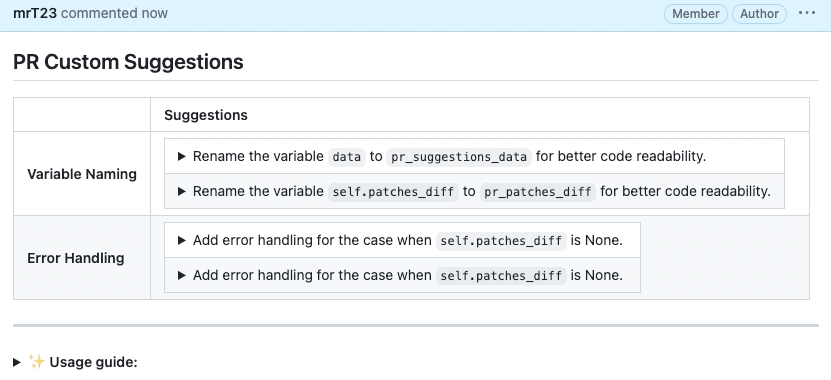
Results obtained with the prompt above:
Last updated