

BetaGitHubBitbucketAzure DevOps
Admins can create, edit, enable, approve, and delete rules. Members can generate rules in the portal; however, these rules appear in the Suggestions tab and require admin approval before becoming active. Members can also view active rules, suggested rules, and review rule outcomes during code reviews.
Review Standards
In the Qodo portal, navigate to Review Standards from the left menu.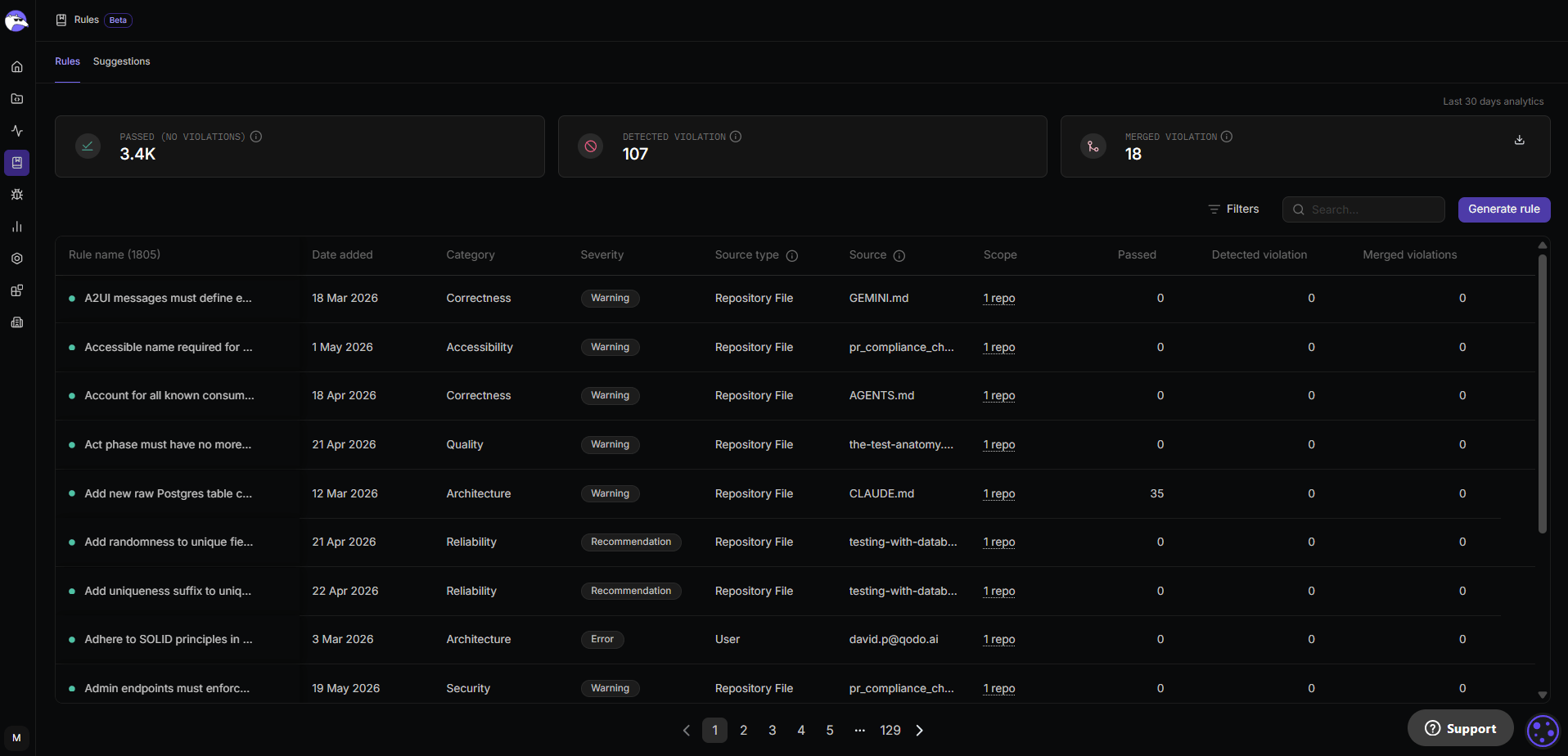
Anatomy of a rule
A rule consists of the following fields:| Field | Description | Details |
|---|---|---|
| Rule name | Short, descriptive title summarizing the rule’s intent. | Shown in the table in the Rules tab and in code review findings. |
| Rule content | Enforcement description used during reviews. | Explains what to check and what behavior is expected. |
| Examples | Compliant and non-compliant code examples. | Displayed to developers when violations occur. |
| Category | Type of issue the rule addresses. | Security, Correctness, Quality, Reliability, Performance, Testability, Compliance, Accessibility, Observability, Architecture. |
| Severity | Priority level of a violation. | Error (action required), Warning (recommended), Recommendation (informational). |
| Scope | Where the rule is enforced. | Can be left empty to apply organization-wide, or limited to specific Git organizations, repositories, and optional path patterns. |
| Source type | The category of origin: how this rule was created or added. | User, Repository File, Qodo Library, Mined Pattern, Compliance File |
| Source | The exact location the rule came from. | A file path, URL, or identifier pointing to the original source. |
- Organization: leave the scope empty to apply the rule to all repositories across all Git organizations.
- Git organization: applies the rule to selected Git organizations.
- Repository: applies only to selected repositories.
- Path patterns: applies to specific directories or files within a repository. Path patterns are optional and can only be added after selecting a repository, and are especially useful for monorepos where different projects or services live under the same repository.
Rules extracted from supported files (such as AGENTS.md) are automatically scoped to the folder containing that file, with no additional portal configuration needed.
Generate a rule
Use this flow to describe a rule in natural language and let Qodo agent generate a structured draft.Start rule generation
- From Rules, click Generate.
- Enter a short description of the rule’s intent.
- Click Generate rule.
- “Disallow
console.login production builds” - “Avoid SQL string concatenation with user input”

Review the generated rule draft
Qodo generates a complete rule draft that can be edited before activation.
Related rules check
Before activation, Qodo checks for:
- Conflicts
- Duplicates
- Overlapping scope

If you are a member (non-admin), your rule appears in Rules > Suggestions for admin review before activation, unless an admin has enabled Auto-approve user suggestions. For more information, see Review and activate suggested rules.
Manage existing rules
Management actions for existing rules are available from the actions menu (⋮) in the table in the Rules tab. These actions are optional and can be performed at any time by admins or team admins.| Action | Description |
|---|---|
| Edit rule | Update the rule name, content, examples, scope, or severity. |
| Deactivate or Activate | Pauses enforcement while retaining the rule and its history. |
| Delete rule | Permanently removes the rule. This cannot be undone. |
Automatic rule updates from files
Qodo continuously monitors the supported rule files across your repositories. When changes to these files are merged to your repository, or when a new supported file is added, Qodo processes the diff and automatically adds new rules to the Review Standards as active rules. The scope of extracted rules is automatically determined by the file’s location in the repository. New rules added this way are:- Added directly as active rules
- Enriched with category, severity, scope, and examples
Fetch rules using get-qodo-rules skill
Supported AI coding agents can access your Review Standards directly using the get-qodo-rules skill.
The skill fetches repository specific rules from the Qodo platform API, including organization, repository, and path-level rules, and loads them into the agent context. This allows the agent to reference the same rules that are defined in Qodo.
This capability is optional and does not replace Qodo’s rule enforcement. It enables agents to use the rules already configured for the repository. Using the skill requires a Qodo API key and rules configured in the Qodo platform.
For more information, see:
- To set up the Rules Skill, see the open-source installation instructions.
- For an overview on Qodo Agent Skills, see Agent Skills.
What’s next
- Best practices for setting rules: Guidance on writing clear, impactful, and maintainable rules.
- Rule analytics: Track how rules perform across pull requests over time.