
Best Practices
Best Practices lets Qodo learn from accepted code suggestions and continuously adapt to your team's coding patterns.
Auto Best Practices
You must enable a Wiki to use this feature.
Auto best practices is a Qodo capability that:
Identifies recurring patterns from accepted suggestions.
Automatically generates best practices page based on what your team consistently values.
Applies these learned patterns to future code reviews.
This creates an automatic feedback loop where the system continuously learns from your team's choices to provide increasingly relevant suggestions.
How to enable Auto Best Practices
To enable auto best practices, add the following to your configuration file:
[auto_best_practices]
# Disable all auto best practices usage or generation
enable_auto_best_practices = true

# Disable usage of auto best practices file in the 'improve' tool
utilize_auto_best_practices = true

# Extra instructions to the auto best practices generation prompt
extra_instructions = ""

# Max number of patterns to be detected
max_patterns = 5Example

Custom Best Practices
Local best practices file
For basic usage, create a best_practices.md file in your repository's root directory containing a list of best practices, coding standards, and guidelines specific to your repository. Qodo will use this best_practices.md file as a reference.
In case the PR code violates any of the best practices guidelines, Qodo will create additional suggestions, with a dedicated label: Organization best practices.
Writing effective best practices files
The following guidelines apply to all best practices files:
Write clearly and concisely.
Include brief code examples when helpful with before/after patterns.
Focus on project-specific guidelines that will result in relevant suggestions you actually want to get.
Keep each file relatively short, under 800 lines, since:
AI models may not process effectively very long documents.
Long files tend to contain generic guidelines already known to AI.
Use pattern-based structure rather than simple bullet points for better clarity.
Example best_practices.md
best_practices.mdError handling
You can create a best_practices.md file in your repository root with content like:
Example code before:
Example code after:
Null checks
You can create a best_practices.md file in your repository root with content like:
Example code before:
Example code after:
Global hierarchical best practices
For organizations managing multiple repositories with different requirements, Qodo supports a hierarchical best practices system using a dedicated global configuration repository.
Supported scenarios:
Standalone repositories: Individual repositories can have their own specific best practices tailored to their unique requirements
Groups of repositories: Repositories can be mapped to shared group-level best practices for consistent standards across similar projects
Monorepos with subprojects: Large monorepos can have both repository-level and subproject-level best practices, with automatic path-based matching
Setting up global hierarchical best practices
1. Create a new repository named pr-agent-settings in your organization/workspace.
2. Build the folder hierarchy in your pr-agent-settings repository. For example:
Grouping and categorizing best practices
Each folder (including the global folder) can contain a single
best_practices.mdfile.Organize repository best practices by creating subfolders within the
groupsfolder. Group them by purpose, programming languages, or other categories
3. Define the metadata file metadata.yaml that maps your repositories to their relevant best practices paths. For example:
4. Set the following configuration in your global configuration file:
Best practices priority
When global best practices are enabled, Qodo follows this priority order:
1. Primary: Global hierarchical best practices from pr-agent-settings repository:
2. Fallback: Local repository best_practices.md file:
Edge cases and behavior
Missing paths: If specified paths in
metadata.yamldon't exist in the file system, those paths are skippedMonorepo subproject matching: For monorepos, Qodo automatically matches PR file paths against subproject paths to apply relevant best practices
Multiple group inheritance: Repositories can inherit from multiple groups, and all applicable best practices are combined
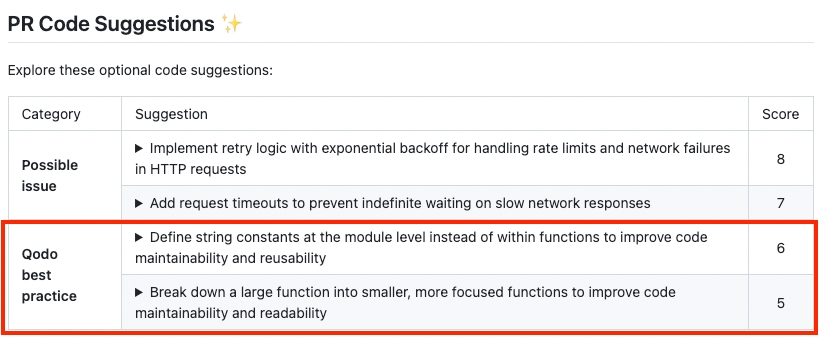
Best practices suggestions label
Best practice suggestions are labeled as Organization best practice by default.
To customize this label, modify it in your configuration file:
And the label will be: {organization_name} best practice.
How It Works
1. Exploration Phase – Finding Code Issues
The improve tool scans PR code changes for potential issues—not minor formatting errors, but real problems like bugs, logic flaws, or anti-patterns.
This phase is exploratory by design, helping surface meaningful suggestions beyond predefined categories.
2. Tracking Implemented Suggestions
Qodo automatically tracks accepted AI-generated suggestions. When PR authors apply a suggestion, it’s logged in the .pr_agent_accepted_suggestions Wiki page.
This tracking provides the foundation for learning what works.
3. Learning from Accepted Patterns
Once a month, Qodo analyzes accepted suggestions to generate a custom .pr_agent_auto_best_practices Wiki file.
These patterns represent practices that your team implicitly approves through repeated adoption.
4. Applying Best Practices in Reviews
During the next use of the improve tool:
The tool checks code changes against these learned patterns.
If a suggestion matches a learned best practice, it’s clearly labeled with “Learned best practice.”
This creates a two-phase analysis:
Exploratory: Surfaces general issues without restrictions
Targeted: Checks for violations of established, successful patterns
Keeping both phases separate allows Qodo to stay innovative while building on your team’s real-world feedback.
Last updated