

Workspace as the billing entity
In Qodo, billing and usage are managed at the workspace level:- One shared credit pool per workspace.
- All users and activity within a workspace draw from the same credits.
- No per-user or per-engineer provisioning.
- Multiple workspaces per account are not supported.
Free trial starting point for everyone
Every workspace begins with a 14-day free trial starting at signup. This is the universal entry point into Qodo. The trial provides full access to the product with unlimited usage and operates within the same workspace and credit system used after the trial. When the trial ends, usage stops unless a paid billing setup is active. The trial is the initial state of every workspace, not a separate plan or tier.Billing model
Qodo uses a credit-based usage system with the following billing and consumption rules:- Credits are shared at the workspace level.
- Credits are consumed based on feature usage.
- Base credits renew on a monthly cycle.
- Usage continues beyond included credits through overage billing.
- Overage is charged at the same per-credit rate as the base plan.
- Overage accrues against a configurable monthly spending cap.
- Billing is usage-based (not seat-based).
- No annual self-serve billing option.
Post-trial usage
After the 14-day free trial, the workspace continues under a paid billing model. Included credits renew monthly, and usage beyond the included credits is billed as overage up to the workspace’s configured spending limit. Full product access remains available while billing is active.Billing options
After the trial, workspaces continue under one of two billing arrangements.Pro Teams
Pro Teams is the standard self-serve offering for teams using Qodo in production.- Full product access.
- Credit-based usage.
- Shared workspace credits.
- Unlimited users per workspace.
Enterprise
Enterprise is designed for larger organizations with additional commercial requirements.- Full product access.
- Credit-based usage.
- Shared workspace credits.
- Enterprise support, pricing structure, and deployment options.
Check your workspace billing status Beta
To view your workspace’s current billing and usage status, open the Billing and analytics page. The Billing page located in the Qodo portal under the Account Management section provides an overview of your workspace’s plan, credit balance, usage, and renewal status.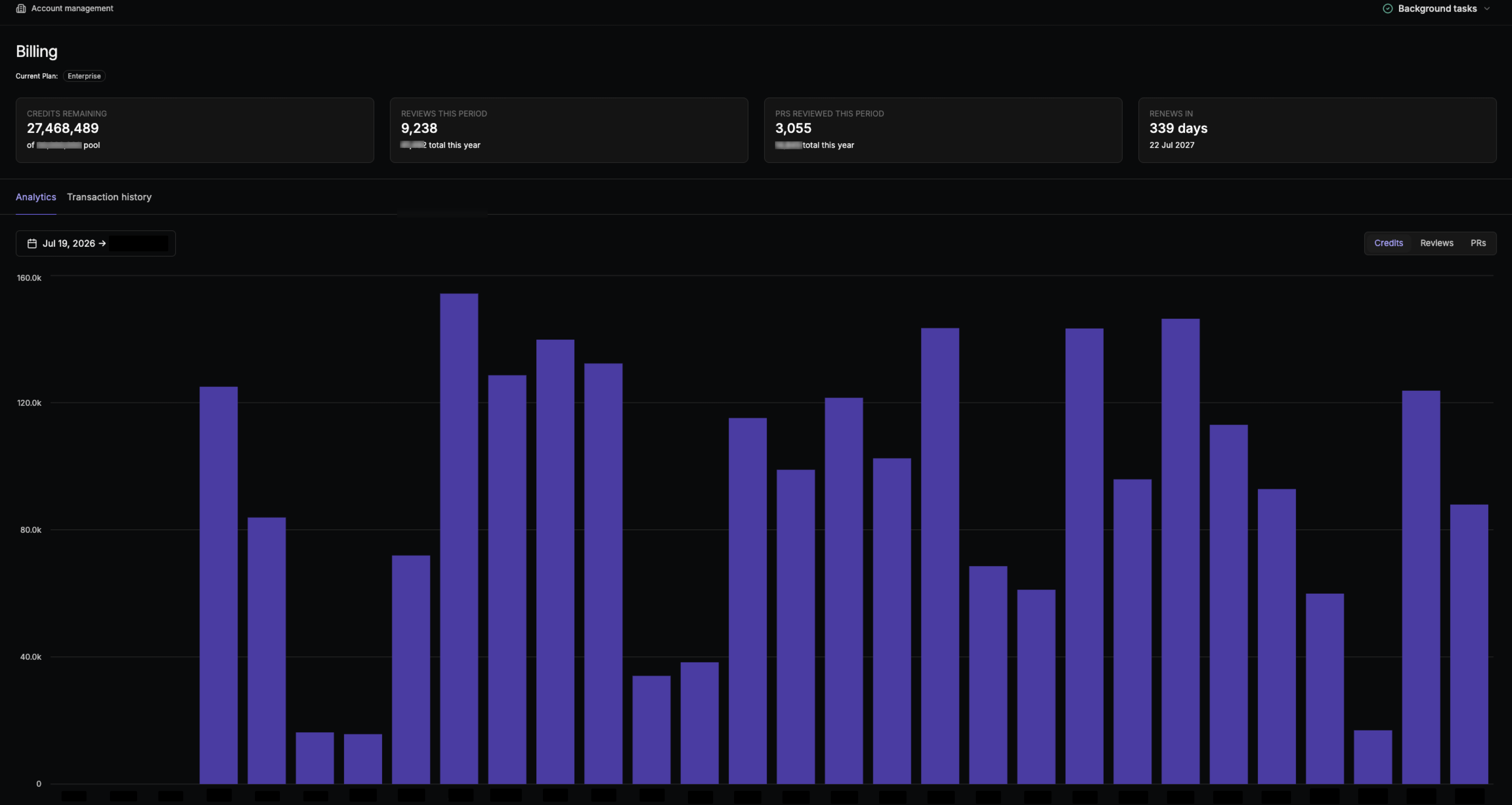
Billing summary
At the top of the page, you can see:- Current plan: The billing plan currently assigned to your workspace.
- Credits remaining: The number of credits remaining in the workspace’s current credit pool, along with the total included credit allocation.
- Reviews this period: The number of reviews run during the current billing period, with the total number of reviews for the year shown below.
- PRs reviewed this period: The number of pull requests reviewed during the current billing period, with the yearly total shown below.
- Renews in: The number of days until the workspace’s billing period renews, along with the renewal date.
Usage analytics
Select Analytics to see how your workspace uses its credits over time. Use the date range selector to view a specific period, and switch between Credits, Reviews, and PRs to see different usage metrics. The chart shows daily usage for the selected period, helping you understand how quickly the workspace is consuming credits and how review activity contributes to usage.Transaction history
Select Transaction history to view the workspace’s billing transactions and credit activity. For more information about how credits are allocated and consumed, see Billing model.Related resources
- Official pricing page: Check out the complete pricing, credit allocation details, and purchasing options.