> ## Documentation Index
> Fetch the complete documentation index at: https://docs.qodo.ai/llms.txt
> Use this file to discover all available pages before exploring further.
# What's new
> Explore the highlights of our most significant releases. For a full version-by-version breakdown, see the [Qodo Changelog](/changelog).
## Qodo 2.6
*Released 15 July 2026*
### Support for IdP-initiated SSO login
Qodo now supports Identity Provider (IdP)-initiated login for Single Sign-On (SSO). Users can launch the Qodo application directly from their identity provider portal, such as Microsoft Entra ID or Okta, without first navigating to the Qodo sign-in page.
This feature complements the existing Service Provider (SP)-initiated login flow, giving organizations the flexibility to choose the authentication experience that best fits their environment. For more information, see [Configure Single Sign-on (SSO)](/account-management/single-sign-on-sso).
## Qodo 2.5
*Released 30 June 2026*
### Automatic discovery of cross-repository relationships (Beta)
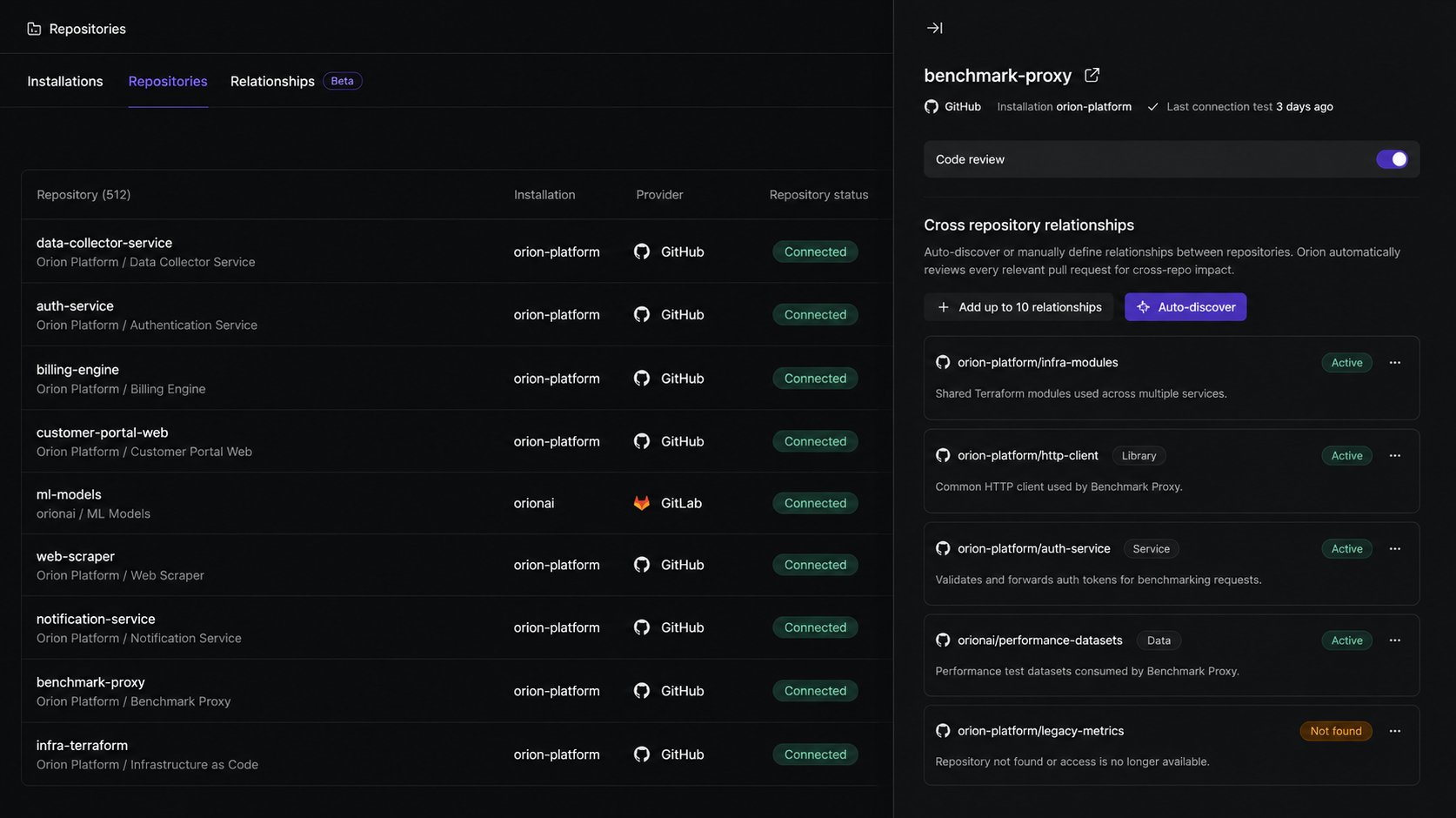
Mapping how your repositories depend on one another just got automatic. For any repository, Qodo can discover its related repositories for you, instead of you defining every relationship by hand.
Open a repository's cross-repository relationships, select **Auto-discover**, and Qodo surfaces the repositories it connects to. From there, it automatically reviews every relevant pull request for cross-repository impact. Prefer to map them yourself? Manual relationships are still fully supported.
 For more information, see [Cross-repository code review](/governance/cross-repo-code-review).
## Qodo 2.4
*Released 16 June 2026*
### Catch breaking changes across repositories (Beta)
Breaking changes that cross repository boundaries are the hardest to catch in review. A function signature shifts in a shared library, an API contract changes, or a schema evolves. Each passes single-repository review cleanly, and the breakage only shows up in production.
Cross-repository code review closes that gap. You define the relationships between repositories, and Qodo automatically reviews every relevant pull request for cross-repository impact, across providers.
With cross-repository code review you can:
* Detect breaking changes before they reach production, across repository boundaries.
* See cross-repo findings directly in the pull request, tagged `Cross-repo`, with a link to the affected lines.
* Audit every relationship across your organization in List and Graph views.
* Manage relationships across Git providers from a single location.
* Define relationships between repositories manually.
For more information, see:
* [Cross-repository code review](/governance/cross-repo-code-review)
* [Manage cross-repository relationships](/governance/cross-repo-code-review/repository-relationships)
### Generate rules from pull request history with Rule Miner (Beta)
Your best review standards aren't in any document. They're in the comments senior engineers leave on every pull request: the same patterns flagged again and again, never formally written down.
Rule Miner analyzes your organization's pull request history to surface these patterns and generate rules from them automatically, turning repeated feedback into enforceable standards without manual rule creation.
For more information, see [Cross-repository code review](/governance/cross-repo-code-review).
## Qodo 2.4
*Released 16 June 2026*
### Catch breaking changes across repositories (Beta)
Breaking changes that cross repository boundaries are the hardest to catch in review. A function signature shifts in a shared library, an API contract changes, or a schema evolves. Each passes single-repository review cleanly, and the breakage only shows up in production.
Cross-repository code review closes that gap. You define the relationships between repositories, and Qodo automatically reviews every relevant pull request for cross-repository impact, across providers.
With cross-repository code review you can:
* Detect breaking changes before they reach production, across repository boundaries.
* See cross-repo findings directly in the pull request, tagged `Cross-repo`, with a link to the affected lines.
* Audit every relationship across your organization in List and Graph views.
* Manage relationships across Git providers from a single location.
* Define relationships between repositories manually.
For more information, see:
* [Cross-repository code review](/governance/cross-repo-code-review)
* [Manage cross-repository relationships](/governance/cross-repo-code-review/repository-relationships)
### Generate rules from pull request history with Rule Miner (Beta)
Your best review standards aren't in any document. They're in the comments senior engineers leave on every pull request: the same patterns flagged again and again, never formally written down.
Rule Miner analyzes your organization's pull request history to surface these patterns and generate rules from them automatically, turning repeated feedback into enforceable standards without manual rule creation.
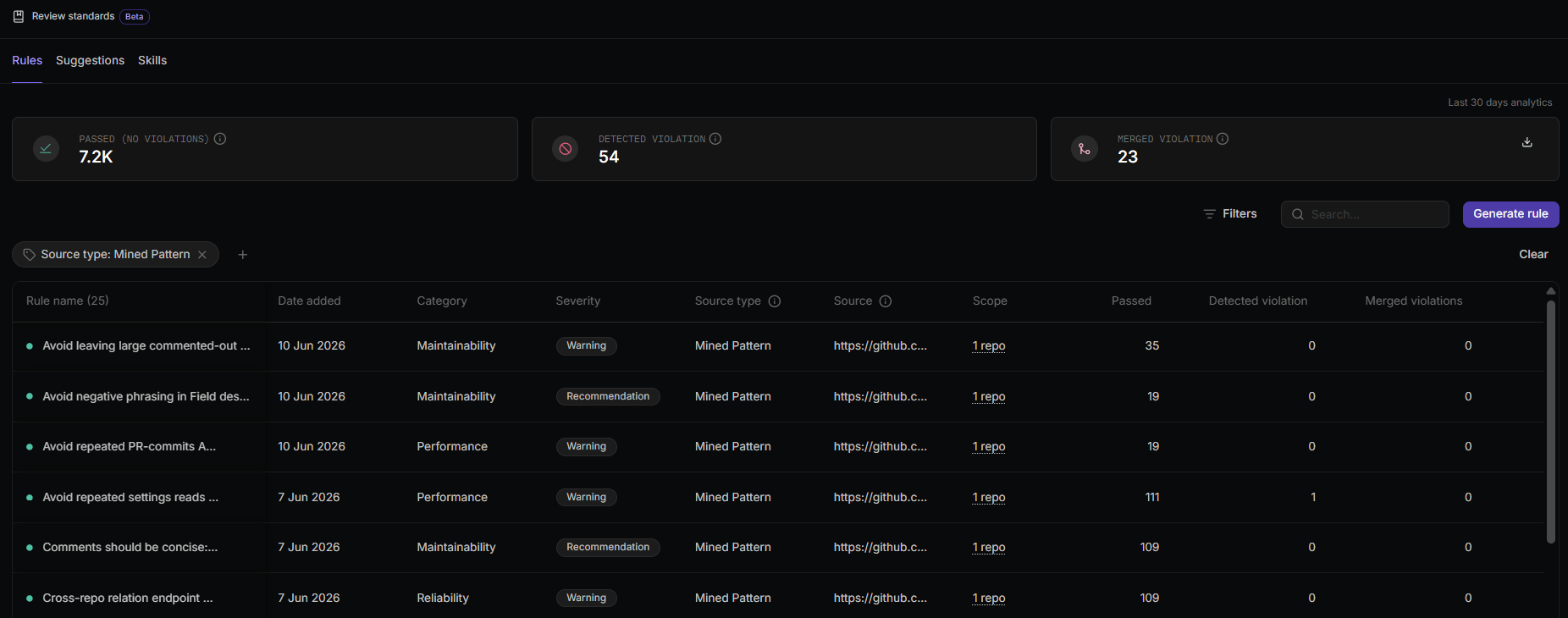 With Rule Miner you can:
* Automatically discover recurring review patterns from accepted pull request comments across your repositories.
* Generate up to 10 rules per repository on the first run, then continue building the rule set every two weeks as new patterns emerge.
* Review generated rules before activation, or auto-approve and enforce them immediately.
* Trace each generated rule back to the pull request it came from using the source link.
For more information, see [Generate rules from pull request history](/governance/rule-enforcement/rule-miner).
### Centrally manage rule-related skills across repositories (Beta)
Strengthen code review governance across your organization with centralized visibility into rule-related skills and their repository coverage.
With Rule Miner you can:
* Automatically discover recurring review patterns from accepted pull request comments across your repositories.
* Generate up to 10 rules per repository on the first run, then continue building the rule set every two weeks as new patterns emerge.
* Review generated rules before activation, or auto-approve and enforce them immediately.
* Trace each generated rule back to the pull request it came from using the source link.
For more information, see [Generate rules from pull request history](/governance/rule-enforcement/rule-miner).
### Centrally manage rule-related skills across repositories (Beta)
Strengthen code review governance across your organization with centralized visibility into rule-related skills and their repository coverage.
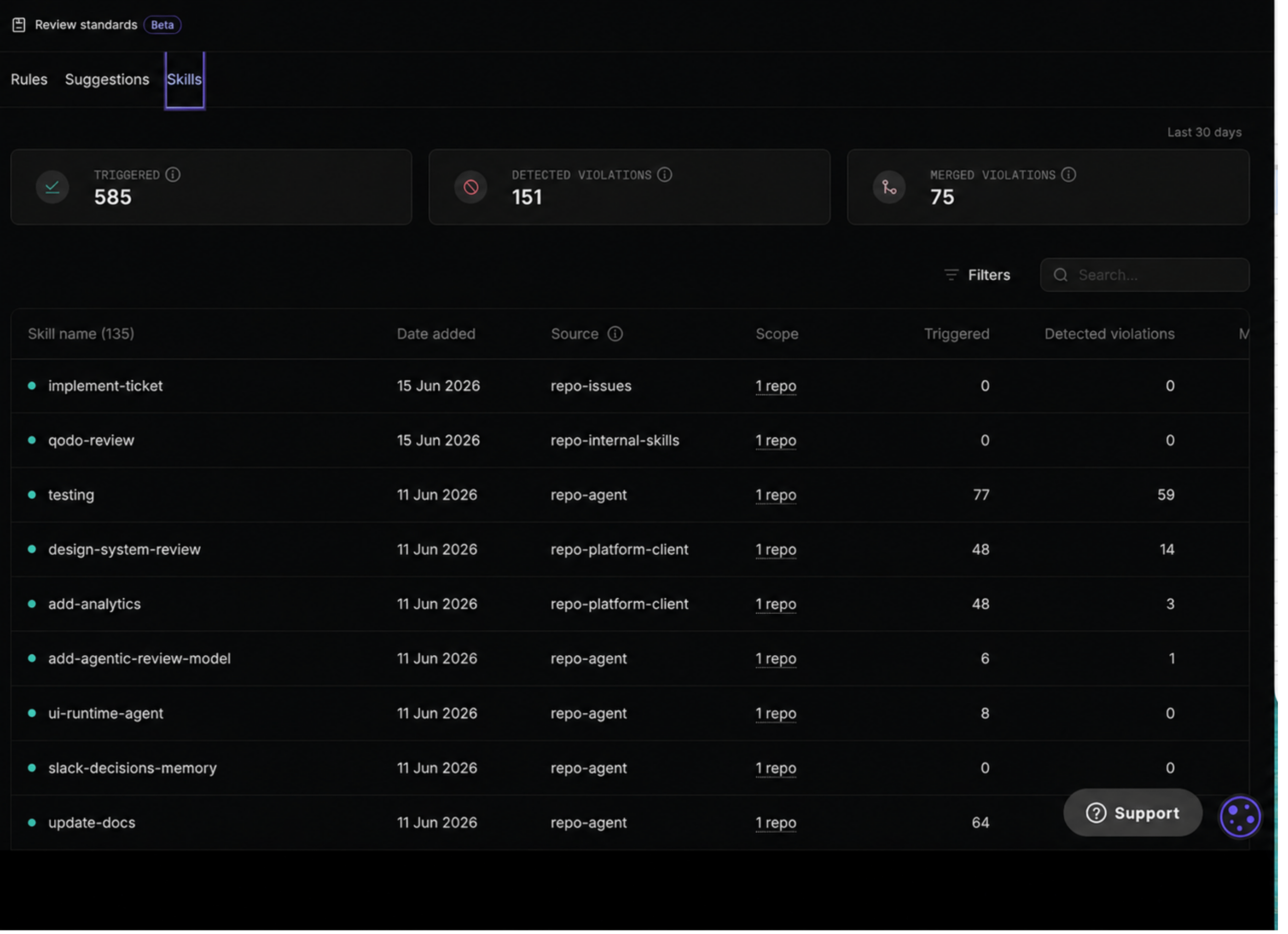 Rule-related skills define coding standards that are enforced during code review. Qodo automatically discovers Skill files in your repositories, derives the review rules they contain, and applies those rules during code review.
The **Skills** page in the Qodo portal lets you view the Skill files Qodo detected and the repositories to which they are assigned. This helps you validate skill coverage, identify gaps in enforcement, and verify that review standards are applied where expected.
You can also monitor rule activity over time, identify inconsistencies in enforcement, and maintain consistent application of security, compliance, architecture, and other organizational standards across repositories.
For more information, see [Manage skills across repositories](/governance/manage-skills-across-repositories).
### Chat with Qodo in pull requests (Beta)
Interacting with Qodo in pull requests is now more powerful, flexible, and natural. You can have contextual conversations with Qodo anywhere in your pull request by addressing it with the keyword `qodo`. Any variation works, such as `@qodo`, `/qodo`, or `qodo`, in comments, review threads, or inline code discussions.
We've taken the legacy `/ask` experience to the next level with chatting with Qodo in your pull requests. Instead of a single-purpose command, Qodo can now participate in richer, context-aware discussions directly within your review workflow.
When you chat with Qodo, you can:
* **Ask for explanations**: Understand why a finding was raised or how a suggested fix works.
* **Dismiss findings**: Tell Qodo when a finding is incorrect, intentional, or should be addressed later, and Qodo updates the review accordingly.
* **Discuss suggestions**: Ask follow-up questions, request more context, or challenge a recommendation in natural language.
The chat with Qodo is built for collaborative reviews. Qodo only responds when explicitly addressed, so reviewer discussions remain uninterrupted. Whether you're chatting on a specific line of code, discussing a finding, or reviewing the entire pull request, Qodo uses the surrounding context to provide relevant answers.
For more information, see [Chat with Qodo in your pull requests](/code-review/conversational-chat#use-conversational-chat-in-pull-requests).
### Introducing the Research Preview program
The Research Preview program is intended for exploring features that are under active development. These features let you try new capabilities and share feedback before broader release, and are clearly identified throughout the documentation. Features leave the program once they advance to Beta or General Availability.
For more information, see [Qodo Research Preview program](/preview-research-program).
## Qodo 2.3
*Released 13 May 2026*
### View and analyze cross-organization PR findings (Beta)
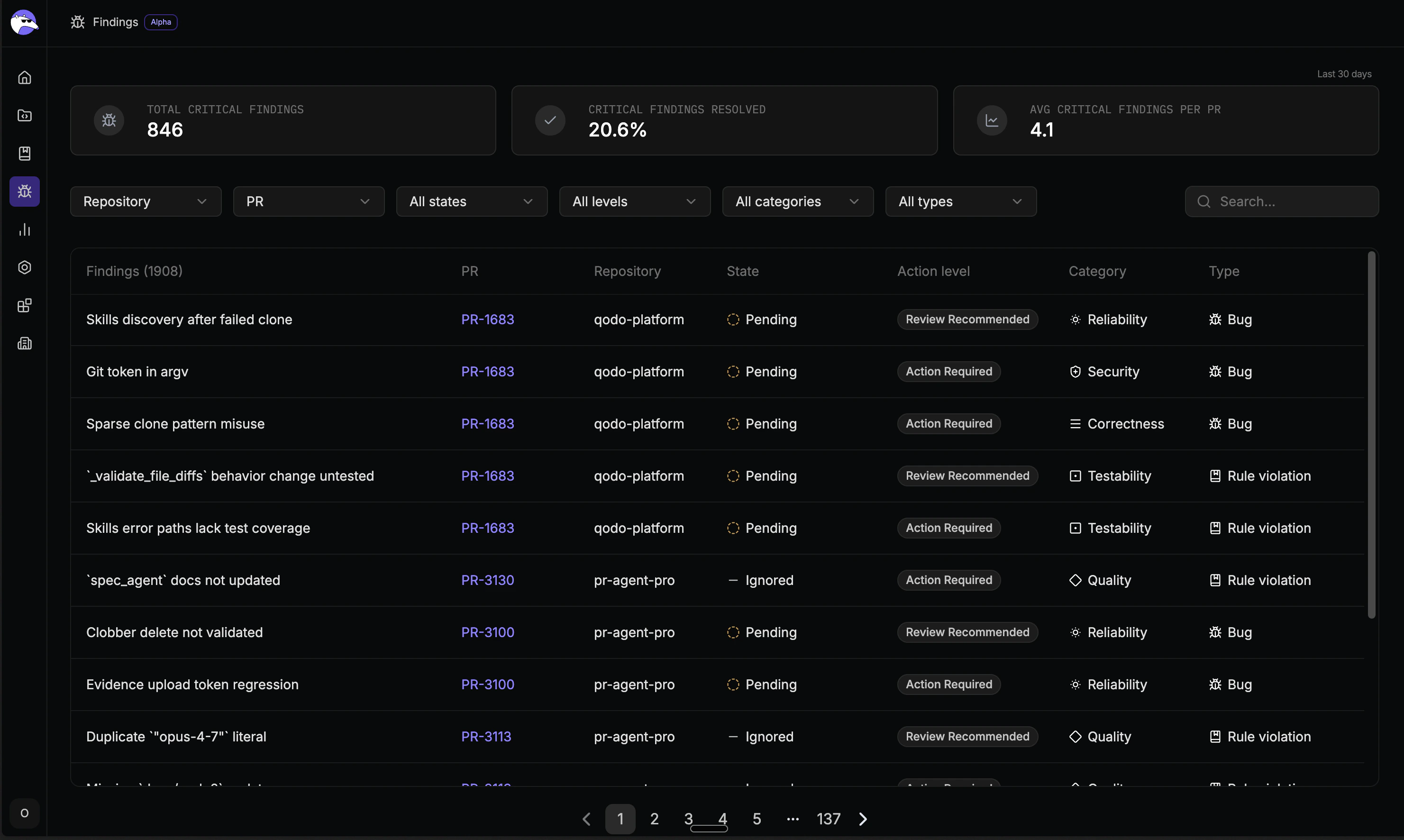
Qodo 2.3 introduces the Findings page, bringing code review findings from across all your organization's repositories together in one place. Previously only visible inside individual pull requests, findings are now available to team leads and engineering managers to understand code quality trends, monitor whether critical issues are being resolved, and measure the impact of Qodo's reviews over time.
From the Findings page you can:
* See all critical findings across every repository without opening individual PRs
* Find findings from any pull request without navigating into it
* Know whether critical issues are being fixed or bypassed before merge
* Measure the impact of your review standards with 30-day analytics
For more information, see:
* [View and analyze cross-organization PR findings](/governance/view-all-findings-in-organization)
Rule-related skills define coding standards that are enforced during code review. Qodo automatically discovers Skill files in your repositories, derives the review rules they contain, and applies those rules during code review.
The **Skills** page in the Qodo portal lets you view the Skill files Qodo detected and the repositories to which they are assigned. This helps you validate skill coverage, identify gaps in enforcement, and verify that review standards are applied where expected.
You can also monitor rule activity over time, identify inconsistencies in enforcement, and maintain consistent application of security, compliance, architecture, and other organizational standards across repositories.
For more information, see [Manage skills across repositories](/governance/manage-skills-across-repositories).
### Chat with Qodo in pull requests (Beta)
Interacting with Qodo in pull requests is now more powerful, flexible, and natural. You can have contextual conversations with Qodo anywhere in your pull request by addressing it with the keyword `qodo`. Any variation works, such as `@qodo`, `/qodo`, or `qodo`, in comments, review threads, or inline code discussions.
We've taken the legacy `/ask` experience to the next level with chatting with Qodo in your pull requests. Instead of a single-purpose command, Qodo can now participate in richer, context-aware discussions directly within your review workflow.
When you chat with Qodo, you can:
* **Ask for explanations**: Understand why a finding was raised or how a suggested fix works.
* **Dismiss findings**: Tell Qodo when a finding is incorrect, intentional, or should be addressed later, and Qodo updates the review accordingly.
* **Discuss suggestions**: Ask follow-up questions, request more context, or challenge a recommendation in natural language.
The chat with Qodo is built for collaborative reviews. Qodo only responds when explicitly addressed, so reviewer discussions remain uninterrupted. Whether you're chatting on a specific line of code, discussing a finding, or reviewing the entire pull request, Qodo uses the surrounding context to provide relevant answers.
For more information, see [Chat with Qodo in your pull requests](/code-review/conversational-chat#use-conversational-chat-in-pull-requests).
### Introducing the Research Preview program
The Research Preview program is intended for exploring features that are under active development. These features let you try new capabilities and share feedback before broader release, and are clearly identified throughout the documentation. Features leave the program once they advance to Beta or General Availability.
For more information, see [Qodo Research Preview program](/preview-research-program).
## Qodo 2.3
*Released 13 May 2026*
### View and analyze cross-organization PR findings (Beta)
Qodo 2.3 introduces the Findings page, bringing code review findings from across all your organization's repositories together in one place. Previously only visible inside individual pull requests, findings are now available to team leads and engineering managers to understand code quality trends, monitor whether critical issues are being resolved, and measure the impact of Qodo's reviews over time.
From the Findings page you can:
* See all critical findings across every repository without opening individual PRs
* Find findings from any pull request without navigating into it
* Know whether critical issues are being fixed or bypassed before merge
* Measure the impact of your review standards with 30-day analytics
For more information, see:
* [View and analyze cross-organization PR findings](/governance/view-all-findings-in-organization)
 {/* ### View and manage Git installations and repository connections (Beta)
Qodo 2.3 introduces the Repositories page, giving administrators a centralized view of all Git installations and repository connections across providers. With the Repositories page, teams get full visibility into where Qodo is active across every provider, all from a single location in the Qodo portal.
From the Repositories page, administrators can:
* Check connection health across all installations and repositories
* Enable or disable code review per repository without touching configuration files
* Add new installations and manage access directly from the Qodo portal
For more information:
* [Manage repositories and installations](/administration/repositories)
* [Manage code review across repositories](/code-review/get-started/repositories) */}
## Qodo 2.2
*Released 11 March 2026*
### [Central configuration page in the Qodo portal](/code-review/get-started/configuration-overview/portal-configuration)
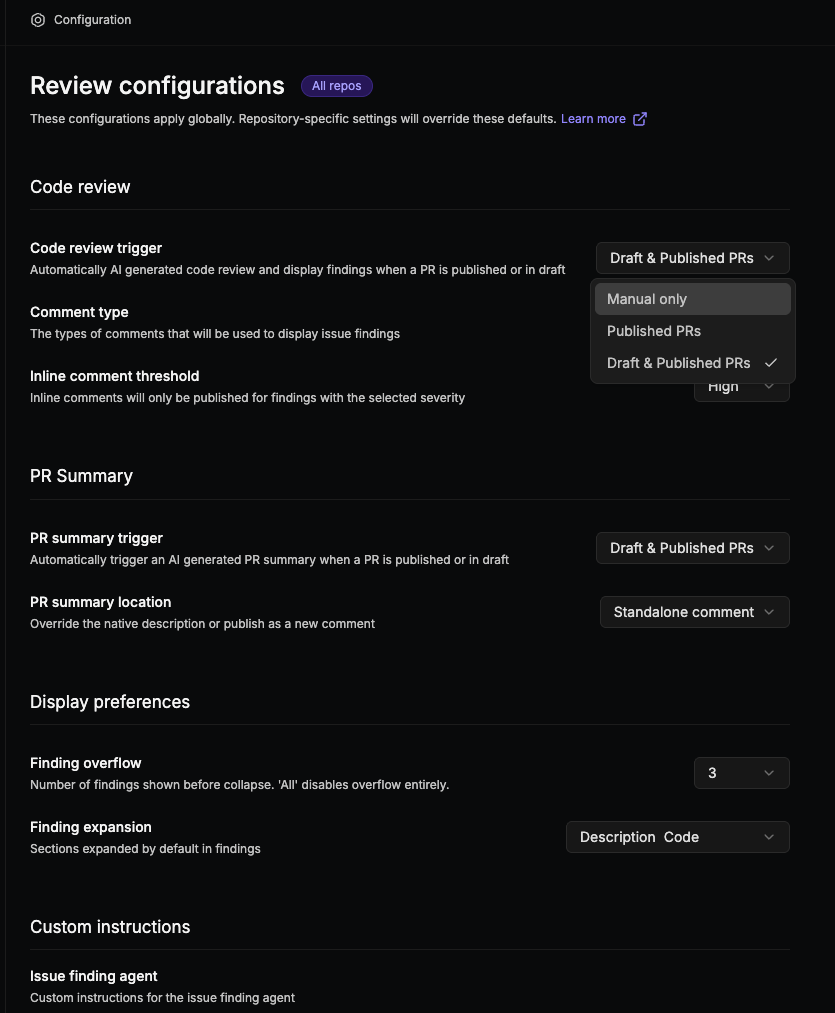
Qodo 2.2 introduces a new Configuration page, providing a centralized way to manage how Qodo performs AI-powered code reviews across your organization.
Instead of relying only on repository configuration files, you can now control review behavior directly from the Qodo portal, including how reviews run, how findings are surfaced, and how feedback appears in pull requests.
These settings allow you to shape the review experience to match your workflow. For example, you can configure a lean review that surfaces only the most critical issues and minimizes noise. Alternatively, you can configure a more verbose review that provides broader coverage and richer context.
The portal works alongside existing repository and organization-level configuration methods, allowing you to define shared defaults while still supporting repository-specific overrides.
{/* ### View and manage Git installations and repository connections (Beta)
Qodo 2.3 introduces the Repositories page, giving administrators a centralized view of all Git installations and repository connections across providers. With the Repositories page, teams get full visibility into where Qodo is active across every provider, all from a single location in the Qodo portal.
From the Repositories page, administrators can:
* Check connection health across all installations and repositories
* Enable or disable code review per repository without touching configuration files
* Add new installations and manage access directly from the Qodo portal
For more information:
* [Manage repositories and installations](/administration/repositories)
* [Manage code review across repositories](/code-review/get-started/repositories) */}
## Qodo 2.2
*Released 11 March 2026*
### [Central configuration page in the Qodo portal](/code-review/get-started/configuration-overview/portal-configuration)
Qodo 2.2 introduces a new Configuration page, providing a centralized way to manage how Qodo performs AI-powered code reviews across your organization.
Instead of relying only on repository configuration files, you can now control review behavior directly from the Qodo portal, including how reviews run, how findings are surfaced, and how feedback appears in pull requests.
These settings allow you to shape the review experience to match your workflow. For example, you can configure a lean review that surfaces only the most critical issues and minimizes noise. Alternatively, you can configure a more verbose review that provides broader coverage and richer context.
The portal works alongside existing repository and organization-level configuration methods, allowing you to define shared defaults while still supporting repository-specific overrides.
 ### [PR history–based relevance for code review findings](/code-review/concepts/pr-history) (beta) (Enterprise) (Single-tenant)
This feature is currently in beta and available on GitHub, with support for additional Git providers coming soon.
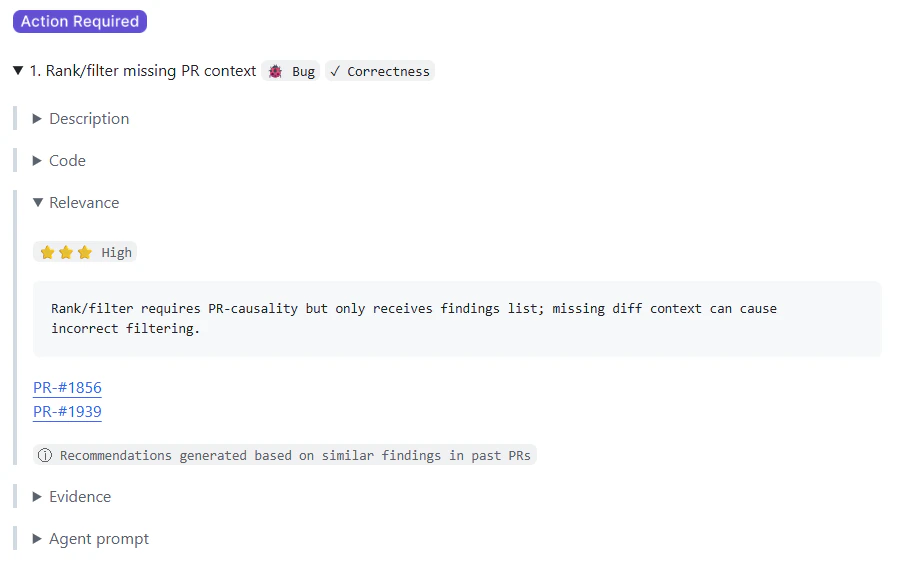
AI code review tools often surface many findings, but it can be difficult to determine which ones are truly important for a specific repository. PR history–based relevance helps reviewers evaluate the significance of code review findings by incorporating historical pull request context.
By analyzing how similar issues were handled in past pull requests, Qodo surfaces relevant historical context directly within the pull request review. Each finding may include a Relevance section that links to related PRs and indicates whether similar issues were typically fixed or dismissed. This helps you quickly understand how similar findings were treated in the past and prioritize issues that are more likely to matter for your repository.
Incorporating pull request history into the review workflow helps you maintain consistency across reviews, reduce noise from low-value findings, and focus attention on issues that are more likely to impact code quality.
### [PR history–based relevance for code review findings](/code-review/concepts/pr-history) (beta) (Enterprise) (Single-tenant)
This feature is currently in beta and available on GitHub, with support for additional Git providers coming soon.
AI code review tools often surface many findings, but it can be difficult to determine which ones are truly important for a specific repository. PR history–based relevance helps reviewers evaluate the significance of code review findings by incorporating historical pull request context.
By analyzing how similar issues were handled in past pull requests, Qodo surfaces relevant historical context directly within the pull request review. Each finding may include a Relevance section that links to related PRs and indicates whether similar issues were typically fixed or dismissed. This helps you quickly understand how similar findings were treated in the past and prioritize issues that are more likely to matter for your repository.
Incorporating pull request history into the review workflow helps you maintain consistency across reviews, reduce noise from low-value findings, and focus attention on issues that are more likely to impact code quality.
 ## Qodo 2.1
*Released 17 February 2026*
### Introducing Qodo's [Rule System](/governance/rule-enforcement) (beta)
Currently supported for GitHub single- and multi-tenant.
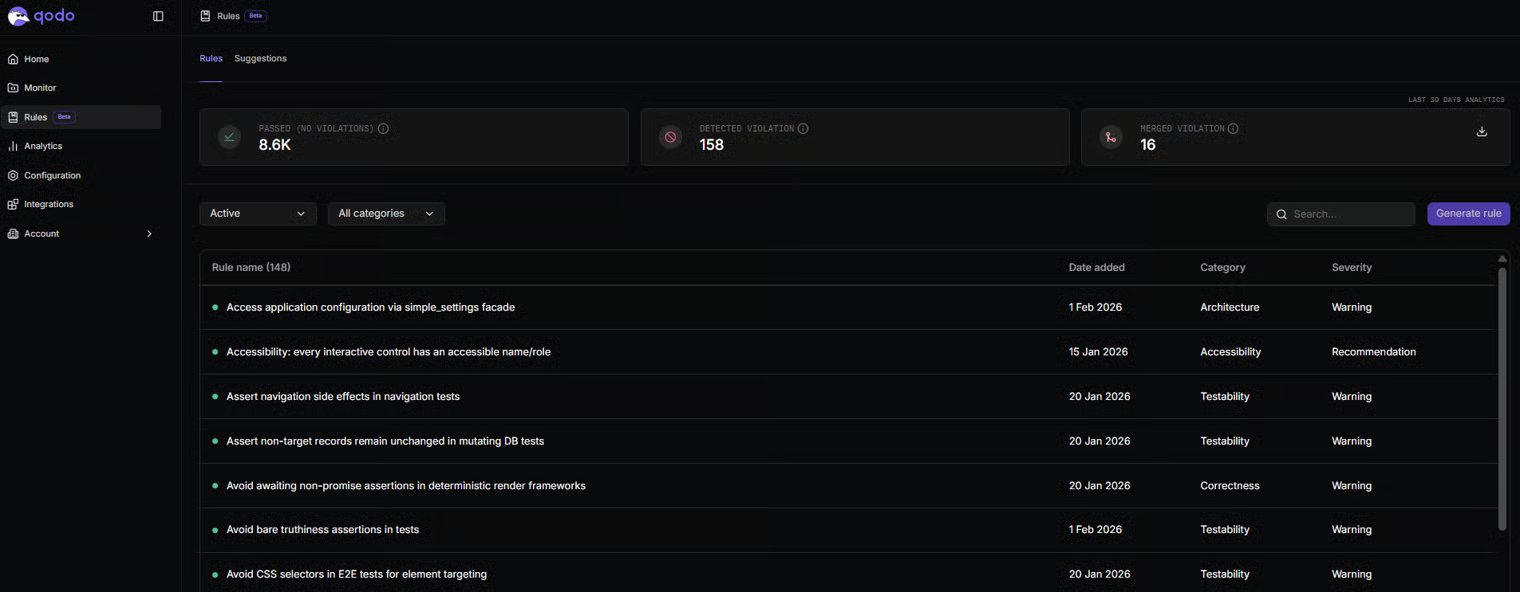
Qodo 2.1 expands the platform with Qodo's Rule System, a centralized and intelligent framework for defining, managing, and enforcing engineering standards at scale.
As AI tools generate more code across teams and environments, standards can drift across linters, markdown files, and informal conventions. The Rule System creates a single source of truth for organizational standards and integrates them directly into the review workflow.
The Rule System enables:
* Converting existing rules into structured, enforceable standards
* Generating structured rules from natural language
* Discovering implicit standards from codebase patterns and PR history
* Identifying duplicate, conflicting, or outdated rules to maintain rule health
* Measuring rule adoption and violations to track effectiveness over time
Qodo flags violated rules during pull request review, ensuring changes align with organizational standards.
The Rule System supports scoped enforcement at the organization, repository group, and repository levels, with inheritance and override controls. It also continuously evaluates rule health by detecting duplicates, conflicts, and outdated standards to keep governance clean and effective over time.
With Qodo 2.1, standards become a living system that evolves with your code and scales consistently across teams and tools.
## Qodo 2.1
*Released 17 February 2026*
### Introducing Qodo's [Rule System](/governance/rule-enforcement) (beta)
Currently supported for GitHub single- and multi-tenant.
Qodo 2.1 expands the platform with Qodo's Rule System, a centralized and intelligent framework for defining, managing, and enforcing engineering standards at scale.
As AI tools generate more code across teams and environments, standards can drift across linters, markdown files, and informal conventions. The Rule System creates a single source of truth for organizational standards and integrates them directly into the review workflow.
The Rule System enables:
* Converting existing rules into structured, enforceable standards
* Generating structured rules from natural language
* Discovering implicit standards from codebase patterns and PR history
* Identifying duplicate, conflicting, or outdated rules to maintain rule health
* Measuring rule adoption and violations to track effectiveness over time
Qodo flags violated rules during pull request review, ensuring changes align with organizational standards.
The Rule System supports scoped enforcement at the organization, repository group, and repository levels, with inheritance and override controls. It also continuously evaluates rule health by detecting duplicates, conflicts, and outdated standards to keep governance clean and effective over time.
With Qodo 2.1, standards become a living system that evolves with your code and scales consistently across teams and tools.
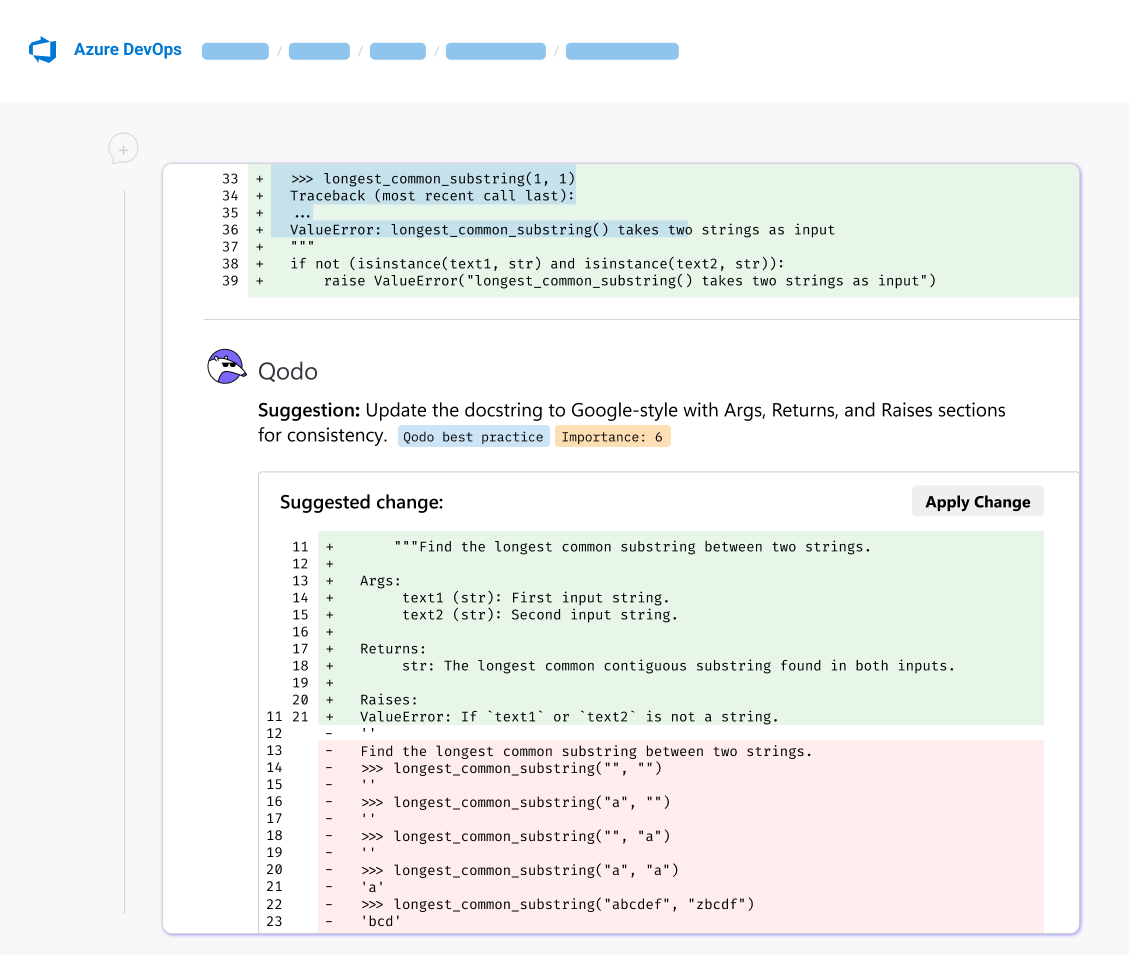
 ### [Azure DevOps integration](/code-review/get-started/install/azure-devops)
Qodo now integrates natively with Azure DevOps for Enterprise customers, bringing advanced AI powered code review directly into Microsoft based development environments.
Using Microsoft Entra ID authentication and Azure DevOps service hooks, Qodo connects securely to your repositories and pull request workflows without requiring additional tools or process changes.
With this integration, Qodo:
* Publishes AI powered reviews directly inside Azure DevOps pull requests
* Uses Azure Boards work items and associated tickets for added context and compliance checks
* Supports repository level or project level configuration for flexible deployment
Once configured, Qodo automatically analyzes pull requests and delivers prioritized findings and structured suggestions directly in the workflow you already use.
### [Azure DevOps integration](/code-review/get-started/install/azure-devops)
Qodo now integrates natively with Azure DevOps for Enterprise customers, bringing advanced AI powered code review directly into Microsoft based development environments.
Using Microsoft Entra ID authentication and Azure DevOps service hooks, Qodo connects securely to your repositories and pull request workflows without requiring additional tools or process changes.
With this integration, Qodo:
* Publishes AI powered reviews directly inside Azure DevOps pull requests
* Uses Azure Boards work items and associated tickets for added context and compliance checks
* Supports repository level or project level configuration for flexible deployment
Once configured, Qodo automatically analyzes pull requests and delivers prioritized findings and structured suggestions directly in the workflow you already use.
 ## Qodo 2.0
*Released 4 February 2026*
Qodo 2.0 is available for GitHub single- and multi-tenant.
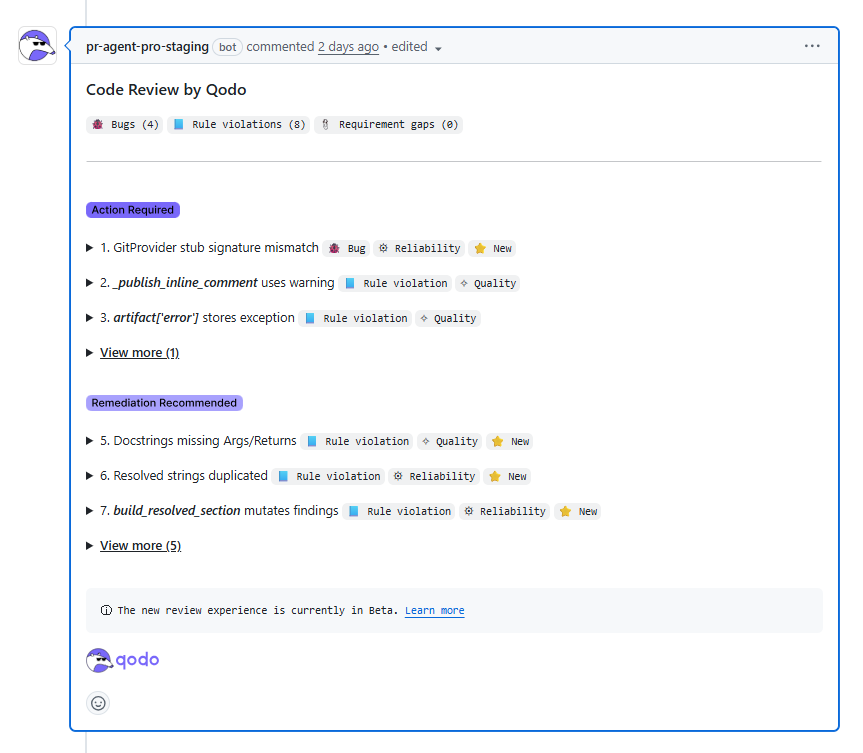
### Next generation [agentic PR review](/code-review)
This feature is now generally available (GA).
Qodo 2.0 introduces a major upgrade to AI-powered code review with a next-generation agentic PR review experience designed for shipping increasing volumes of AI-generated code.
Instead of a single review pass, Qodo uses a **multi agent system** where specialized agents collaborate using multi step reasoning. Each agent focuses on specific responsibilities including:
* Critical issue detection
* Duplicated logic
* Ticket compliance
* Standards enforcement
This approach increases both coverage and depth, enabling Qodo to surface issues that traditional AI review tools often miss.
In each pull request, Qodo leverages full repository context, repository structure awareness, and PR history. By understanding how the codebase evolved and how past decisions were made, Qodo evaluates changes in architectural and historical context, not just as isolated diffs.
Findings are prioritized by impact, clearly explained, and paired with structured remediation guidance. The result is higher recall, improved precision, and significantly less noise, delivering reviews you trust and act on.
## Qodo 2.0
*Released 4 February 2026*
Qodo 2.0 is available for GitHub single- and multi-tenant.
### Next generation [agentic PR review](/code-review)
This feature is now generally available (GA).
Qodo 2.0 introduces a major upgrade to AI-powered code review with a next-generation agentic PR review experience designed for shipping increasing volumes of AI-generated code.
Instead of a single review pass, Qodo uses a **multi agent system** where specialized agents collaborate using multi step reasoning. Each agent focuses on specific responsibilities including:
* Critical issue detection
* Duplicated logic
* Ticket compliance
* Standards enforcement
This approach increases both coverage and depth, enabling Qodo to surface issues that traditional AI review tools often miss.
In each pull request, Qodo leverages full repository context, repository structure awareness, and PR history. By understanding how the codebase evolved and how past decisions were made, Qodo evaluates changes in architectural and historical context, not just as isolated diffs.
Findings are prioritized by impact, clearly explained, and paired with structured remediation guidance. The result is higher recall, improved precision, and significantly less noise, delivering reviews you trust and act on.
 ## Qodo 1.7
*Released 21 October 2025*
Qodo 1.7 is available for GitHub single- and multi-tenant.
### Code review, reinvented - meet Local Review
We're thrilled to introduce Qodo Gen **version 1.7.0**, bringing a smarter way to review your code before you commit. This release puts quality and clarity front and center, helping you keep every branch clean, consistent, and ready for fast PRs.
#### Review your local changes before you commit
Meet the **Local review** workflow, your new pre-commit review companion.
Before you push your code, get a complete understanding of what's changed and why.
Here's what it does for you:
* **Holistic review:** Scans all local changes before commit, summarizing updates across files and themes.
* **Thematic walkthrough:** Groups modified files by topic (features, fixes, refactors, etc.) for easier navigation.
* **Intelligent insights:** Surfaces potential issues and suggestions by category (correctness, style, performance, best practices).
* **Instant fixes:** With one click, resolve detected issues or apply suggestions, no context switching needed.
* **Project alignment:** Validates that agent-written code follows your team's conventions and rules, ensuring smoother PR reviews.
It's like having a senior reviewer on demand, keeping your local branch clean, consistent, and production-ready.
#### Farewell to standard mode
We've **removed the Standard mode**. It's officially deprecated, and our smarter workflows now cover everything it used to do, and more.
#### A new welcome experience
Start strong with the **new Welcome Screen**, featuring quick access to your top quality-focused workflows:
* **Local Review**
* **Unit Test**
* **Cleanup**
* **Fix**
Keep your codebase clean, consistent, and bug-free from the very first click.
## Qodo 1.7
*Released 21 October 2025*
Qodo 1.7 is available for GitHub single- and multi-tenant.
### Code review, reinvented - meet Local Review
We're thrilled to introduce Qodo Gen **version 1.7.0**, bringing a smarter way to review your code before you commit. This release puts quality and clarity front and center, helping you keep every branch clean, consistent, and ready for fast PRs.
#### Review your local changes before you commit
Meet the **Local review** workflow, your new pre-commit review companion.
Before you push your code, get a complete understanding of what's changed and why.
Here's what it does for you:
* **Holistic review:** Scans all local changes before commit, summarizing updates across files and themes.
* **Thematic walkthrough:** Groups modified files by topic (features, fixes, refactors, etc.) for easier navigation.
* **Intelligent insights:** Surfaces potential issues and suggestions by category (correctness, style, performance, best practices).
* **Instant fixes:** With one click, resolve detected issues or apply suggestions, no context switching needed.
* **Project alignment:** Validates that agent-written code follows your team's conventions and rules, ensuring smoother PR reviews.
It's like having a senior reviewer on demand, keeping your local branch clean, consistent, and production-ready.
#### Farewell to standard mode
We've **removed the Standard mode**. It's officially deprecated, and our smarter workflows now cover everything it used to do, and more.
#### A new welcome experience
Start strong with the **new Welcome Screen**, featuring quick access to your top quality-focused workflows:
* **Local Review**
* **Unit Test**
* **Cleanup**
* **Fix**
Keep your codebase clean, consistent, and bug-free from the very first click.