> ## Documentation Index
> Fetch the complete documentation index at: https://docs.qodo.ai/llms.txt
> Use this file to discover all available pages before exploring further.
# Describe
GitHub
GitLab
Bitbucket
**Git Integration (formerly Qodo Merge)** – AI code review agents for pull requests. This documentation describes the Qodo v1 experience. For the Qodo v2 documentation, click [here.](/code-review)
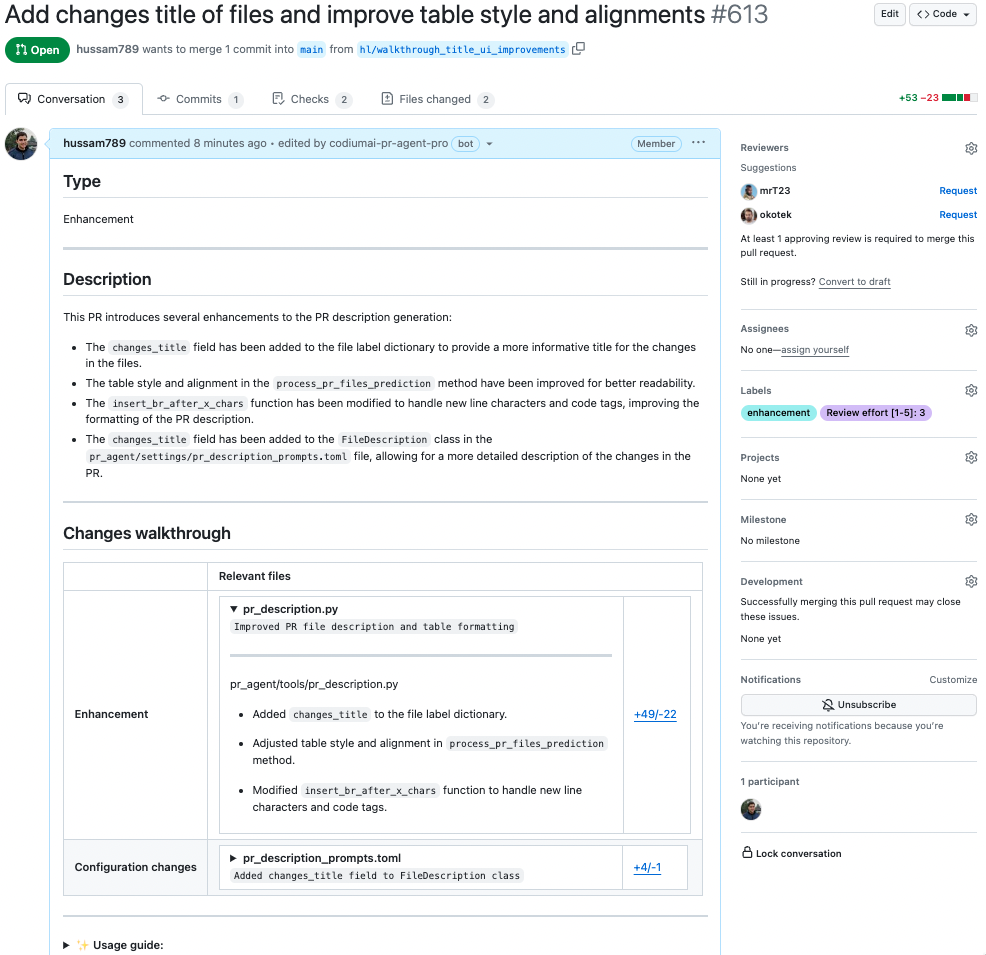
The `describe` tool scans the PR code changes, and generates a full PR description: title, type, summary, a walkthrough of the changes made in the PR, and suggested labels.
## Example usage
### Manual triggering
Comment `/describe` on any PR:
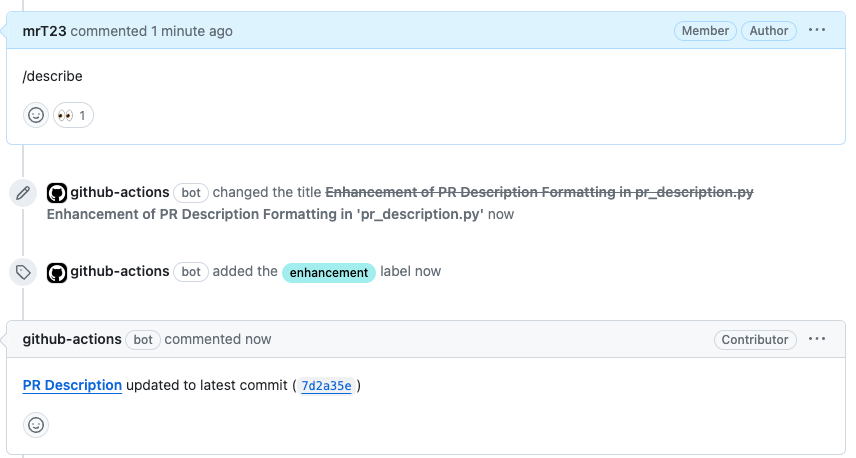 Qodo Git plugin will generate a description for the PR:
 ## How to use the `describe` tool
**Manual usage**
Comment on the PR:
```bash theme={null}
/describe
```
You can also add configuration flags to the command to customize behavior:
```bash theme={null}
/describe --pr_description.publish_labels=true
```
**Automatic usage**
To run the tool automatically when a PR is opened, add it to your [configuration file](/v1/configuration/configuration-file/):
```bash theme={null}
[github_app]
pr_commands = [
"/describe",
...
]
[pr_description]
publish_labels = true
...
```
## Configuration options
### Configuration options table
Configure the `describe` tool by setting configurations under the `pr_description` part in your [configuration file](/v1/configuration/configuration-file/).
| Possible configurations | Default value | What do they do |
| :------------------------------------------ | :------------ | :----------------------------------------------------------------------------------------------------------------------------------------------------------------------------------- |
| `publish_labels` | `false` | If set to true, Qodo will publish labels to the PR. |
| `publish_description_as_comment` | `false` | If set to true, Qodo will publish the description as a comment to the PR. If false, it will overwrite the original description. |
| `publish_description_as_comment_persistent` | `true` | If set to true and `publish_description_as_comment` is true, Qodo will publish the description as a persistent comment to the PR. |
| `add_original_user_description` | `true` | If set to true, Qodo will add the original user description to the generated description. |
| `generate_ai_title` | `false` | If set to true, Qodo will generate an AI title for the PR. |
| `extra_instructions` | none | Optional extra instructions for the tool. For example: "focus on the changes in the file X", "Ignore changes in ..." |
| `enable_pr_type` | `true` | If set to false, Qodo will not show the `PR type` as a text value in the description content. |
| `final_update_message` | `false` | If set to true, Qodo will add a comment message `PR Description updated to latest commit...` after finishing calling `/describe`. |
| `enable_semantic_files_types` | `true` | If set to true, "Changes walkthrough" section will be generated. |
| `collapsible_file_list` | `adaptive` | If set to true, the file list in the "Changes walkthrough" section will be collapsible. If set to "adaptive", the file list will be collapsible only if there are more than 8 files. |
| `enable_large_pr_handling` | `true` | If set to true, in case of a large PR Qodo will make several calls to the AI models and combine them to be able to cover more files. |
| `enable_help_text` | `false` | If set to true, Qodo will display a help text in the comment. |
### Preserve your own PR description
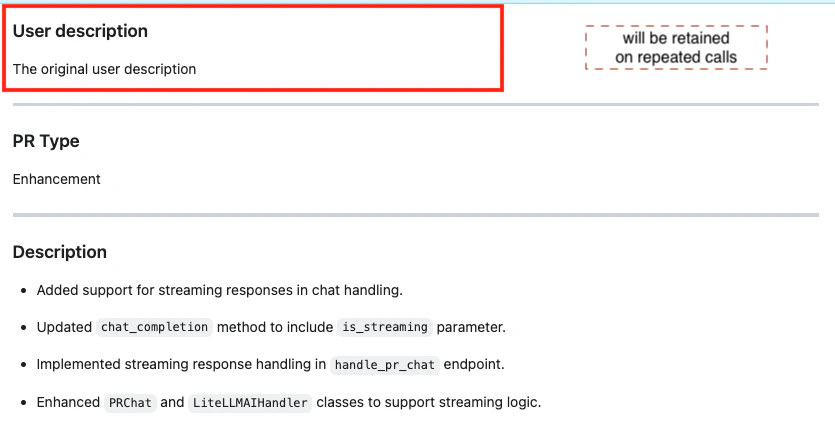
By default, Qodo keeps your original PR description at the top and adds the generated description below it. Just make sure to add your description during the initial PR creation. Editing the description while Qodo is running might cause issues.
Any text above the `PR Type` header is considered as user-written content and will be preserved. Any text below it is auto-generated and will be replaced.
## How to use the `describe` tool
**Manual usage**
Comment on the PR:
```bash theme={null}
/describe
```
You can also add configuration flags to the command to customize behavior:
```bash theme={null}
/describe --pr_description.publish_labels=true
```
**Automatic usage**
To run the tool automatically when a PR is opened, add it to your [configuration file](/v1/configuration/configuration-file/):
```bash theme={null}
[github_app]
pr_commands = [
"/describe",
...
]
[pr_description]
publish_labels = true
...
```
## Configuration options
### Configuration options table
Configure the `describe` tool by setting configurations under the `pr_description` part in your [configuration file](/v1/configuration/configuration-file/).
| Possible configurations | Default value | What do they do |
| :------------------------------------------ | :------------ | :----------------------------------------------------------------------------------------------------------------------------------------------------------------------------------- |
| `publish_labels` | `false` | If set to true, Qodo will publish labels to the PR. |
| `publish_description_as_comment` | `false` | If set to true, Qodo will publish the description as a comment to the PR. If false, it will overwrite the original description. |
| `publish_description_as_comment_persistent` | `true` | If set to true and `publish_description_as_comment` is true, Qodo will publish the description as a persistent comment to the PR. |
| `add_original_user_description` | `true` | If set to true, Qodo will add the original user description to the generated description. |
| `generate_ai_title` | `false` | If set to true, Qodo will generate an AI title for the PR. |
| `extra_instructions` | none | Optional extra instructions for the tool. For example: "focus on the changes in the file X", "Ignore changes in ..." |
| `enable_pr_type` | `true` | If set to false, Qodo will not show the `PR type` as a text value in the description content. |
| `final_update_message` | `false` | If set to true, Qodo will add a comment message `PR Description updated to latest commit...` after finishing calling `/describe`. |
| `enable_semantic_files_types` | `true` | If set to true, "Changes walkthrough" section will be generated. |
| `collapsible_file_list` | `adaptive` | If set to true, the file list in the "Changes walkthrough" section will be collapsible. If set to "adaptive", the file list will be collapsible only if there are more than 8 files. |
| `enable_large_pr_handling` | `true` | If set to true, in case of a large PR Qodo will make several calls to the AI models and combine them to be able to cover more files. |
| `enable_help_text` | `false` | If set to true, Qodo will display a help text in the comment. |
### Preserve your own PR description
By default, Qodo keeps your original PR description at the top and adds the generated description below it. Just make sure to add your description during the initial PR creation. Editing the description while Qodo is running might cause issues.
Any text above the `PR Type` header is considered as user-written content and will be preserved. Any text below it is auto-generated and will be replaced.
 ### Show file summaries in "Files changed"
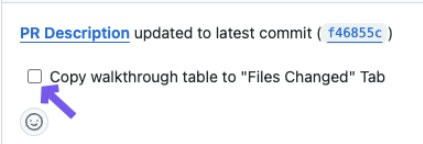
You can select whether to show a summary of code changes for each file inside the "Files changed" tab (GitHub only).
Click on the checkbox that appears in the PR Description status message, below the main PR Description.
### Show file summaries in "Files changed"
You can select whether to show a summary of code changes for each file inside the "Files changed" tab (GitHub only).
Click on the checkbox that appears in the PR Description status message, below the main PR Description.
 **To enable the summary for every PR:** make the following change in your configuration file:
```bash theme={null}
[pr_description]
inline_file_summary = "table" # or "true" or "false"
```
* `table`: A summary table will be displayed at the top of "Files changed" tab.
* `true`: Adds a comment to each file with a short summary.
* `false` (default): File changes walkthrough will appear only in the main PR description (the "Conversations" tab).
### Use markers to control placement of generated content
You can define exactly where each part of the generated description should appear using markers.
For example, if the PR's original description was:
```bash theme={null}
## PR Type:
pr_agent:type
## PR Description:
pr_agent:summary
## PR Walkthrough:
pr_agent:walkthrough
```
The description will replace the `pr_agent:` placeholders with the relevant content.
To enable this, make the following change in your configuration file:
```bash theme={null}
[pr_description]
use_description_markers = true
include_generated_by_header = false
```
**Configuration params**:
* `use_description_markers`: if set to true, the tool will use markers template. Default is false.
* `include_generated_by_header`: if set to true, the tool will add a dedicated header: **Generated by PR Agent at...** to any automatic content. Default is true.
### Custom labels
The default labels of the describe tool are generic: `Bug fix`, `Tests`, `Enhancement`, `Documentation`, `Other`.
You can add your own custom labels that fit your repository better.
There are two ways to define them:
#### 1. From a configuration file
```bash theme={null}
[config]
enable_custom_labels=true
[custom_labels."sql_changes"]
description = "Use when a PR contains changes to SQL queries"
[custom_labels."test"]
description = "use when a PR primarily contains new tests"
...
```
**Follow these guidelines for setting custom labels in your configuration file:**
* Use a clear name.
* Add a detailed description for each label so that Qodo knows when to suggest it.
* A good description should be a conditional statement that indicates whether the label should be added to the PR or not, based on the PR's content. For example: `Use when a PR contains changes to SQL queries`.
#### 2. From your repository's labels page
* **GitHub:** Go to `https://github.com/{owner}/{repo}/labels`
* **GitLab:** Go to `https://gitlab.com/{owner}/{repo}/-/labels`
**Follow these guidelines for setting custom labels in your repository's labels page:**
* Use a clear name.
* Add a detailed description for each label so that Qodo knows when to suggest it.
* Start the description of with prefix `pr_agent:`, for example: `pr_agent: Description of when AI should suggest this label`.
**To enable the summary for every PR:** make the following change in your configuration file:
```bash theme={null}
[pr_description]
inline_file_summary = "table" # or "true" or "false"
```
* `table`: A summary table will be displayed at the top of "Files changed" tab.
* `true`: Adds a comment to each file with a short summary.
* `false` (default): File changes walkthrough will appear only in the main PR description (the "Conversations" tab).
### Use markers to control placement of generated content
You can define exactly where each part of the generated description should appear using markers.
For example, if the PR's original description was:
```bash theme={null}
## PR Type:
pr_agent:type
## PR Description:
pr_agent:summary
## PR Walkthrough:
pr_agent:walkthrough
```
The description will replace the `pr_agent:` placeholders with the relevant content.
To enable this, make the following change in your configuration file:
```bash theme={null}
[pr_description]
use_description_markers = true
include_generated_by_header = false
```
**Configuration params**:
* `use_description_markers`: if set to true, the tool will use markers template. Default is false.
* `include_generated_by_header`: if set to true, the tool will add a dedicated header: **Generated by PR Agent at...** to any automatic content. Default is true.
### Custom labels
The default labels of the describe tool are generic: `Bug fix`, `Tests`, `Enhancement`, `Documentation`, `Other`.
You can add your own custom labels that fit your repository better.
There are two ways to define them:
#### 1. From a configuration file
```bash theme={null}
[config]
enable_custom_labels=true
[custom_labels."sql_changes"]
description = "Use when a PR contains changes to SQL queries"
[custom_labels."test"]
description = "use when a PR primarily contains new tests"
...
```
**Follow these guidelines for setting custom labels in your configuration file:**
* Use a clear name.
* Add a detailed description for each label so that Qodo knows when to suggest it.
* A good description should be a conditional statement that indicates whether the label should be added to the PR or not, based on the PR's content. For example: `Use when a PR contains changes to SQL queries`.
#### 2. From your repository's labels page
* **GitHub:** Go to `https://github.com/{owner}/{repo}/labels`
* **GitLab:** Go to `https://gitlab.com/{owner}/{repo}/-/labels`
**Follow these guidelines for setting custom labels in your repository's labels page:**
* Use a clear name.
* Add a detailed description for each label so that Qodo knows when to suggest it.
* Start the description of with prefix `pr_agent:`, for example: `pr_agent: Description of when AI should suggest this label`.
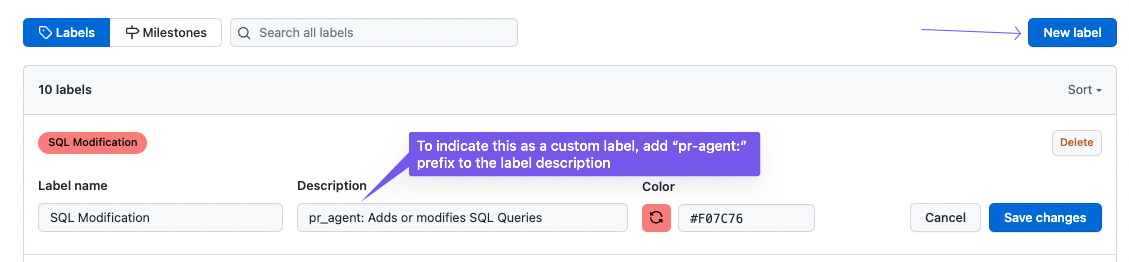 For example:
```bash theme={null}
Name: Main topic:performance
Description: pr_agent:The main topic of this PR is performance
Name: New endpoint
Description: pr_agent:A new endpoint was added in this PR
Name: SQL query
Description: pr_agent:A new SQL query was added in this PR
Name: Dockerfile changes
Description: pr_agent:The PR contains changes in the Dockerfile
```
For example:
```bash theme={null}
Name: Main topic:performance
Description: pr_agent:The main topic of this PR is performance
Name: New endpoint
Description: pr_agent:A new endpoint was added in this PR
Name: SQL query
Description: pr_agent:A new SQL query was added in this PR
Name: Dockerfile changes
Description: pr_agent:The PR contains changes in the Dockerfile
```