> ## Documentation Index
> Fetch the complete documentation index at: https://docs.qodo.ai/llms.txt
> Use this file to discover all available pages before exploring further.
# Custom prompt
GitHub
GitLab
Bitbucket
**Git Integration (formerly Qodo Merge)** – AI code review agents for pull requests. This documentation describes the Qodo v1 experience. For the Qodo v2 documentation, click [here.](/code-review)
The `custom_prompt` tool scans the PR code changes, and automatically generates suggestions for improving the PR code.
It shares similarities with the `improve` tool, but with one main difference: the `custom_prompt` tool will **only propose suggestions that follow specific guidelines defined by the prompt** in the `pr_custom_prompt.prompt` configuration.
With this tool, you are the prompter. Be specific, clear, and concise in the instructions. Specify relevant aspects that you want the model to focus on.
## How to use the `custom_prompt` tool
**Manual usage**
Comment on the PR:
```bash theme={null}
/custom_prompt --pr_custom_prompt.prompt="
The code suggestions should focus only on the following:
- ...
- ...
"
```
**Automatic usage**
To run the tool automatically when a new issue is opened, add it to your [configuration file](/v1/configuration/configuration-file/):
```bash theme={null}
[pr_custom_prompt]
prompt="""\
The suggestions should focus only on the following:
-...
-...
"""
```
## Configuration options
Configure the `custom_prompt` tool by setting configurations under the `pr_custom_prompt` part in your [configuration file](/v1/configuration/configuration-file/).
| Possible configurations | Default value | What they do |
| :------------------------------- | :------------ | :-------------------------------------------------------------------------- |
| `prompt` | none | The prompt for the tool. It should be a multi-line string. |
| `num_code_suggestions_per_chunk` | `3` | Number of code suggestions provided by the `custom_prompt` tool, per chunk. |
| `enable_help_text` | `true` | If set to true, the tool will display a help text in the comment |
## Example usage
An example of a possible prompt defined in the configuration file:
```bash theme={null}
[pr_custom_prompt]
prompt="""\
The code suggestions should focus only on the following:
- look for edge cases when implementing a new function
- make sure every variable has a meaningful name
- make sure the code is efficient
"""
```
The prompt should be specific and clear, and be tailored to the needs of your project.
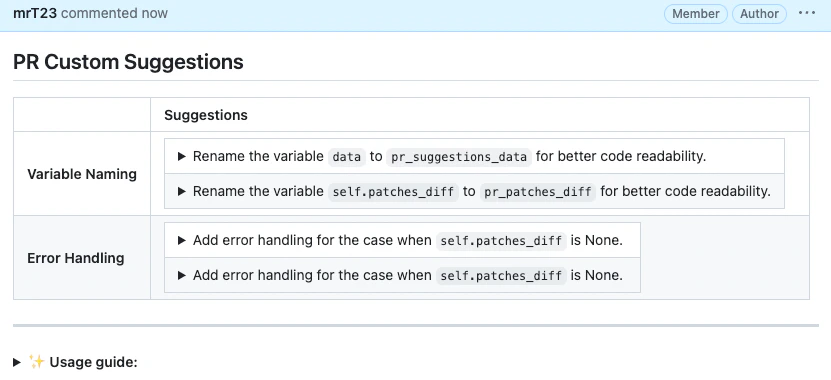
Results obtained with the prompt above: