> ## Documentation Index
> Fetch the complete documentation index at: https://docs.qodo.ai/llms.txt
> Use this file to discover all available pages before exploring further.
# Qodo Context Engine
GitHub
GitLab
Bitbucket Data Center
**Git Integration (formerly Qodo Merge)** – AI code review agents for pull requests. This documentation describes the Qodo v1 experience. For the Qodo v2 documentation, click [here.](/code-review)
This feature is available for [Enterprise users](https://www.qodo.ai/pricing/) only.
## What is Qodo Context Engine?
Qodo Context Engine is the code intelligence engine behind the Qodo platform. It connects to all your repos, analyzes architecture and patterns, and powers AI agents that help you search, understand, and solve technical problems.
Think of it as an AI-powered Principal Engineer, that understands your entire system and helps you move faster with confidence.
### Why should I use it?
When used with Qodo Git interface, Qodo Context Engine brings deep, architecture-level understanding directly into your review workflow.
You ask the questions, and Qodo Context Engine finds the answers from across your entire codebase.
### How does it work?
Qodo Context Engine uses Retrieval-Augmented Generation (RAG) and agentic reasoning to understand your codebase:
* **Indexing** – Builds a deep internal map of your code
* **Retrieval** – Pulls relevant code, docs, and patterns
* **Reasoning** – AI agents analyze dependencies and logic
* **Generation** – Produces grounded, accurate responses
## Using Qodo Context Engine
In order to enable the RAG feature, add the following lines to your [configuration file](/v1/configuration/configuration-file):
```bash theme={null}
[rag_arguments]
enable_rag=true
```
The [`/ask`](/v1/tools/tools-list/ask) tool can access broader repository context through the RAG feature when answering questions that go beyond the PR scope alone.
The **References** section displays the additional repository content consulted to formulate the answer.
 The [`/compliance`](/v1/tools/tools-list/compliance) tool offers the *Codebase Code Duplication Compliance* section which contains feedback based on the RAG references. This section highlights possible code duplication issues in the PR, providing developers with insights into potential code quality concerns.
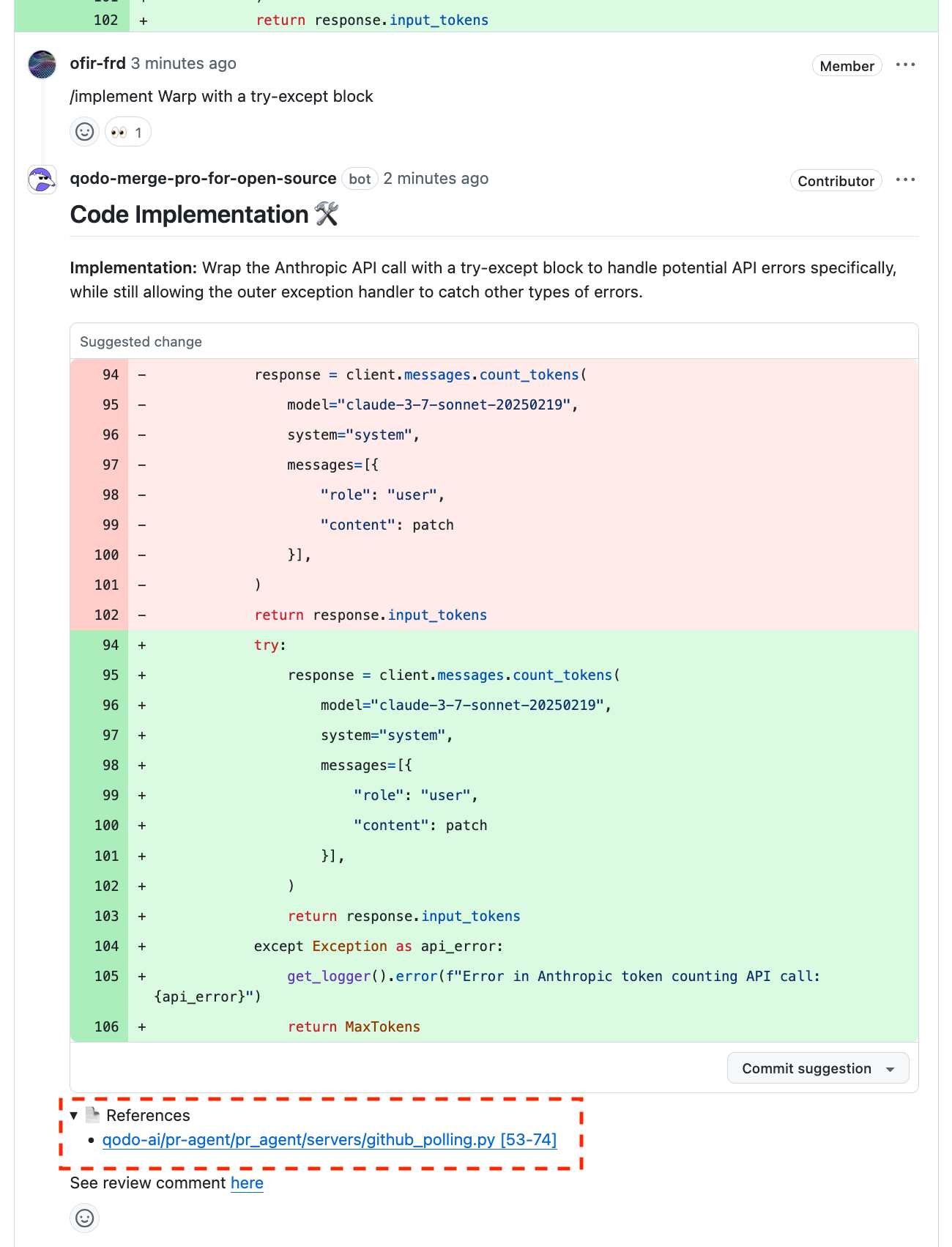
 The [`/implement`](/v1/tools/tools-list/implement) tool utilizes the RAG feature to provide comprehensive context of the repository codebase, allowing it to generate more refined code output.
The **References** section contains links to the content used to support the code generation.
The [`/implement`](/v1/tools/tools-list/implement) tool utilizes the RAG feature to provide comprehensive context of the repository codebase, allowing it to generate more refined code output.
The **References** section contains links to the content used to support the code generation.
 The [`/review`](/v1/tools/tools-list/review) tool offers the **Focus area** \*\*which contains feedback based on the RAG output.
The complete list of references found relevant to the PR will be shown in the **References** section, helping developers understand the broader context by exploring the provided references.
The [`/review`](/v1/tools/tools-list/review) tool offers the **Focus area** \*\*which contains feedback based on the RAG output.
The complete list of references found relevant to the PR will be shown in the **References** section, helping developers understand the broader context by exploring the provided references.
 ## Configuration options
| Possible configurations | Default value | What does it do |
| ----------------------- | -------------------------------------------- | ------------------------------------------------------------------------------------------------------------------------------------------------------------------------------------------------------------- |
| `enable_rag` | `false` | If set to true, repository enrichment using RAG will be enabled. |
| `rag_repo_list` | The repository from which the PR was opened. | A list of repositories that will be used by the semantic search for RAG.
## Configuration options
| Possible configurations | Default value | What does it do |
| ----------------------- | -------------------------------------------- | ------------------------------------------------------------------------------------------------------------------------------------------------------------------------------------------------------------- |
| `enable_rag` | `false` | If set to true, repository enrichment using RAG will be enabled. |
| `rag_repo_list` | The repository from which the PR was opened. | A list of repositories that will be used by the semantic search for RAG.
Use `['all']` to consider the entire codebase, or a select list of repositories. For example: `['my-org/my-repo', ...]`. |