> ## Documentation Index
> Fetch the complete documentation index at: https://docs.qodo.ai/llms.txt
> Use this file to discover all available pages before exploring further.
# Model selection
Enterprise
Qodo IDE plugin, formerly Qodo Gen, brings local code review workflows to JetBrains and VS Code as part of the Qodo Platform.
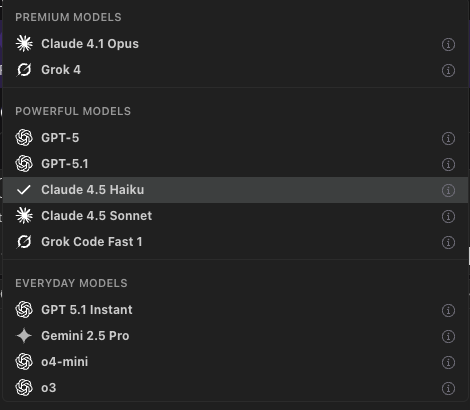
Qodo IDE Plugin lets you choose between multiple AI models, each with different strengths in speed, reasoning, and context handling.
## Available models
1. **GPT**
1. **GPT 5.1** OpenAI Latest, advanced reasoning model for complex tasks
2. **GPT 5.1 Instant** OpenAI Latest, fast, conversational instruction-following model
3. **GPT 5** medium-fast general purpose; great default for coding + reasoning when a bit of latency is OK.
2. **Claude**
1. **Sonnet 4.5** Claude’s fast, responsive variant, excellent for interactive chat and frequent short prompts where latency matters most.
2. **Haiku 4.5** Lightweight model for rapid coding and low-latency workflows.
3. **Opus 4.1** Premium Model More reasoning depth than Sonnet with moderate latency; solid for multi-file refactors and detailed code edits.
3. **Gemini 2.5 Pro** Strong at large-context and multimodal work; good when you need to reason over many files or combine text with images.
4. **Grok (XAI)** Premium Model Fast, witty, and concise. Well-suited for brainstorming, natural language exploration, and lighter reasoning tasks. Good option when you want responsiveness with personality, though not as strong for very large context or enterprise-grade coding.
5. **OpenAI o-series (o3, o4-mini)** Reasoning-focused models trained to “think longer” before responding.
* **o3**: Higher-end reasoning for hard problems; good when you want strong tool use and stepwise problem solving.
* **o4-mini**: Smaller, faster while still strong at coding/math/visual tasks; great when you want low latency + good reasoning.
Below is an updated comparison of Qodo’s available models. Each model offers different trade-offs in terms of speed (latency), reasoning depth, cost, and best use cases. Use this guide to select the model that aligns with your task priorities.
| Model | Speed vs Claude Fast Variants | Best for… | Avoid when… |
| ----------------------------- | ----------------------------------------------------------------------------------------- | ------------------------------------------------------------------------------------------------- | ----------------------------------------------------------------------------------------------------------------- |
| GPT-5 + GPT-5.1 | Medium, still **slower** than Claude Sonnet for short prompts. | Complex reasoning,
large context (big docs / codebases), tool use,
high accuracy tasks. | You need instant feedback / live chat / very short prompts;
latency is critical. |
| Claude Sonnet 4.5 + Haiku 4.5 | Fast, very low latency, usually faster than GPT-5. | Interactive UX, short queries,
prototyping, frequent lightweight tasks. | Very large context or advanced reasoning beyond its depth. |
| Claude Opus 4.1 | Medium, slower than Sonnet but still often quicker than GPT-5 on many tasks. | Balanced mix of speed and reasoning,
multi-file refactors, reliable code edits. | Trivial tasks where Sonnet is sufficient;
cost-sensitive workflows. |
| Gemini 2.5 Pro | Moderate, can be slower than Claude for short tasks, but optimized for **huge contexts**. | Handling very large codebases or documents,
multimodal reasoning, context-heavy workflows. | Simple or short prompts (extra context overhead makes it slower);
interactive tasks needing instant replies. |
## Using model selection
Select a model from the dropdown menu on the bottom left below the chatbox. The selected model will be used for your next query.