> ## Documentation Index
> Fetch the complete documentation index at: https://docs.qodo.ai/llms.txt
> Use this file to discover all available pages before exploring further.
# What is an agent?
Enterprise
Qodo IDE plugin, formerly Qodo Gen, brings local code review workflows to JetBrains and VS Code as part of the Qodo Platform.
An agent is a configurable AI-powered assistant that can perform tasks, automate workflows, and interact with tools (MCPs). Each agent is defined by a set of instructions, optional arguments, and access to tools like version control, the file system, CI pipelines, or cloud environments.
Agents act as task-specific operators. You can think of them as highly focused copilots, each with a clear objective and strategy. Rather than manually guiding an AI through each step, you define the desired behavior once and reuse it reliably.
## Why should I use agents?
Using agents has several benefits:
* **Customization**: Define detailed instructions, tool access, and behavior tailored to your workflow.
* **Repeatability**: Agents behave consistently across runs, environments, and users.
* **Automation**: Agents can replace repetitive manual work: code reviews, testing, deployments, and more.
* **Collaboration**: Teams can share, version, and build on each other’s agents for unified engineering workflows.
## Agent types
Agents and Task Agents share the same creation flow (name, instructions, tool access, rules), but they differ significantly in usage:
* **Modes** are conversational and persistent.
* **Workflows** are command-style and stateless.
### Modes
Modes are persona-driven agents and assistants designed for ongoing, multi-turn conversations. You can interact with them in a way that aligns with a specific role or mindset.
Examples:
* **Architect Mode:** Helps with system design and deep architectural questions.
* **Lite Mode:** Provides fast, lightweight responses using minimal tools.
[**Modes are selected from a dropdown menu in the chat**](/qodo-ide/agent/modes), and remain active across multiple messages, adapting to your workflow during a session.
### Workflows
**Workflows** are single-task executors. They are not meant for back-and-forth interaction but are triggered to perform a specific job, similar to Qodo’s slash commands.
Examples:
* **Test Agent:** Automatically writes tests based on predefined logic.
* **Review Agent:** Runs a static code review with structured output.
[**Workflows are launched via slash commands**](/qodo-ide/agent/workflows), run independently of chat context, and return the chat to its previously active agent after completion.
## Agent tool usage
Agents can use [**tools (MCPs)**](/qodo-ide/tools-mcps/what-is-an-mcp) behind the scenes to store information, manage context, or behave in specific ways.
You can configure which tools an agent has access to within the mode or workflow’s **configuration panel**.
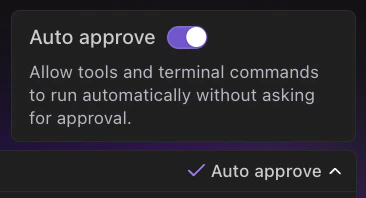
Additionally, you can enable automatic approval for all tool and terminal command usage by toggling the switch above the chatbox.