> ## Documentation Index
> Fetch the complete documentation index at: https://docs.qodo.ai/llms.txt
> Use this file to discover all available pages before exploring further.
# Generate a Code Review
> Qodo’s code review analyzes each pull request using a multi-agent, context-aware review system.
The review focuses on surfacing issues that matter, explaining why they matter, and helping developers resolve them efficiently, without overwhelming you with low-signal feedback.
## What is the code review
A Qodo finding includes:
* Actionability of the finding (Action requires, review recommended or other)
* Clear, human-readable explanations
* Direct references to the relevant lines of code
* Agent-assisted fix prompts and remediation guidance
Issues are grouped and prioritized so you can quickly understand what needs attention first.
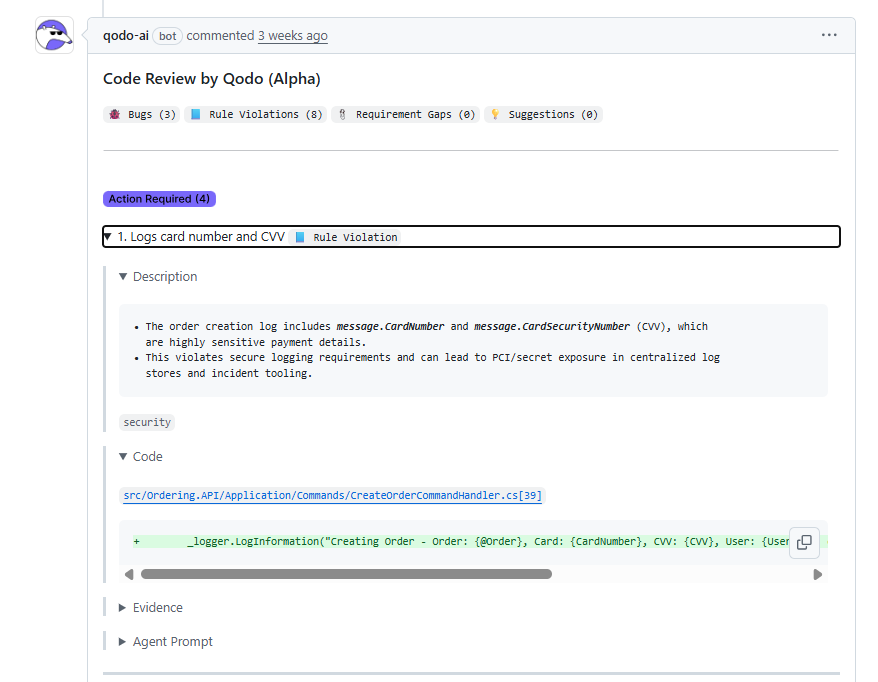 ## Where review feedback appears
Review feedback can appear in one or both of the following places, depending on configuration:
* Summary view (Conversation tab)
* High-level overview of findings
* Issue prioritization and explanations
* Inline view (Files changed)
* Issues anchored directly to the relevant code
* Ideal for fixing problems in context
## How to run a code review
### **Manually**
To request a review on demand, add the following comment to the pull request:
`/agentic_review`
Qodo reacts to acknowledge the request and posts the review directly in the pull request.
### **Automatically**
Qodo can run code reviews automatically when pull requests are opened or updated.
Automatic reviews are configured using `.pr_agent.toml` and allow Qodo to:
* Run reviews on PR open, reopen, or when marked ready for review
* Update existing review comments when new commits are pushed
* Keep feedback aligned with the latest code changes
See the [**Configuration Fundamentals**](/code-review/get-started/configuration-overview) for details on enabling and customizing automatic code reviews.
## Where review feedback appears
Review feedback can appear in one or both of the following places, depending on configuration:
* Summary view (Conversation tab)
* High-level overview of findings
* Issue prioritization and explanations
* Inline view (Files changed)
* Issues anchored directly to the relevant code
* Ideal for fixing problems in context
## How to run a code review
### **Manually**
To request a review on demand, add the following comment to the pull request:
`/agentic_review`
Qodo reacts to acknowledge the request and posts the review directly in the pull request.
### **Automatically**
Qodo can run code reviews automatically when pull requests are opened or updated.
Automatic reviews are configured using `.pr_agent.toml` and allow Qodo to:
* Run reviews on PR open, reopen, or when marked ready for review
* Update existing review comments when new commits are pushed
* Keep feedback aligned with the latest code changes
See the [**Configuration Fundamentals**](/code-review/get-started/configuration-overview) for details on enabling and customizing automatic code reviews.