> ## Documentation Index
> Fetch the complete documentation index at: https://docs.qodo.ai/llms.txt
> Use this file to discover all available pages before exploring further.
# Configure Qodo using the portal
> The recommended way to manage organization-wide and repository-level code review configuration, from the Configurations page in the Qodo portal.
export const AzureIcon = () => ;
The **Configurations** page in the Qodo portal is organized into five tabs: [Code review](#code-review), [Display preferences](#display-preferences), [Remediation](#remediation), [Custom instructions](#custom-instructions), and [Account](#account). Each tab groups related settings so you can quickly find and manage what you need.
To access it, select **Configurations** from the left navigation menu in the [Qodo portal](https://app.qodo.ai/).
## Configuration levels: organization and repository
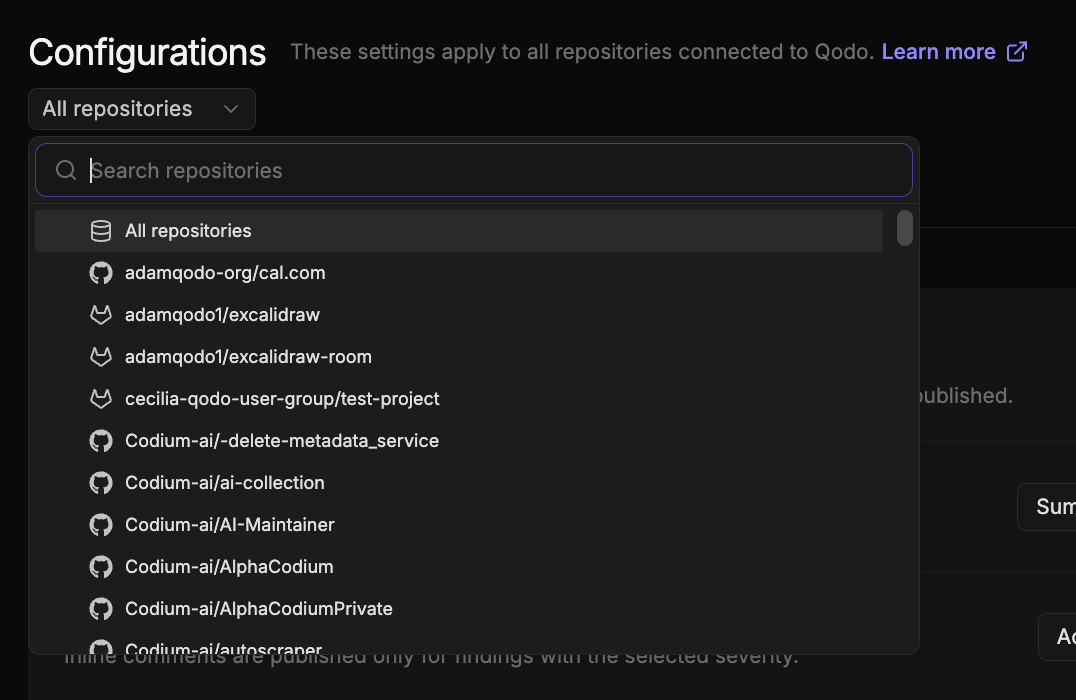
By default, settings on this page apply to all repositories connected to Qodo. Use the **All repositories** selector at the top left of the Configurations page to switch between two levels:
* **Organization level** (default): Settings apply to all connected repositories.
* **Repository level**: Settings apply only to the selected repository and override the organization-level defaults in the portal.
Click **Save**, located at the top right of the Configurations page, to apply your changes. A confirmation toast appears to let you know your changes were saved successfully.
To restore settings to Qodo's defaults, select **Reset**, next to **Save**.
This repository-level override applies only within the portal and does not change where portal settings sit in the overall hierarchy. Portal settings have the lowest precedence overall: configuration defined in the repository wiki, repository root, or organization settings repository (`pr-agent-settings`) takes precedence over any portal setting. See [Customize the code review experience](/install-and-configure/configuration-overview#configuration-precedence).
## Code review
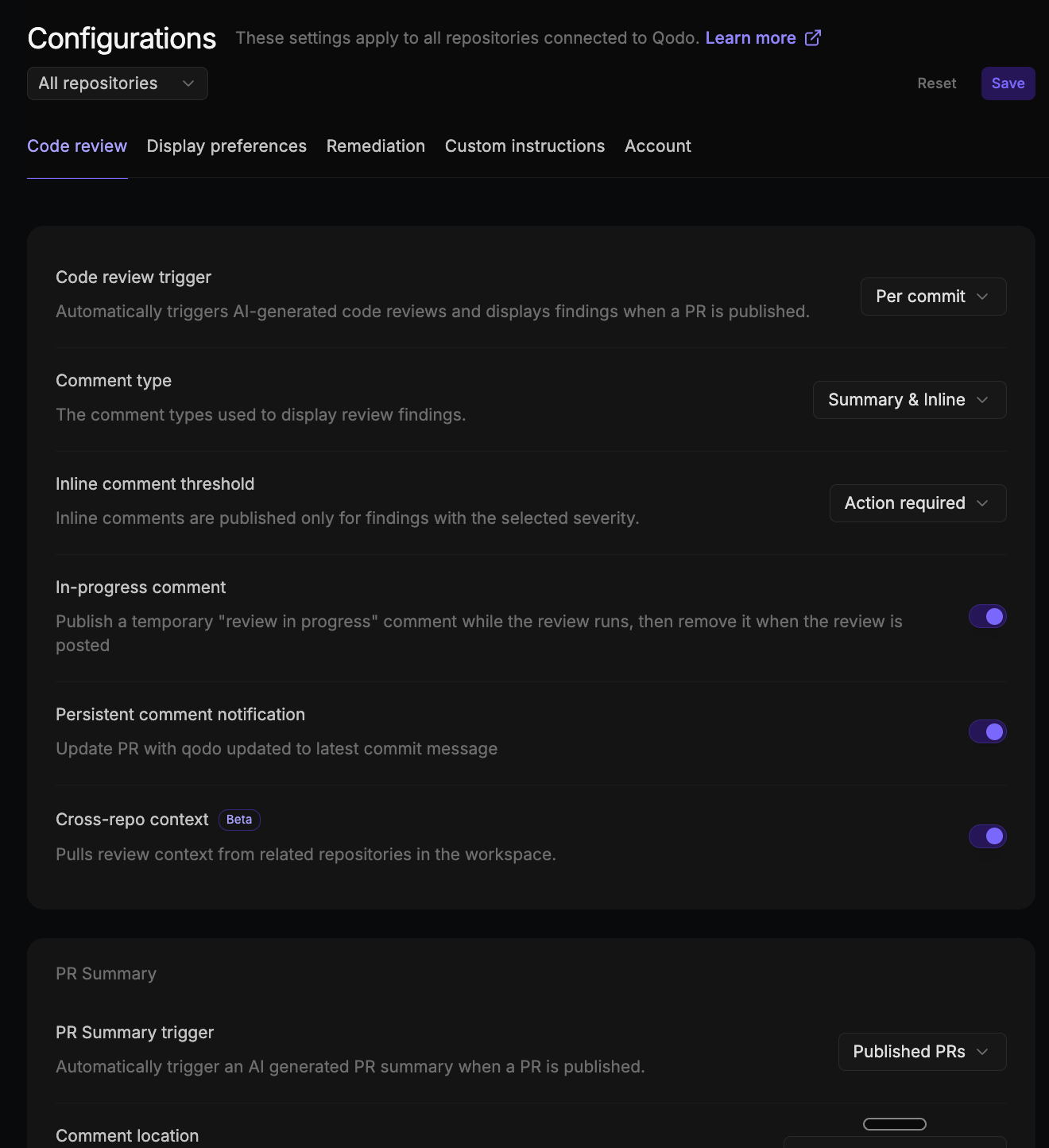
The **Code review** tab controls how Qodo runs code reviews, generates PR summaries, manages review standards and skills, and enables advanced review capabilities.
| Setting | Description | Options |
| ------------------------------------------------------------------------------------------------------------------------------ | ------------------------------------------------------------------------------------------------------------------------------------------ | ----------------------------------------------------------------------------------------------------------------------------------------------------------------------------------------------------------------------------------------------------------------------------------------------------------------------- |
| **Code review trigger** | Determines when Qodo runs an AI code review. | • **Manual only**: Reviews run only when triggered manually using `/agentic_review` • **Published PRs**: Reviews run automatically when a PR is published (default) • **[Per commit](/code-review/persistent-review-comments)**: Reviews run automatically on every commit pushed to an open pull request |
| **Comment type** | Controls how findings are posted in the pull request. | • **Summary only**: All findings appear in a single summary comment • **Inline only**: Findings are posted directly on relevant lines of code • **Summary & Inline**: A summary comment is posted and findings are also added inline (default) |
| **Inline comment threshold** | Determines which severity levels generate inline comments. Findings at or above the selected level appear inline. | • **Action required**: Only action-required findings appear inline (default) • **Review recommended**: Review recommended and action-required findings appear inline • **Informational**: All findings appear inline |
| **In-progress comment** | Publishes a temporary "review in progress" comment while the review runs, then removes it when the review is posted. | Enable (default) / Disable |
| **Persistent comment notification** | Posts a "Qodo updated to latest commit" message in the pull request each time Qodo updates the persistent review comment for a new commit. | Enable (default) / Disable |
| **[Cross-repo context](/governance/cross-repo-code-review)** Beta | Pulls review context from related repositories in the workspace. Must be enabled for Qodo to run cross-repository code review. | Enable (default) / Disable |
### PR Summary
The **PR Summary** settings control when Qodo generates a PR summary and how it's presented.
| Setting | Description | Options |
| -------------------------------------------------------------------------------------------------------------------------------------------------------------------------------------------------------------------------------------------------------------------------------------------------------------------------------------------------------------------- | ------------------------------------------------------------------------------------------------------------------------------- | ------------------------------------------------------------------------------------------------------------------------------------------------------------------------------------------------------------------------------------------------------------------------------------------------------------------------------------------- |
| **[PR summary trigger](/code-review/pr-summary)** | Determines when Qodo generates a PR summary. | • **Manual only**: Generated using `/agentic_describe` • **Published PRs**: Generated automatically when a PR is published (default) |
| **[Comment location](/code-review/comment-location)** | Determines where Qodo publishes the PR summary. | • **Dynamic location**: Posts a comment if the author wrote a pull request description, otherwise updates the pull request body • **Native PR description**: Updates the pull request body, adding User Description and AI Description headings • **Standalone comment**: Posts the summary as a persistent comment (default) |
| **[Publish review time estimate label](/code-review/pr-summary#review-time-estimate-label)** GitHubGitLabAzure DevOps | Applies the estimated review effort (for example, "10-20 Minutes") as a label on the pull request and in the pull request list. | Enable / Disable (default) |
### Review standards
The **Review standards** settings control how rules from [Rule Miner](/governance/rule-enforcement/rule-miner) and from non-admin users are approved, and whether native skills are applied during review.
| Setting | Description | Options |
| ------------------------------------------------------------------------------------------------------------------------------------------------ | ---------------------------------------------------------------------------------------------------------------------------------------------------------------------------------------------------------------------------------- | -------------------------- |
| **Mine rules from code review history** | Enables or disables Rule Miner for the organization or a specific repository. | Enable (default) / Disable |
| **Auto-approve rule miner suggestions** | When enabled, mined rules from review history are activated automatically. When disabled, rules appear in **Rules > Suggestions** for review before activation. | Enable / Disable (default) |
| **Auto-approve user suggestions** | When enabled, rules added by non-admins are activated immediately without requiring admin approval. When disabled, they appear in **Rules > Suggestions** for admin approval. This setting applies at the organization level only. | Enable / Disable (default) |
| **[Native skills](/governance/manage-skills-across-repositories)** Research preview | Native skills in your repository that enforce findings are applied during code review. | Enable / Disable (default) |
### [Chat agent](/code-review/conversational-chat)
| Setting | Description | Options |
| -------------------------------------------------------------------------------- | ---------------------------------------------------------------------------------- | -------------------------- |
| **Chat agent** Beta | Enables the Qodo chat agent to answer questions and run commands on pull requests. | Enable (default) / Disable |
### Spec & design
The **Spec & design** settings extend reviews by checking pull requests against your linked specifications and Figma designs.
| Setting | Description | Options |
| ----------------------------------------------------------------------------------------------------------------------------------------------- | --------------------------------------------------------------------------------------------------------------- | -------------------------- |
| **[Spec agents](/code-review/view-requirement-gaps-in-findings)** Research preview | Extends requirement gap findings with Spec and PRD reviews. Click **Connect specs** to set up. | Enable / Disable (default) |
| **[Design review](/code-review/view-ux-deviations-in-findings)** Research preview | A finding type that compares Figma requirements against your front-end code. Click **Connect Figma** to set up. | Enable / Disable (default) |
{/* Extended mode — own section under Code review. Commented out pending release.
### Extended mode
| Setting | Description | Options |
|--------|-------------|--------|
| **Extended mode** Research preview | Deep code review with higher recall and precision. Uses approximately 2x more LLM calls on average. [Contact your Qodo Account Manager](/qodo-support) to enable. | Enable / Disable (default) |
*/}
## Display preferences
The **Display preferences** tab controls how findings appear in pull requests.
### [Verbosity](/code-review/review-verbosity)
The **Verbosity** settings control how Qodo's findings are surfaced on your pull requests.
| Setting | Description | Options |
| ----------------------------- | --------------------------------------------------------------------------------------------------------------------------------------------------------------------- | -------------------------------------------------------------------------------------------------------------------------------------------------------------------------------------------------------------- |
| **View more** | Controls how findings in lower action levels collapse in the summary comment. | • **More per action level**: Each action level gets its own **View more** control • **More by action level**: Only the top action level is surfaced, and the rest are wrapped in a single **View more** |
| **Action level routing mode** | Sets where findings appear for all action levels at once. Select **Custom** to set a different location for each action level. | • **Both** • **Inline** • **Summary** • **Custom** |
| **Per-action-level routing** | When **Action level routing mode** is set to **Custom**, select where each action level (Action Required, Review Recommended, and Informational) routes its findings. | • **Inline**: Directly on the relevant lines of code • **Summary**: In the summary comment • **Both**: Inline and in the summary comment • **Drop**: Not shown |
### Findings
| Setting | Description | Options |
| ------------------------------ | ------------------------------------------------------------------------------------------------------------------------ | -------------------------------------------------------------------------------------------------------------------------------------------------------------------------------------------------------------------------------------------------------------------------------------------------------------------------------------- |
| **Finding overflow** | Number of findings shown per severity group before the rest collapse. **All** disables overflow entirely. | • **0**: All collapsed • **1, 3, or 5**: Findings shown before collapsing (**3** by default) • **All**: All findings expanded |
| **Finding display** | Controls how finding type and category labels appear in review comments. | • **Minimal**: Type icon only • **Short**: Type and category icon • **Detailed**: Type icon, category icon, and category name • **Full**: Type icon, category icon, and full name (default) |
| **Per-finding verbosity** | For each part of a finding, choose whether it's hidden, shown collapsed, or shown expanded in the PR comment. | Each part can be set to **Hidden**, **Collapsed**, or **Expanded**: • **Description**: the issue explanation • **Code**: the referenced code snippet • **Recommendation**: the recommended change • **Evidence**: supporting evidence and citations • **Agent prompt**: the copy-paste agent prompt |
| **Show images and animations** | Shows Qodo's illustrations and animations in the loading and empty state review comments. Disable to hide these visuals. | Enable (default) / Disable |
{/* TODO (TOML cleanup, deferred): the old expand_* keys still appear in findings-visibility, shape-the-review-experience, configuration-and-command-reference, and git-provider-feature-support. Remove them when the TOML side is finalized. */}
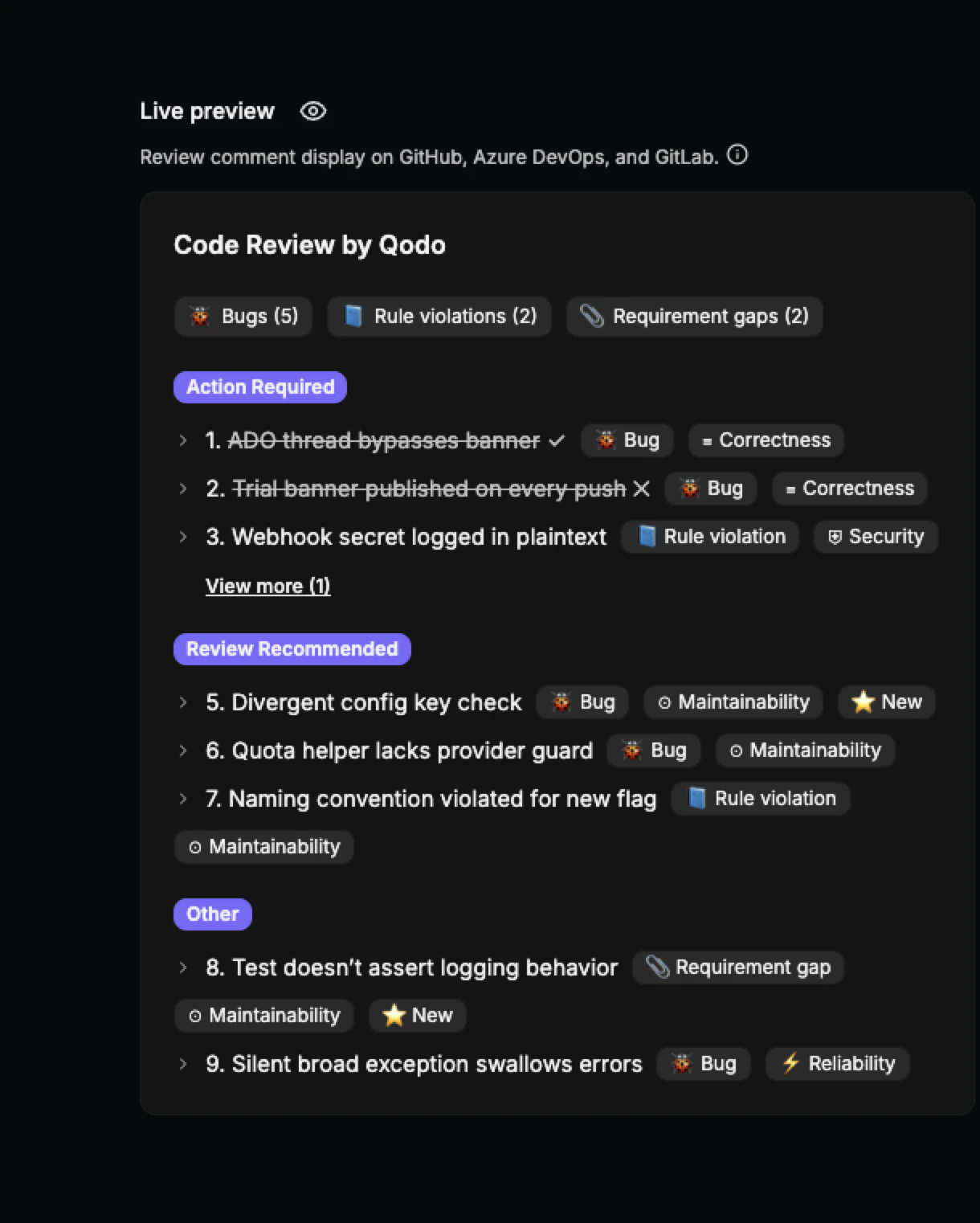
### Display live preview
GitHubGitLabAzure DevOps
The **Live Preview** pane shows a real-time visual of how review comments will appear in the target Git provider. Changes to display preference settings update the preview immediately, with no save or refresh required.
## Remediation
The **Remediation** tab lets Qodo resolve review findings for you, either on demand through chat or automatically with the Remediation Agent.
| Setting | Description | Options |
| --------------------------------------------------------------------------------------------------------------------------------------------- | --------------------------------------------------------------------------------------------------------------------------- | ------------------------------------------------------------------------------------------ |
| **Suggest committable fixes** Beta | Enables committable code suggestions within inline comments. Supported on GitHub and GitLab only. | Enable (default) / Disable |
| **Fix with the chat** Research preview | Lets the chat agent run `/fix` on demand from a PR comment. | Enable / Disable (default) |
| **[Remediation agent](/code-review/remediate-findings-in-prs)** Research preview | Automatically generates fixes for review findings. | Enable / Disable (default) |
| ↳ **Auto-fix severity** | Sub-setting of Remediation agent. Automatically fixes findings at or above the selected severity. | • **Action required** (default) • **Review recommended** • **Informational** |
| **Open a fix PR** Research preview | When on, fixes are delivered as a separate PR. When off, fixes are pushed directly to the PR's source branch. | Enable (default) / Disable |
| ↳ **Close fix PR when done** | Sub-setting of Open a fix PR. Closes the auto-fix PR once the fixing loop concludes. The branch is preserved for reopening. | Enable (default) / Disable |
## Custom instructions
The **Custom instructions** tab lets you add free-text instructions to guide how Qodo behaves during reviews. Click **Save** after completing your instructions.
| Setting | Description | Options |
| ----------------------- | ---------------------------------------------------------------------- | ---------------------------- |
| **Issue finding agent** | Custom instructions to guide issue detection and reporting behavior. | Free text (empty by default) |
| **Compliance agent** | Custom instructions to guide compliance checks and policy enforcement. | Free text (empty by default) |
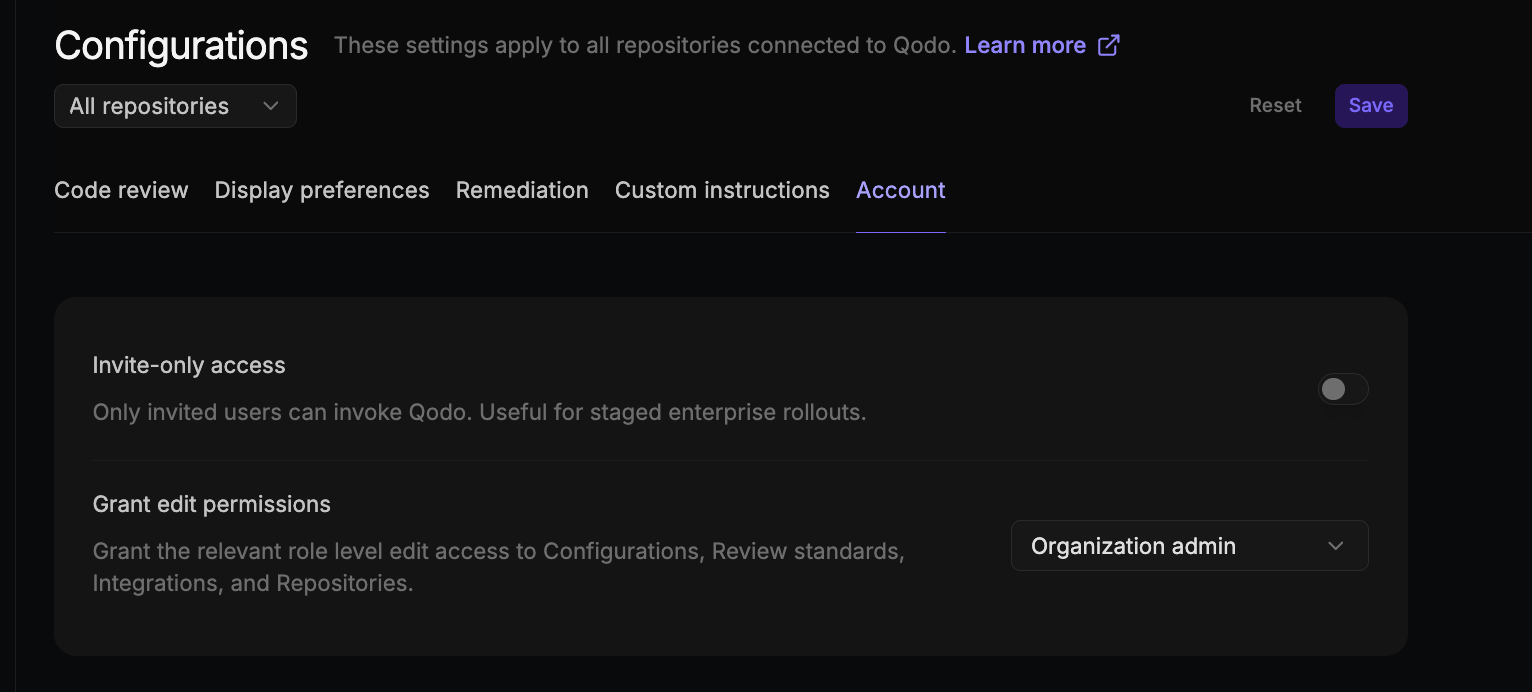
## Account
The **Account** tab controls organization-level settings.
| Setting | Description | Options |
| -------------------------- | --------------------------------------------------------------------------------------------------------------------------------------------------------------------------------------------------------------------------------------------------------------------------------------------------------------------------------------------------------------------------------------------- | --------------------------------------------------- |
| **Invite-only access** | When enabled, only invited users receive Qodo's review feedback on their pull requests. Other users are silently skipped. Applies at the organization level. Useful for staged rollouts. Organization admins can always modify this setting. Team owners can also modify it once Grant edit permissions is set to Team owner or Members; members can modify it only once it's set to Members. | Enable / Disable (default) |
| **Grant edit permissions** | Grants edit access to the Configuration, Review standards, Integrations, and Repositories pages to the selected role and any higher-privileged role. For example, selecting **Members** grants access to members, team owners, and organization admins alike. Applies at the organization level. Only organization admins can change this setting. | Organization admin (default) / Team owner / Members |
## Next steps
* [Customize the code review experience](/install-and-configure/configuration-overview): The full configuration hierarchy and all available configuration methods.
* [Configuration and command reference](/install-and-configure/configuration-overview/configuration-and-command-reference): A complete list of configuration options and PR commands.
* [Cross-repository code review](/governance/cross-repo-code-review): Set up cross-repo context.
 Click **Save**, located at the top right of the Configurations page, to apply your changes. A confirmation toast appears to let you know your changes were saved successfully.
To restore settings to Qodo's defaults, select **Reset**, next to **Save**.
Click **Save**, located at the top right of the Configurations page, to apply your changes. A confirmation toast appears to let you know your changes were saved successfully.
To restore settings to Qodo's defaults, select **Reset**, next to **Save**.
 | Setting | Description | Options |
| ------------------------------------------------------------------------------------------------------------------------------ | ------------------------------------------------------------------------------------------------------------------------------------------ | ----------------------------------------------------------------------------------------------------------------------------------------------------------------------------------------------------------------------------------------------------------------------------------------------------------------------- |
| **Code review trigger** | Determines when Qodo runs an AI code review. | • **Manual only**: Reviews run only when triggered manually using `/agentic_review`
| Setting | Description | Options |
| ------------------------------------------------------------------------------------------------------------------------------ | ------------------------------------------------------------------------------------------------------------------------------------------ | ----------------------------------------------------------------------------------------------------------------------------------------------------------------------------------------------------------------------------------------------------------------------------------------------------------------------- |
| **Code review trigger** | Determines when Qodo runs an AI code review. | • **Manual only**: Reviews run only when triggered manually using `/agentic_review` 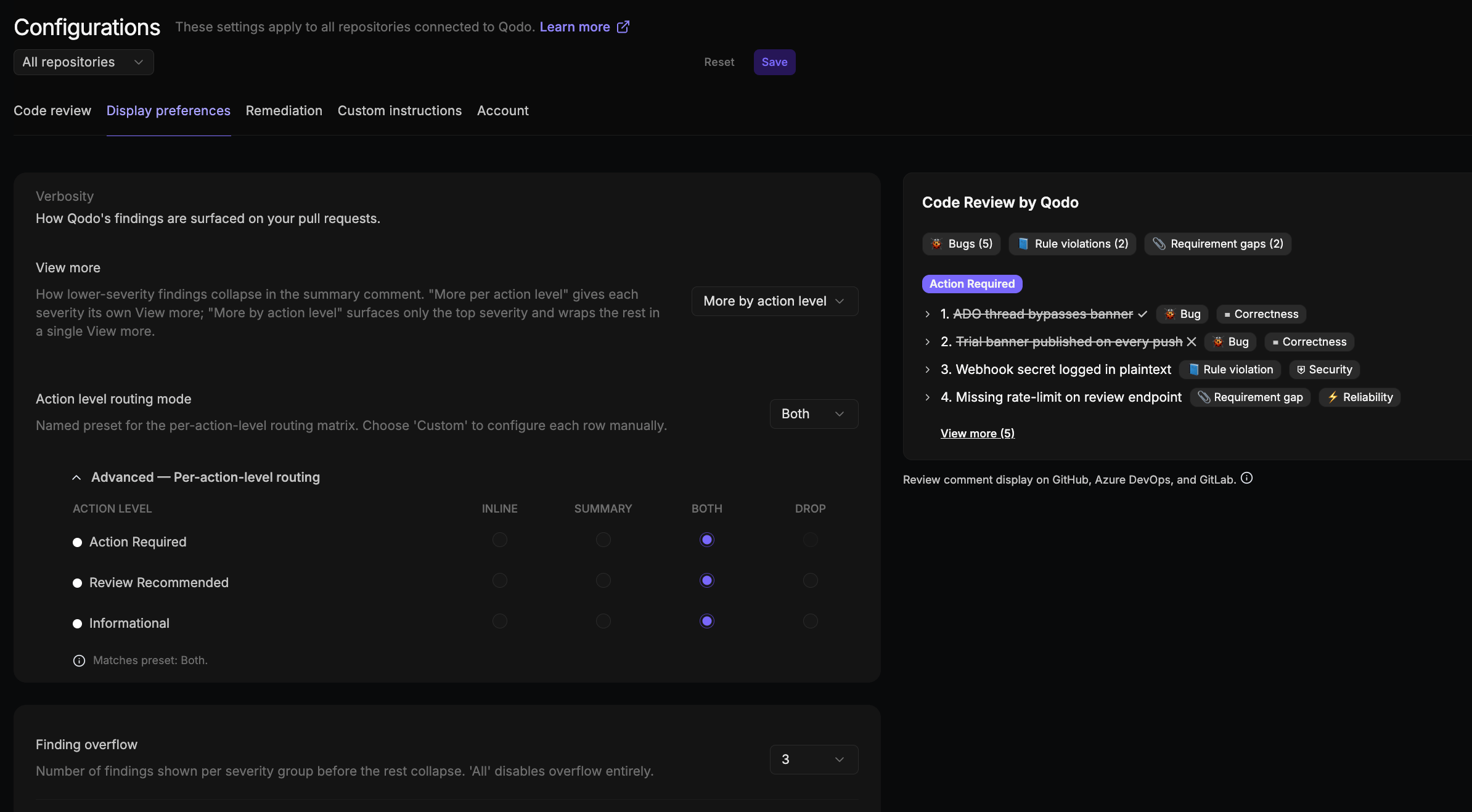 ### [Verbosity](/code-review/review-verbosity)
The **Verbosity** settings control how Qodo's findings are surfaced on your pull requests.
| Setting | Description | Options |
| ----------------------------- | --------------------------------------------------------------------------------------------------------------------------------------------------------------------- | -------------------------------------------------------------------------------------------------------------------------------------------------------------------------------------------------------------- |
| **View more** | Controls how findings in lower action levels collapse in the summary comment. | • **More per action level**: Each action level gets its own **View more** control
### [Verbosity](/code-review/review-verbosity)
The **Verbosity** settings control how Qodo's findings are surfaced on your pull requests.
| Setting | Description | Options |
| ----------------------------- | --------------------------------------------------------------------------------------------------------------------------------------------------------------------- | -------------------------------------------------------------------------------------------------------------------------------------------------------------------------------------------------------------- |
| **View more** | Controls how findings in lower action levels collapse in the summary comment. | • **More per action level**: Each action level gets its own **View more** control 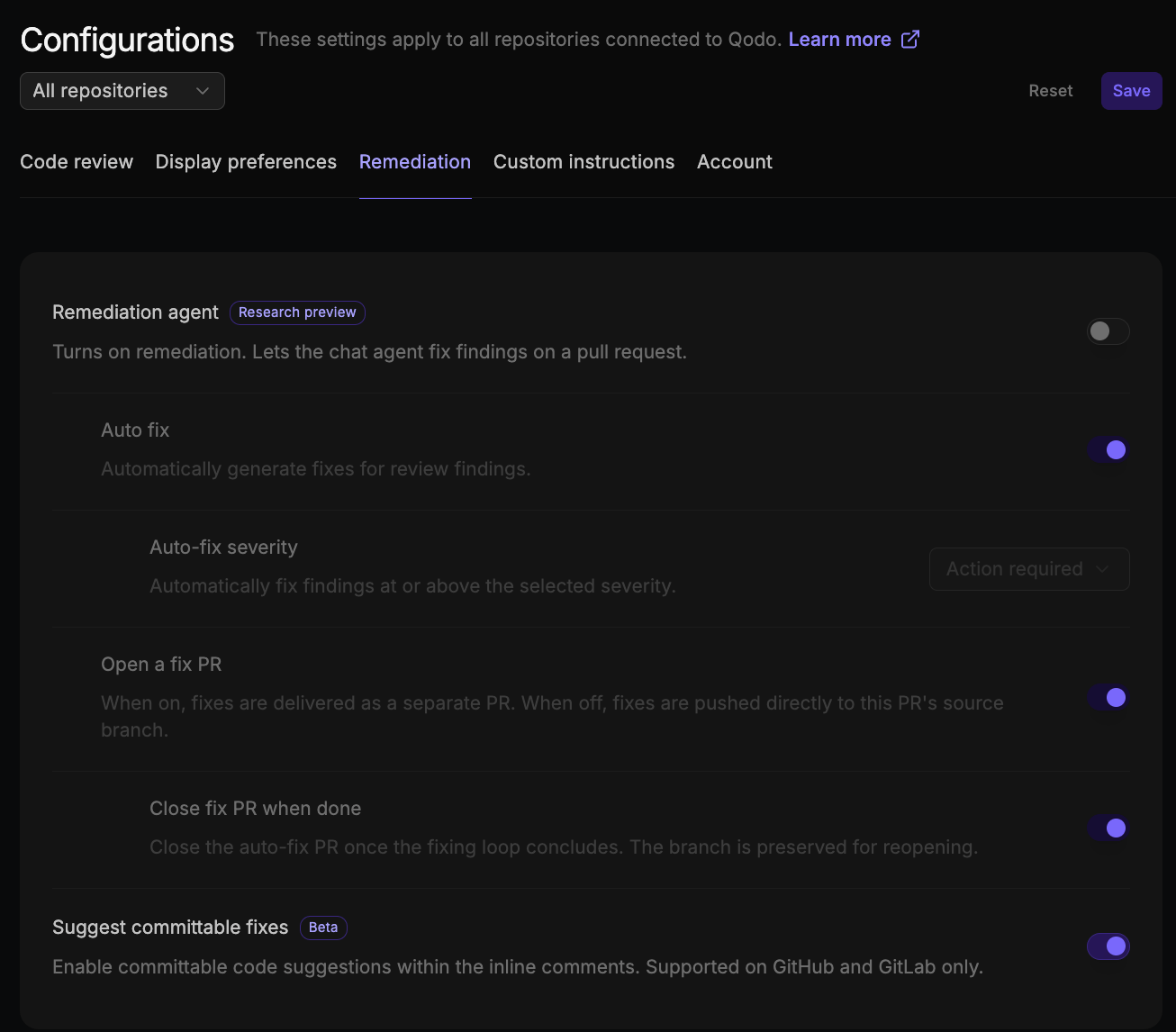 | Setting | Description | Options |
| --------------------------------------------------------------------------------------------------------------------------------------------- | --------------------------------------------------------------------------------------------------------------------------- | ------------------------------------------------------------------------------------------ |
| **Suggest committable fixes**
| Setting | Description | Options |
| --------------------------------------------------------------------------------------------------------------------------------------------- | --------------------------------------------------------------------------------------------------------------------------- | ------------------------------------------------------------------------------------------ |
| **Suggest committable fixes** 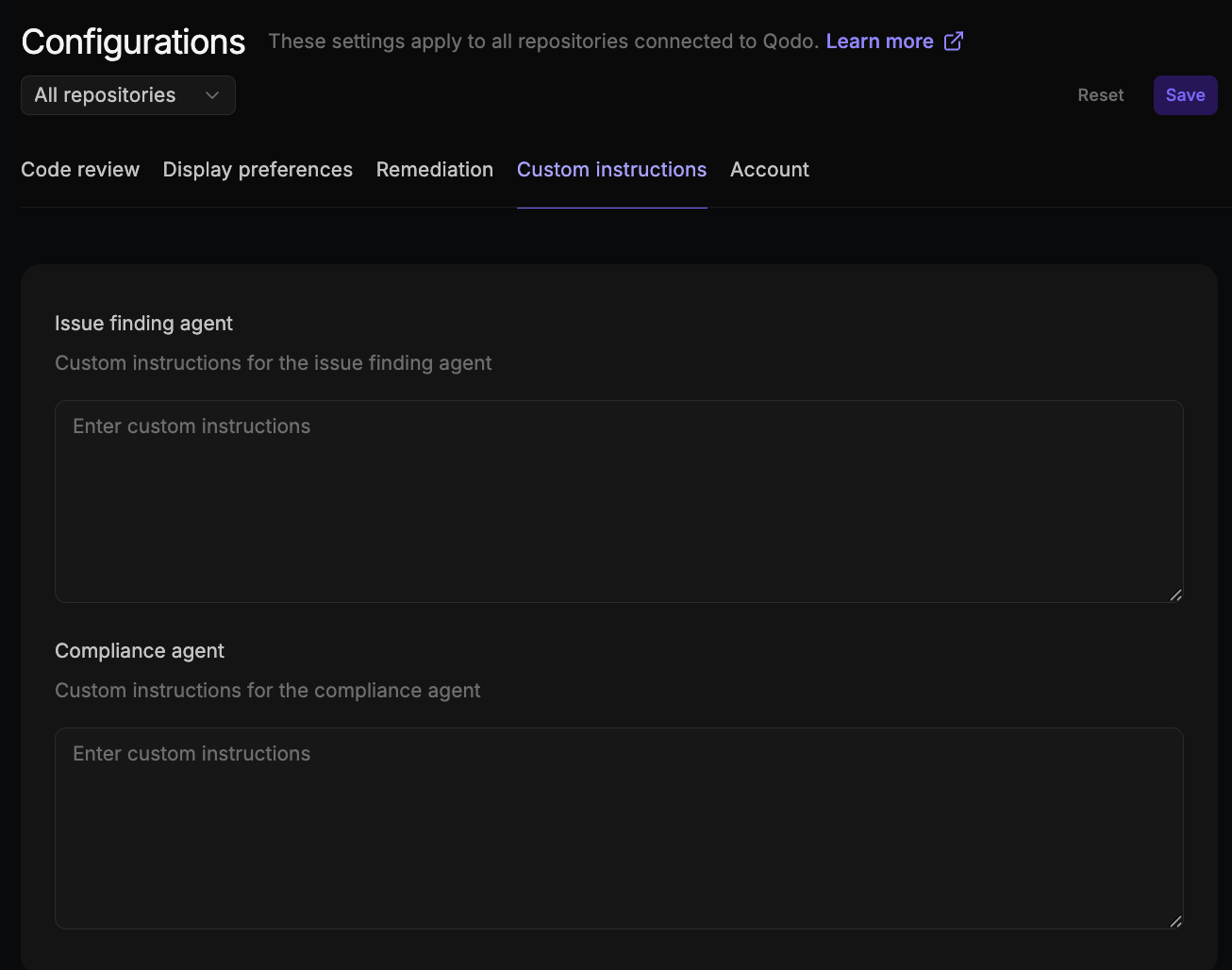 | Setting | Description | Options |
| ----------------------- | ---------------------------------------------------------------------- | ---------------------------- |
| **Issue finding agent** | Custom instructions to guide issue detection and reporting behavior. | Free text (empty by default) |
| **Compliance agent** | Custom instructions to guide compliance checks and policy enforcement. | Free text (empty by default) |
## Account
The **Account** tab controls organization-level settings.
| Setting | Description | Options |
| ----------------------- | ---------------------------------------------------------------------- | ---------------------------- |
| **Issue finding agent** | Custom instructions to guide issue detection and reporting behavior. | Free text (empty by default) |
| **Compliance agent** | Custom instructions to guide compliance checks and policy enforcement. | Free text (empty by default) |
## Account
The **Account** tab controls organization-level settings.
 | Setting | Description | Options |
| -------------------------- | --------------------------------------------------------------------------------------------------------------------------------------------------------------------------------------------------------------------------------------------------------------------------------------------------------------------------------------------------------------------------------------------- | --------------------------------------------------- |
| **Invite-only access** | When enabled, only invited users receive Qodo's review feedback on their pull requests. Other users are silently skipped. Applies at the organization level. Useful for staged rollouts. Organization admins can always modify this setting. Team owners can also modify it once Grant edit permissions is set to Team owner or Members; members can modify it only once it's set to Members. | Enable / Disable (default) |
| **Grant edit permissions** | Grants edit access to the Configuration, Review standards, Integrations, and Repositories pages to the selected role and any higher-privileged role. For example, selecting **Members** grants access to members, team owners, and organization admins alike. Applies at the organization level. Only organization admins can change this setting. | Organization admin (default) / Team owner / Members |
## Next steps
* [Customize the code review experience](/install-and-configure/configuration-overview): The full configuration hierarchy and all available configuration methods.
* [Configuration and command reference](/install-and-configure/configuration-overview/configuration-and-command-reference): A complete list of configuration options and PR commands.
* [Cross-repository code review](/governance/cross-repo-code-review): Set up cross-repo context.
| Setting | Description | Options |
| -------------------------- | --------------------------------------------------------------------------------------------------------------------------------------------------------------------------------------------------------------------------------------------------------------------------------------------------------------------------------------------------------------------------------------------- | --------------------------------------------------- |
| **Invite-only access** | When enabled, only invited users receive Qodo's review feedback on their pull requests. Other users are silently skipped. Applies at the organization level. Useful for staged rollouts. Organization admins can always modify this setting. Team owners can also modify it once Grant edit permissions is set to Team owner or Members; members can modify it only once it's set to Members. | Enable / Disable (default) |
| **Grant edit permissions** | Grants edit access to the Configuration, Review standards, Integrations, and Repositories pages to the selected role and any higher-privileged role. For example, selecting **Members** grants access to members, team owners, and organization admins alike. Applies at the organization level. Only organization admins can change this setting. | Organization admin (default) / Team owner / Members |
## Next steps
* [Customize the code review experience](/install-and-configure/configuration-overview): The full configuration hierarchy and all available configuration methods.
* [Configuration and command reference](/install-and-configure/configuration-overview/configuration-and-command-reference): A complete list of configuration options and PR commands.
* [Cross-repository code review](/governance/cross-repo-code-review): Set up cross-repo context.