> ## Documentation Index
> Fetch the complete documentation index at: https://docs.qodo.ai/llms.txt
> Use this file to discover all available pages before exploring further.
# Rule analytics
> Rules analytics provides visibility into how rules are applied across pull requests in the Qodo portal. It helps teams understand rule effectiveness, monitor violations, and track how often issues are resolved before code is merged.
export const AzureIcon = () => ;
BetaGitHubBitbucketAzure DevOps
Rule analytics are available at two levels in the Qodo portal. All metrics reflect activity from the last 30 days.
## Aggregated rules analytics
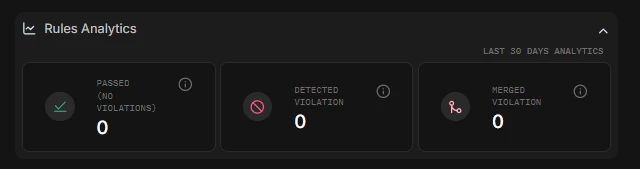
Aggregated rules analytics provide a high-level view of how rules are applied across pull requests in the Qodo portal. These analytics reflect rule activity from the last 30 days and are available at the top of the Review Standards page.
To access aggregated analytics:
Open the [**Qodo portal**](https://app.qodost.st.qodo.ai/).
Select **Review Standards** from the left navigation.
View the analytics summary displayed at the top of the Review Standards page.
The metrics are shown as summary cards:
* **Passed (no violations)** – The number of evaluations where no rule violations were detected
* **Detected violations** – The total number of rule violations identified during pull request reviews
* **Merged violations** – The number of PRs that were merged with one or more unresolved rule violations
These metrics help teams understand how frequently rules are triggered, how often violations are resolved before merge, and where rule enforcement may need attention.
### Exporting analytics
Merged violations analytics can be exported as a CSV file using the **⬇︎ download icon** in the top-right corner of the Review Standards page. The exported file includes merged violations metrics from the last 30 days and can be used to perform offline analysis, share insights with stakeholders, and track trends over time outside the portal.
## Individual rule analytics
Individual Rule Analytics provide detailed insights into how a specific rule behaves across pull requests.
To access individual rule analytics:
Open the [**Qodo portal**](https://app.qodost.st.qodo.ai/).
Select **Review Standards** from the left navigation.
Click a rule from the **Rules** tab.
This opens the rule’s full definition along with rule-level analytics.
Each rule’s analytics show:
* How often the rule was found compliant
* How often the rule is violated
* How frequently violations are merged
These insights help teams identify noisy or ineffective rules, understand developer behavior around specific rule types, and decide whether a rule requires tuning, disabling, or stronger enforcement.
 To access aggregated analytics:
 To access individual rule analytics: