> ## Documentation Index
> Fetch the complete documentation index at: https://docs.qodo.ai/llms.txt
> Use this file to discover all available pages before exploring further.
# Manage pull request bottlenecks with PR Triage
> PR Triage helps teams manage and prioritize open pull requests across their organization, identify review bottlenecks, set their own triage policies, and take action with review and codebase context.
Research Preview
**Research Preview**: PR Triage is set as Research Preview and is under active development. Functionality and results may evolve as we continue to improve the feature. Research Preview features are not covered by any SLA. We recommend reviewing and validating outputs before use, and advise against relying on them in business-critical workflows.
Code review can become a bottleneck when more pull requests are waiting for review than your teams have capacity to handle. Reviewers need to decide what to review first, identify pull requests that are blocking progress, and understand how related changes affect the work ahead. When pull requests are spread across repositories and Git providers, getting a complete view of the review backlog and organizing it for action is difficult.
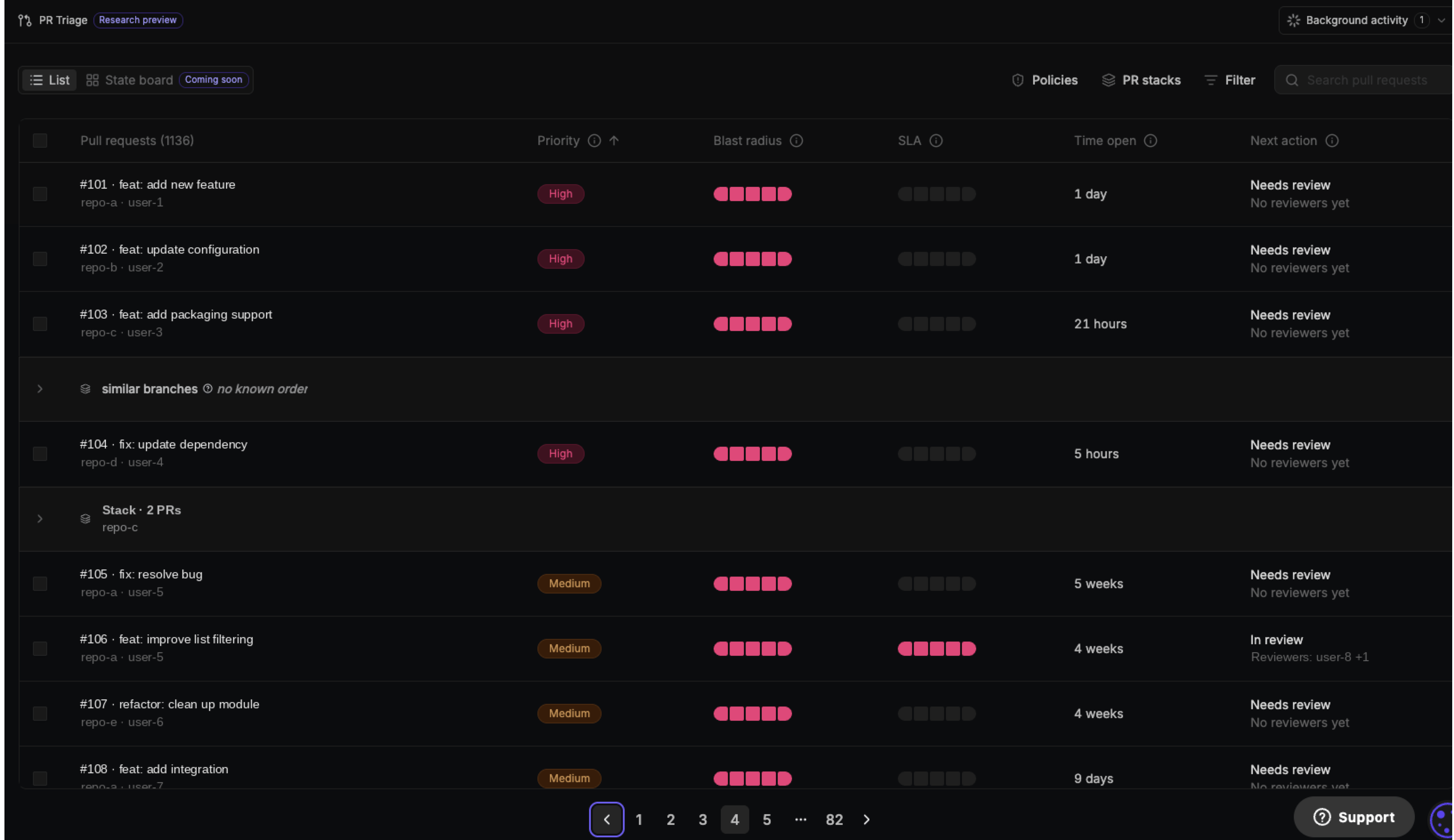
PR Triage in the Qodo portal brings your organization's open pull requests across GitHub, GitLab, Bitbucket, and Azure DevOps into one shared queue. Your triage policies define the signals Qodo uses to prioritize this work, including SLA, priority, and Blast radius. Qodo combines triage signals with review findings, codebase relationships, and your organization's policies to help you understand which pull requests need attention and why.
 ## Access PR Triage in the Qodo portal
By default, PR Triage is accessible to **Admins only**. You can allow admins and team owners or all members to access PR Triage.
### Set access to PR Triage
1. Log in to the Qodo portal.
2. Navigate to **Account Management > Settings**.
3. Under **Grant PR Triage access**, select the access level:
* **Admins only**.
* **Admins and team owners**.
* **All members**.
To open PR Triage, click **PR Triage** from the navigation panel.
## Set your own triage policies
Click **Policies** on the main menu bar to configure how the queue decides **priority**, **SLA**, **Blast radius**, and **Next action**. Git organizations and repositories inherit triage policies from the workspace unless you override a setting.
Use the **Workspace**, **Git organization**, and **Repository** tabs to choose where a setting applies.
## Access PR Triage in the Qodo portal
By default, PR Triage is accessible to **Admins only**. You can allow admins and team owners or all members to access PR Triage.
### Set access to PR Triage
1. Log in to the Qodo portal.
2. Navigate to **Account Management > Settings**.
3. Under **Grant PR Triage access**, select the access level:
* **Admins only**.
* **Admins and team owners**.
* **All members**.
To open PR Triage, click **PR Triage** from the navigation panel.
## Set your own triage policies
Click **Policies** on the main menu bar to configure how the queue decides **priority**, **SLA**, **Blast radius**, and **Next action**. Git organizations and repositories inherit triage policies from the workspace unless you override a setting.
Use the **Workspace**, **Git organization**, and **Repository** tabs to choose where a setting applies.
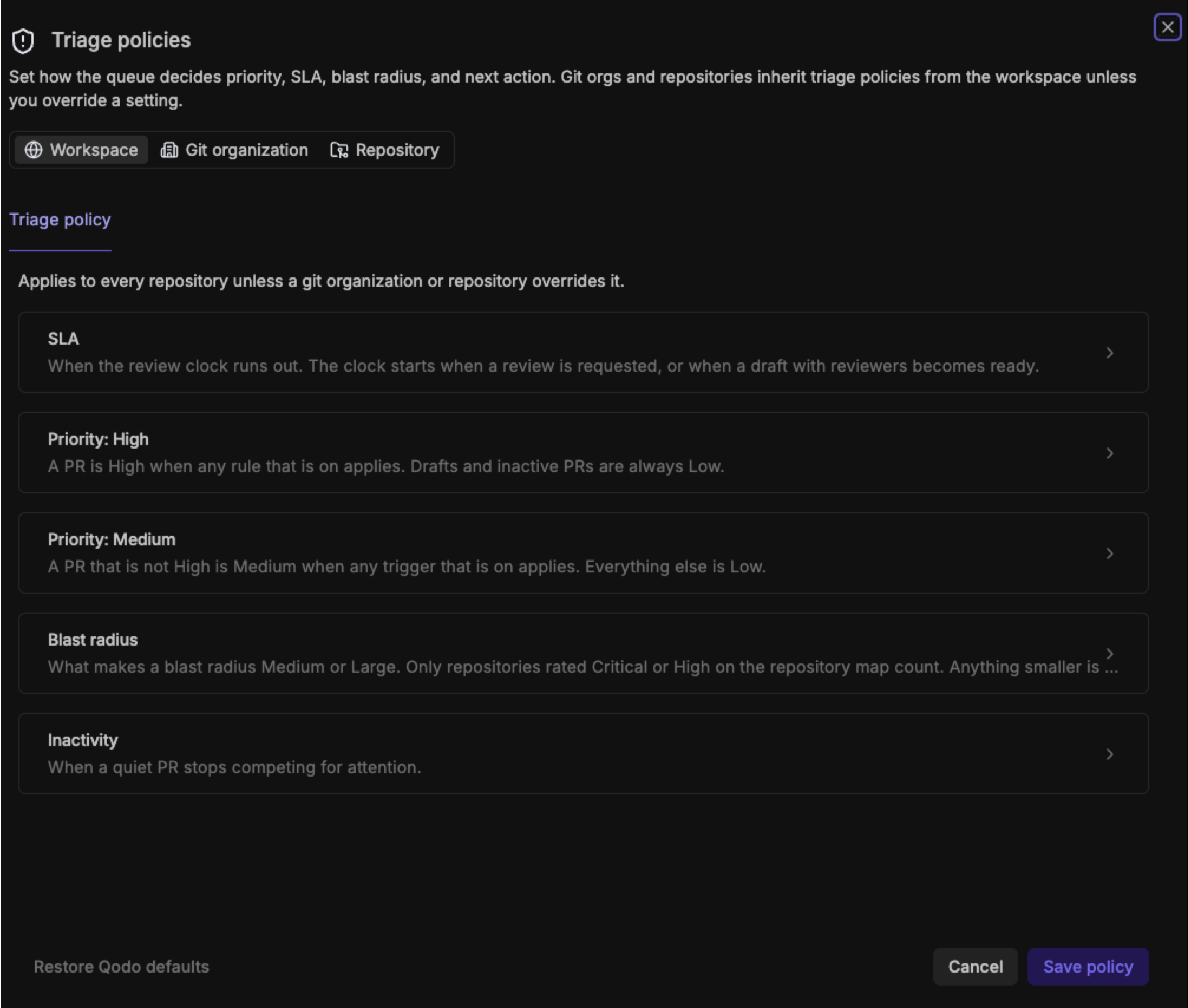 PR Triage applies a default triage policy when you first open it, so you can start prioritizing pull requests without configuring anything. Customize the policy to reflect how your organization manages review work, and apply different settings at the workspace, Git organization, or repository level.
Select the arrow next to a setting to view and configure its parameters.
Set how long a requested review can wait before it is considered stale.
| Parameter | Description |
| - | - |
| **Review SLA** | Set the number of days a requested review can wait before it reaches its SLA. |
| **Far overdue: days after the SLA** | Set the number of additional days that can pass after the review SLA before the pull request is considered far overdue. Far overdue is calculated from the end of the review SLA, not from when the review was requested. For example, if the review SLA is 7 days and Far overdue is set to 2 days, the pull request reaches the far overdue level on day 9 after the review was requested. |
Define the conditions that determine whether a pull request is **High or Medium priority**. A pull request that does not meet any configured High or Medium priority rule is assigned **Low** priority.
**Priority: High**
A pull request is assigned High priority when any enabled High priority rule applies.
| Parameter | Description |
| - | - |
| **High-severity findings with a wide blast radius** | The pull request has at least the minimum number of high-severity findings and its measured blast radius meets the selected minimum size. |
| **Minimum high-severity findings** | Set how many high-severity findings make this rule apply. |
| **Minimum blast radius** | Select the minimum blast radius size required for this rule to apply. Blast radius sizes are defined in the Blast radius accordion. |
| **Long SLA breach on a severe change** | A requested review that has waited well past the SLA on a pull request that also has a severity signal. |
| **Days waiting before High** | Set how many days a review must wait beyond its SLA before this rule applies. |
**Priority: Medium**
A pull request is assigned Medium priority when it does not meet a High priority rule and any enabled Medium priority trigger applies.
| Parameter | Description |
| - | - |
| **Review overdue** | A requested review is at least one day past its review SLA. |
| **High-severity findings** | Qodo found at least the minimum number of high-severity findings. |
| **Minimum findings** | Set how many high-severity findings make this trigger apply. |
Define what makes a pull request's blast radius **Medium** or **Large**. Anything smaller is classified as Small.
**Medium**
Reaches other repositories.
| Parameter | Description |
| - | - |
| **Critical or high repositories** | Set the minimum number of other repositories the pull request must reach. |
**Large**
Reaches many repositories, or blocks other pull requests.
| Parameter | Description |
| - | - |
| **Critical or high repositories** | Set the minimum number of other repositories the pull request must reach. |
| **Blocks other PRs** | Turn on to classify a pull request as Large when other open pull requests are stacked on it, regardless of how many repositories it reaches. |
Define when a quiet pull request stops competing for attention.
| Parameter | Description |
| - | - |
| **Inactive after** | Set the number of days without activity before a pull request drops to Low priority and its next action becomes **Consider closing**. |
| **Suggest closing after** | Set the number of days without activity before a pull request is flagged as safe to close. |
To apply your changes, click **Save policy**. You can select **Restore Qodo defaults** to reset the triage policy to Qodo's default settings.
## Manage review bottlenecks centrally
Once your policies are configured, use the shared queue to see open pull requests across your organization and investigate the work that needs attention.
### Find where review work is accumulating
Open PR Triage to see your organization's open pull requests in one shared queue.
Use the queue to identify pull requests that need attention and filter the list to focus on specific states, review conditions, or types of work.
The queue shows the signals that help you prioritize review work:
* **Priority:** The priority level assigned according to your organization's triage policies.
* **Blast radius:** A measure of how broadly the pull request affects your codebase, showing the repositories reached and any critical repositories involved.
* **SLA:** Where the requested review stands against its review deadline.
* **Time open:** How long the pull request has been open.
* **Next action:** The current state of the pull request and the action needed to move it forward, such as reviewing it, addressing findings, resolving checks, or merging.
### Focus the queue on what matters to you
Use **Filter** on the menu bar to narrow the queue to the pull requests you want to review.
Filter the queue by:
* **Priority:** High, Medium, or Low.
* **State:** Needs review, In review, Waiting for author, Blocked by checks, Conflict, Ready to merge, or Inactive.
* **Focus On:** By default, **Focus On** is set to you and shows pull requests where you are the author or an assigned reviewer. Select another user to focus on their pull requests.
By default, pull requests are grouped by **PR Stacks**. Select **No grouping** to show pull requests individually.
Combine filters to quickly find the pull requests that need attention. For example, set **Focus On** to yourself and **Priority** to **High** to see your highest-priority pull requests.
### Explore PR stacks
When related pull requests are part of a PR stack, Qodo shows them together in the queue.
* Expand a PR stack to see its related pull requests and understand how the changes are connected.
* Select a pull request to investigate it in detail, including its relationships across the codebase.
## Investigate a pull request
Select a pull request to open the pull request details pane. The pane gives you the signals and context behind the pull request’s position in the queue, so you can understand why it was prioritized and what may need attention.
PR Triage applies a default triage policy when you first open it, so you can start prioritizing pull requests without configuring anything. Customize the policy to reflect how your organization manages review work, and apply different settings at the workspace, Git organization, or repository level.
Select the arrow next to a setting to view and configure its parameters.
Set how long a requested review can wait before it is considered stale.
| Parameter | Description |
| - | - |
| **Review SLA** | Set the number of days a requested review can wait before it reaches its SLA. |
| **Far overdue: days after the SLA** | Set the number of additional days that can pass after the review SLA before the pull request is considered far overdue. Far overdue is calculated from the end of the review SLA, not from when the review was requested. For example, if the review SLA is 7 days and Far overdue is set to 2 days, the pull request reaches the far overdue level on day 9 after the review was requested. |
Define the conditions that determine whether a pull request is **High or Medium priority**. A pull request that does not meet any configured High or Medium priority rule is assigned **Low** priority.
**Priority: High**
A pull request is assigned High priority when any enabled High priority rule applies.
| Parameter | Description |
| - | - |
| **High-severity findings with a wide blast radius** | The pull request has at least the minimum number of high-severity findings and its measured blast radius meets the selected minimum size. |
| **Minimum high-severity findings** | Set how many high-severity findings make this rule apply. |
| **Minimum blast radius** | Select the minimum blast radius size required for this rule to apply. Blast radius sizes are defined in the Blast radius accordion. |
| **Long SLA breach on a severe change** | A requested review that has waited well past the SLA on a pull request that also has a severity signal. |
| **Days waiting before High** | Set how many days a review must wait beyond its SLA before this rule applies. |
**Priority: Medium**
A pull request is assigned Medium priority when it does not meet a High priority rule and any enabled Medium priority trigger applies.
| Parameter | Description |
| - | - |
| **Review overdue** | A requested review is at least one day past its review SLA. |
| **High-severity findings** | Qodo found at least the minimum number of high-severity findings. |
| **Minimum findings** | Set how many high-severity findings make this trigger apply. |
Define what makes a pull request's blast radius **Medium** or **Large**. Anything smaller is classified as Small.
**Medium**
Reaches other repositories.
| Parameter | Description |
| - | - |
| **Critical or high repositories** | Set the minimum number of other repositories the pull request must reach. |
**Large**
Reaches many repositories, or blocks other pull requests.
| Parameter | Description |
| - | - |
| **Critical or high repositories** | Set the minimum number of other repositories the pull request must reach. |
| **Blocks other PRs** | Turn on to classify a pull request as Large when other open pull requests are stacked on it, regardless of how many repositories it reaches. |
Define when a quiet pull request stops competing for attention.
| Parameter | Description |
| - | - |
| **Inactive after** | Set the number of days without activity before a pull request drops to Low priority and its next action becomes **Consider closing**. |
| **Suggest closing after** | Set the number of days without activity before a pull request is flagged as safe to close. |
To apply your changes, click **Save policy**. You can select **Restore Qodo defaults** to reset the triage policy to Qodo's default settings.
## Manage review bottlenecks centrally
Once your policies are configured, use the shared queue to see open pull requests across your organization and investigate the work that needs attention.
### Find where review work is accumulating
Open PR Triage to see your organization's open pull requests in one shared queue.
Use the queue to identify pull requests that need attention and filter the list to focus on specific states, review conditions, or types of work.
The queue shows the signals that help you prioritize review work:
* **Priority:** The priority level assigned according to your organization's triage policies.
* **Blast radius:** A measure of how broadly the pull request affects your codebase, showing the repositories reached and any critical repositories involved.
* **SLA:** Where the requested review stands against its review deadline.
* **Time open:** How long the pull request has been open.
* **Next action:** The current state of the pull request and the action needed to move it forward, such as reviewing it, addressing findings, resolving checks, or merging.
### Focus the queue on what matters to you
Use **Filter** on the menu bar to narrow the queue to the pull requests you want to review.
Filter the queue by:
* **Priority:** High, Medium, or Low.
* **State:** Needs review, In review, Waiting for author, Blocked by checks, Conflict, Ready to merge, or Inactive.
* **Focus On:** By default, **Focus On** is set to you and shows pull requests where you are the author or an assigned reviewer. Select another user to focus on their pull requests.
By default, pull requests are grouped by **PR Stacks**. Select **No grouping** to show pull requests individually.
Combine filters to quickly find the pull requests that need attention. For example, set **Focus On** to yourself and **Priority** to **High** to see your highest-priority pull requests.
### Explore PR stacks
When related pull requests are part of a PR stack, Qodo shows them together in the queue.
* Expand a PR stack to see its related pull requests and understand how the changes are connected.
* Select a pull request to investigate it in detail, including its relationships across the codebase.
## Investigate a pull request
Select a pull request to open the pull request details pane. The pane gives you the signals and context behind the pull request’s position in the queue, so you can understand why it was prioritized and what may need attention.
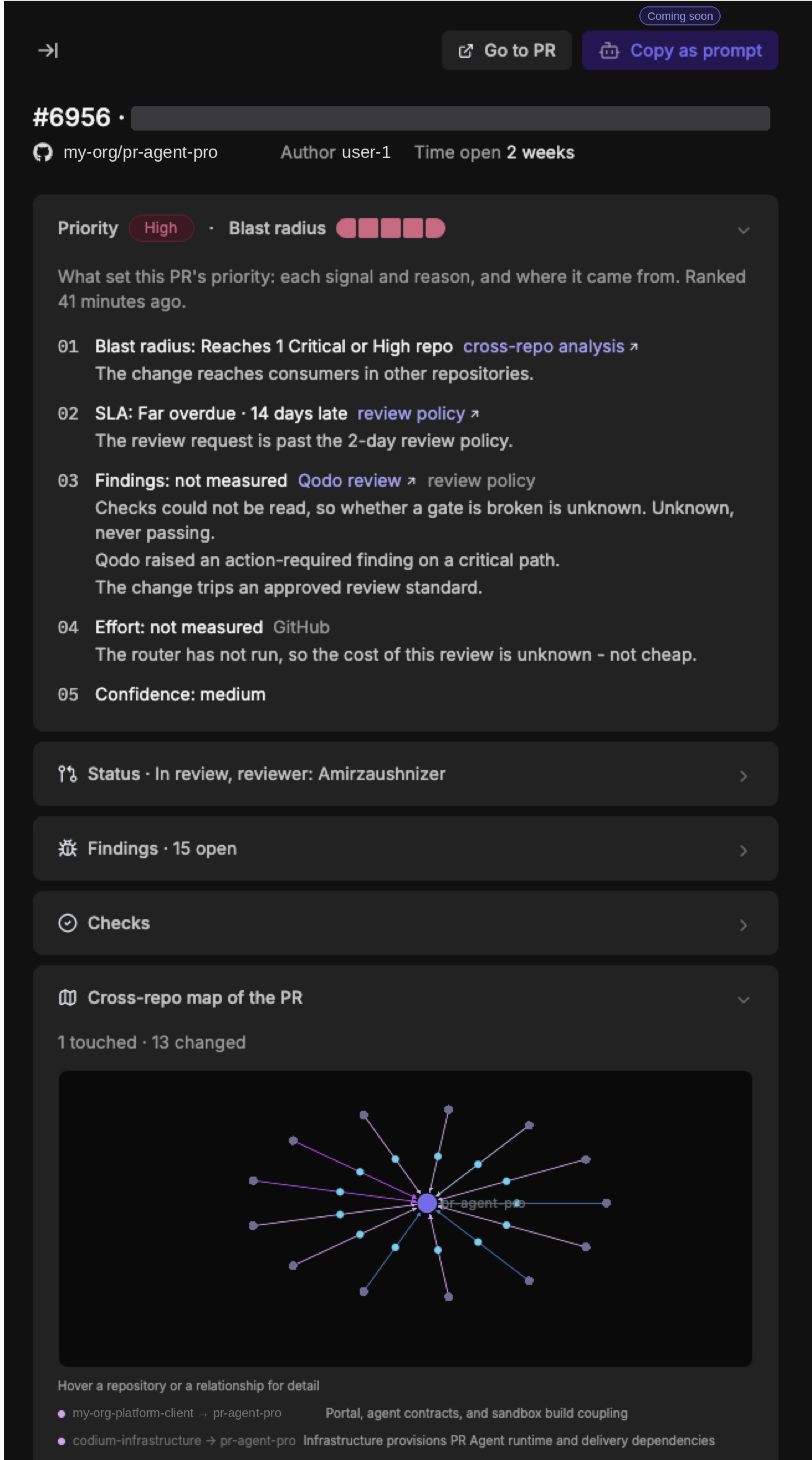 The pull request details pane brings together the relevant triage signals, findings, checks, and codebase relationships, with links to the corresponding details so you can investigate further without leaving the context of the pull request.
### Understand why it ranks here
The **Priority** card shows the signals used to determine the pull request’s ranking and the source of each signal. Review:
* **Blast radius:** How broadly the change reaches across your codebase, including critical or high-impact repositories.
* **SLA:** The pull request’s position relative to its review deadline.
* **Findings:** Findings that may affect the pull request’s priority, including action-required findings and violations of review standards.
* **Effort:** The estimated effort required to address the pull request when available.
* **Reviewer:** The reviewer assigned to the pull request if a reviewer was assigned.
* **Confidence:** The confidence in the signals used to rank the pull request.
The card also shows when the ranking was last updated.
### Review pull request status
The **Status** card shows the current review state, assigned reviewers, and review progress. When information from the Git provider is unavailable, the pane indicates which data is unknown, such as merge state, checks, or approvals.
### Review findings and checks
The **Findings** card shows open findings identified during review, including their severity and links to the relevant findings.
Click **Open all findings for this pull request** to view all findings for the pull request.
The **Checks** card shows the current check status. When check results are unavailable, merge readiness is shown as unknown.
### Explore cross-repository relationships
The **Cross-repo map of the PR** shows how the pull request’s repository relates to other repositories in your codebase. Use the map to understand which repositories are affected or connected to the change.
Hover over a repository or relationship to see more detail. Open the full relationships graph when you need to investigate the complete set of relationships.
### Take action
Once you understand the pull request and its context, you can:
* Open the pull request in your Git provider.
* Assign the work to yourself.
* Continue investigating related pull requests in the PR stack.
* Open the full relationships graph for deeper analysis.
The pull request details pane brings together the relevant triage signals, findings, checks, and codebase relationships, with links to the corresponding details so you can investigate further without leaving the context of the pull request.
### Understand why it ranks here
The **Priority** card shows the signals used to determine the pull request’s ranking and the source of each signal. Review:
* **Blast radius:** How broadly the change reaches across your codebase, including critical or high-impact repositories.
* **SLA:** The pull request’s position relative to its review deadline.
* **Findings:** Findings that may affect the pull request’s priority, including action-required findings and violations of review standards.
* **Effort:** The estimated effort required to address the pull request when available.
* **Reviewer:** The reviewer assigned to the pull request if a reviewer was assigned.
* **Confidence:** The confidence in the signals used to rank the pull request.
The card also shows when the ranking was last updated.
### Review pull request status
The **Status** card shows the current review state, assigned reviewers, and review progress. When information from the Git provider is unavailable, the pane indicates which data is unknown, such as merge state, checks, or approvals.
### Review findings and checks
The **Findings** card shows open findings identified during review, including their severity and links to the relevant findings.
Click **Open all findings for this pull request** to view all findings for the pull request.
The **Checks** card shows the current check status. When check results are unavailable, merge readiness is shown as unknown.
### Explore cross-repository relationships
The **Cross-repo map of the PR** shows how the pull request’s repository relates to other repositories in your codebase. Use the map to understand which repositories are affected or connected to the change.
Hover over a repository or relationship to see more detail. Open the full relationships graph when you need to investigate the complete set of relationships.
### Take action
Once you understand the pull request and its context, you can:
* Open the pull request in your Git provider.
* Assign the work to yourself.
* Continue investigating related pull requests in the PR stack.
* Open the full relationships graph for deeper analysis.