> ## Documentation Index
> Fetch the complete documentation index at: https://docs.qodo.ai/llms.txt
> Use this file to discover all available pages before exploring further.
# Qodo code review analytics
> Analyze how your team responds to Qodo findings across pull requests, repositories, and PR authors.
Beta
Requires Admin permissions.
The **Analytics** dashboard in the Qodo portal shows how your team responds to Qodo findings across pull requests, repositories, and PR authors.
Each finding is tracked through its response. An **acted-on finding** is one with a final outcome: accepted, not accepted, or dismissed. Findings still pending a decision aren't included. An **accepted finding** is one that resulted in an accepted code change. Keeping these metrics separate shows both whether findings reach a decision and whether those decisions lead to code changes.
Break down the data by repository, PR author, severity, category, and finding type. Finding types include bugs and security issues, as well as violations of your organization's rules, gaps against PR requirements, team insights, skills, and changes that affect related repositories.
Use the dashboard to understand Qodo's impact over time, identify high-severity findings that remain unaddressed, and compare finding activity and response across repositories and PR authors. To find the view that answers a specific question, see the [Analytics cheat sheet](#analytics-cheat-sheet).
 ## Filter analytics
You can filter analytics by:
* **Time range:** Today, Last 7 days, Last 30 days, Last 90 days, or a custom range. The time range filters by when Qodo raised the finding. Today starts at midnight UTC. A custom range can cover up to 365 days.
* **Severity:** Low, Medium, High, or All levels.
* **Category:** Accessibility, Architecture, Compliance, Correctness, Maintainability, Observability, Performance, Quality, Reliability, Security, and Testability. For more information, see the [Finding categories](#finding-categories) table.
* **Type:** Bug, Rule violation, Requirement gap, Team insight, Skill, Cross-repo, and Security.
* **Bug:** Logic errors, edge cases, and anti-patterns in the change.
* **Rule violation:** Code that breaks one of your organization's rules.
* **Requirement gap:** The pull request does not fully implement a requirement from its linked ticket or specification.
* **Team insight:** A finding raised from a team profile, which reviews the pull request the way the most relevant teammates would.
* **Skill:** A finding raised by a skill defined in your repository.
* **Cross-repo:** A change that breaks code in a related repository.
* **Security:** A vulnerability in the change, such as an OWASP or CWE-class issue.
* **Repository:** One or more indexed repositories.
* **PR author:** One or more PR authors.
## Finding categories
| **Category** | **What it covers** | **Examples** |
| - | - | - |
| Accessibility | Issues that make UI unusable for people with disabilities | Missing alt text, missing ARIA labels, poor keyboard navigation |
| Architecture | Design and structural problems across modules or services | Layer violations, tight coupling, circular dependencies |
| Compliance | Violations of organizational policies, standards, or regulatory requirements | Breaking coding standards, license issues, PII handling rules |
| Correctness | Logic errors that produce wrong results | Off-by-one errors, wrong conditions, unhandled edge cases |
| Maintainability | Code that's hard to change or extend safely | Large functions, duplication, hidden dependencies |
| Observability | Gaps in the ability to monitor and debug in production | Missing logs, swallowed errors, no metrics on critical paths |
| Performance | Inefficiencies affecting speed or resource use | N+1 queries, unnecessary loops, missing caching |
| Quality | General code hygiene and readability | Unclear naming, dead code, inconsistent style |
| Reliability | Code that can fail or behave unpredictably under real conditions | Unhandled errors, missing retries or timeouts, resource leaks |
| Security | Vulnerabilities that could be exploited | Injection, hardcoded secrets, missing authorization checks |
| Testability | Code that is hard to test or not covered by tests | Hidden dependencies, untestable side effects, no tests for new logic |
## Understand analytics metrics
Analytics metrics are calculated from Qodo findings data. The dashboard counts findings raised on a pull request or linked to one. Local findings and findings detected after merge are excluded.
## Measure the impact of Qodo findings
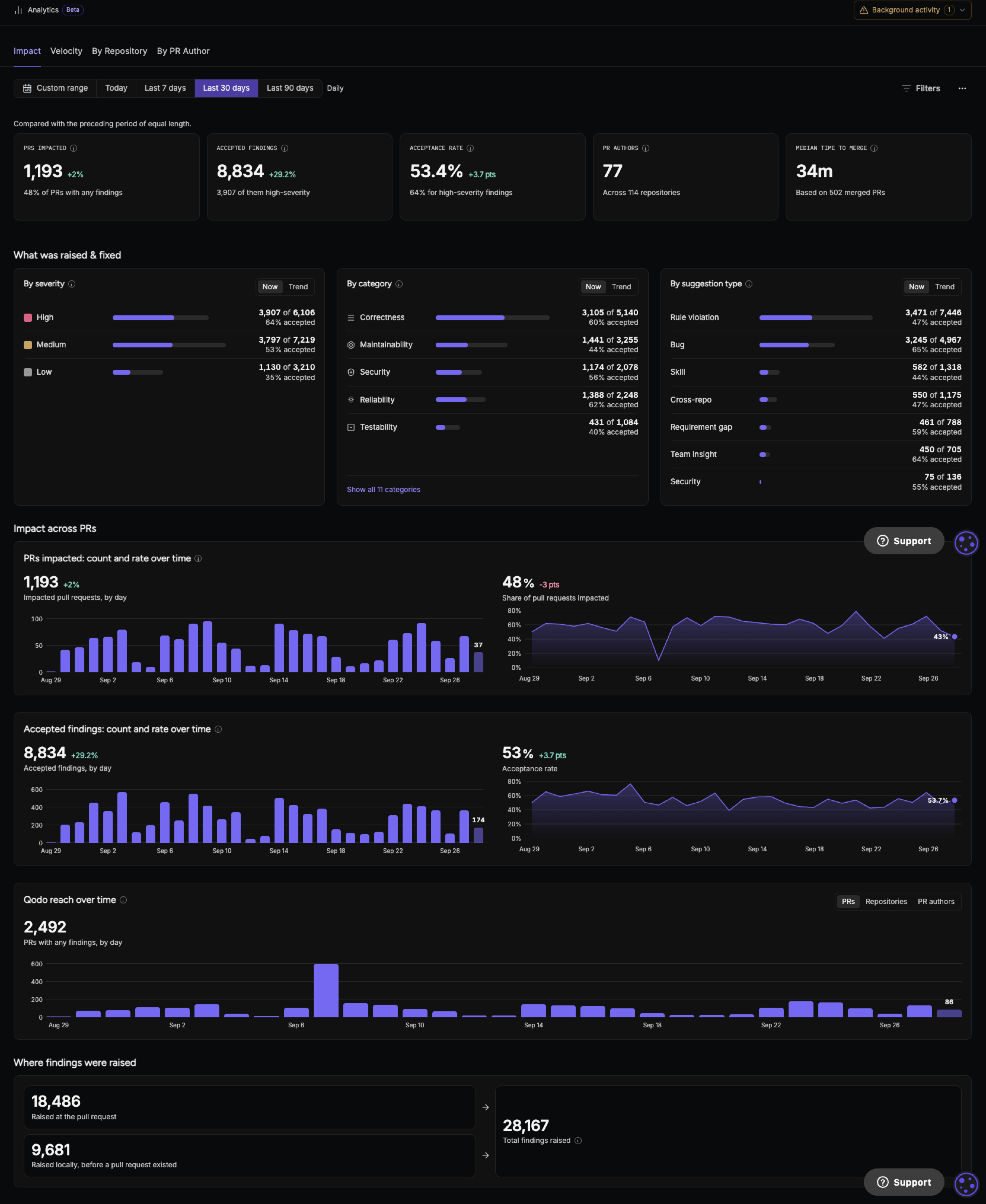
The **Impact** view gives you an organization-wide view of how Qodo findings affect pull requests. Use it to understand how often findings lead to action, how many result in accepted code changes, and how broadly Qodo findings reach across your organization.
| **Metric or view** | **What it shows** |
| - | - |
| **PRs impacted** | Pull requests with at least one accepted finding. |
| **Accepted findings** | Qodo findings that resulted in an accepted code change. |
| **Acceptance rate** | Accepted findings as a percentage of acted-on findings: accepted, not accepted, and dismissed. Pending findings aren't counted. The rate appears once at least 5 findings have an outcome. |
| **PR authors** | PR authors whose pull requests received at least one Qodo finding. |
| **Median time to merge** | The median time from pull request opened to merged, for pull requests merged in the selected time range. Not available when a Category, Type, or Severity filter is applied. Note that data collection started from 29 Septmber, 2026. |
| **What was raised and acted on** | The findings Qodo raised and how authors responded to them. |
| **Impact across PRs** | How findings are distributed across impacted pull requests. |
| **Accepted findings: count and rate over time** | The number of accepted findings and the acceptance rate over time. |
| **Qodo reach over time** | How the number of pull requests, repositories, and PR authors with at least one finding changes over time. |
| **Where findings were raised** | How many findings Qodo raised locally, before a pull request existed, and how many it raised on the pull request. |
## Identify where findings have the most impact by repository
The **By repository** view breaks down finding activity by repository. Use it to understand how findings are acted on across repositories and where acceptance rates differ.
## Filter analytics
You can filter analytics by:
* **Time range:** Today, Last 7 days, Last 30 days, Last 90 days, or a custom range. The time range filters by when Qodo raised the finding. Today starts at midnight UTC. A custom range can cover up to 365 days.
* **Severity:** Low, Medium, High, or All levels.
* **Category:** Accessibility, Architecture, Compliance, Correctness, Maintainability, Observability, Performance, Quality, Reliability, Security, and Testability. For more information, see the [Finding categories](#finding-categories) table.
* **Type:** Bug, Rule violation, Requirement gap, Team insight, Skill, Cross-repo, and Security.
* **Bug:** Logic errors, edge cases, and anti-patterns in the change.
* **Rule violation:** Code that breaks one of your organization's rules.
* **Requirement gap:** The pull request does not fully implement a requirement from its linked ticket or specification.
* **Team insight:** A finding raised from a team profile, which reviews the pull request the way the most relevant teammates would.
* **Skill:** A finding raised by a skill defined in your repository.
* **Cross-repo:** A change that breaks code in a related repository.
* **Security:** A vulnerability in the change, such as an OWASP or CWE-class issue.
* **Repository:** One or more indexed repositories.
* **PR author:** One or more PR authors.
## Finding categories
| **Category** | **What it covers** | **Examples** |
| - | - | - |
| Accessibility | Issues that make UI unusable for people with disabilities | Missing alt text, missing ARIA labels, poor keyboard navigation |
| Architecture | Design and structural problems across modules or services | Layer violations, tight coupling, circular dependencies |
| Compliance | Violations of organizational policies, standards, or regulatory requirements | Breaking coding standards, license issues, PII handling rules |
| Correctness | Logic errors that produce wrong results | Off-by-one errors, wrong conditions, unhandled edge cases |
| Maintainability | Code that's hard to change or extend safely | Large functions, duplication, hidden dependencies |
| Observability | Gaps in the ability to monitor and debug in production | Missing logs, swallowed errors, no metrics on critical paths |
| Performance | Inefficiencies affecting speed or resource use | N+1 queries, unnecessary loops, missing caching |
| Quality | General code hygiene and readability | Unclear naming, dead code, inconsistent style |
| Reliability | Code that can fail or behave unpredictably under real conditions | Unhandled errors, missing retries or timeouts, resource leaks |
| Security | Vulnerabilities that could be exploited | Injection, hardcoded secrets, missing authorization checks |
| Testability | Code that is hard to test or not covered by tests | Hidden dependencies, untestable side effects, no tests for new logic |
## Understand analytics metrics
Analytics metrics are calculated from Qodo findings data. The dashboard counts findings raised on a pull request or linked to one. Local findings and findings detected after merge are excluded.
## Measure the impact of Qodo findings
The **Impact** view gives you an organization-wide view of how Qodo findings affect pull requests. Use it to understand how often findings lead to action, how many result in accepted code changes, and how broadly Qodo findings reach across your organization.
| **Metric or view** | **What it shows** |
| - | - |
| **PRs impacted** | Pull requests with at least one accepted finding. |
| **Accepted findings** | Qodo findings that resulted in an accepted code change. |
| **Acceptance rate** | Accepted findings as a percentage of acted-on findings: accepted, not accepted, and dismissed. Pending findings aren't counted. The rate appears once at least 5 findings have an outcome. |
| **PR authors** | PR authors whose pull requests received at least one Qodo finding. |
| **Median time to merge** | The median time from pull request opened to merged, for pull requests merged in the selected time range. Not available when a Category, Type, or Severity filter is applied. Note that data collection started from 29 Septmber, 2026. |
| **What was raised and acted on** | The findings Qodo raised and how authors responded to them. |
| **Impact across PRs** | How findings are distributed across impacted pull requests. |
| **Accepted findings: count and rate over time** | The number of accepted findings and the acceptance rate over time. |
| **Qodo reach over time** | How the number of pull requests, repositories, and PR authors with at least one finding changes over time. |
| **Where findings were raised** | How many findings Qodo raised locally, before a pull request existed, and how many it raised on the pull request. |
## Identify where findings have the most impact by repository
The **By repository** view breaks down finding activity by repository. Use it to understand how findings are acted on across repositories and where acceptance rates differ.
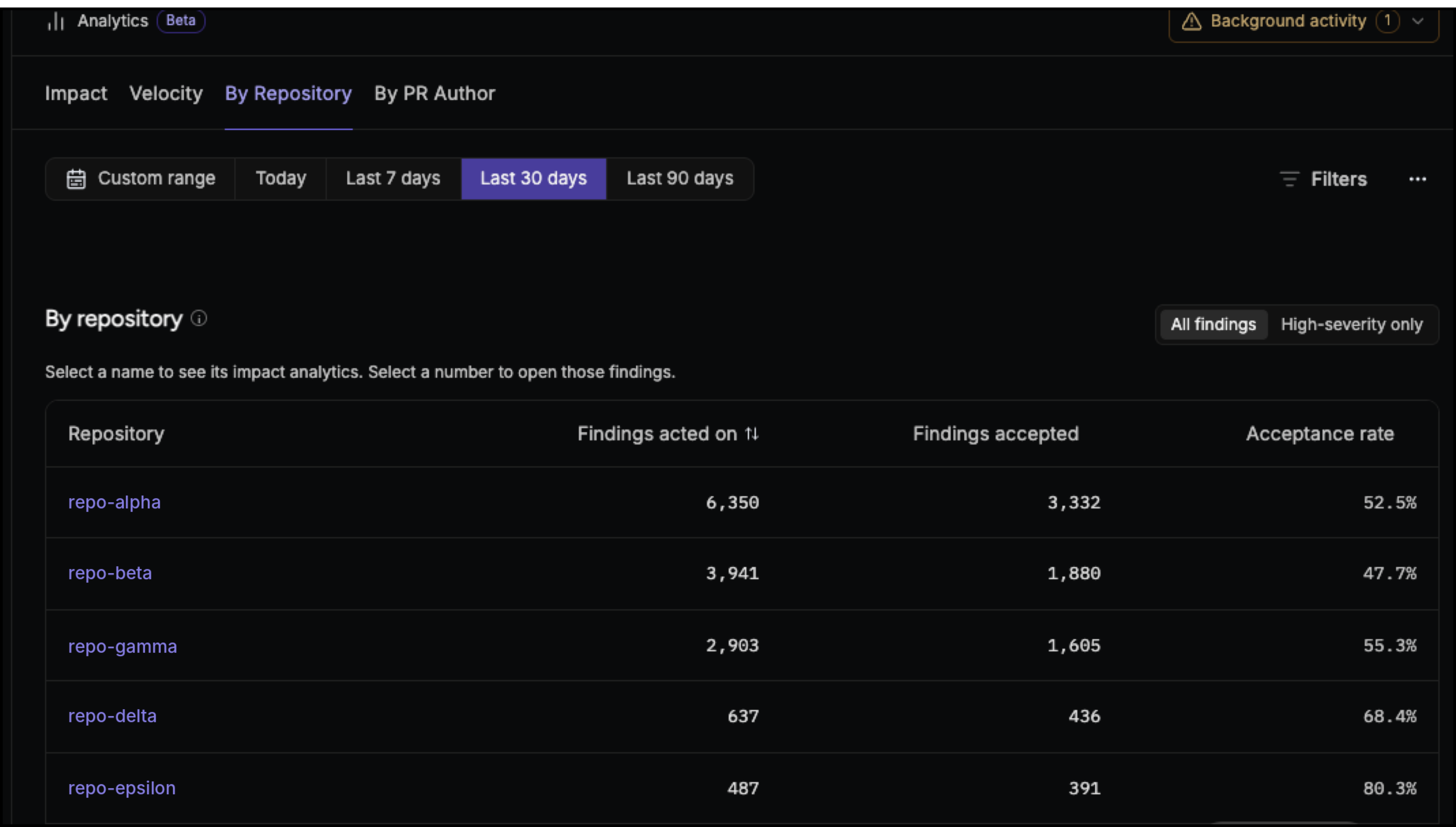 The table includes:
* **Repository:** The repository where findings were raised.
* **Findings acted on:** The number of findings with a final outcome: accepted, not accepted, or dismissed.
* **Findings accepted:** The number of findings that resulted in an accepted code change.
* **Acceptance rate:** The percentage of findings that were accepted.
You can view all findings or focus on high-severity findings.
Select a repository to drill down into its analytics.
## Understand finding response by PR author
The **By PR author** view shows how authors respond to Qodo findings across their pull requests. Use it to understand response patterns, track changes over time, and identify findings that remain unaddressed.
The table includes:
* **Repository:** The repository where findings were raised.
* **Findings acted on:** The number of findings with a final outcome: accepted, not accepted, or dismissed.
* **Findings accepted:** The number of findings that resulted in an accepted code change.
* **Acceptance rate:** The percentage of findings that were accepted.
You can view all findings or focus on high-severity findings.
Select a repository to drill down into its analytics.
## Understand finding response by PR author
The **By PR author** view shows how authors respond to Qodo findings across their pull requests. Use it to understand response patterns, track changes over time, and identify findings that remain unaddressed.
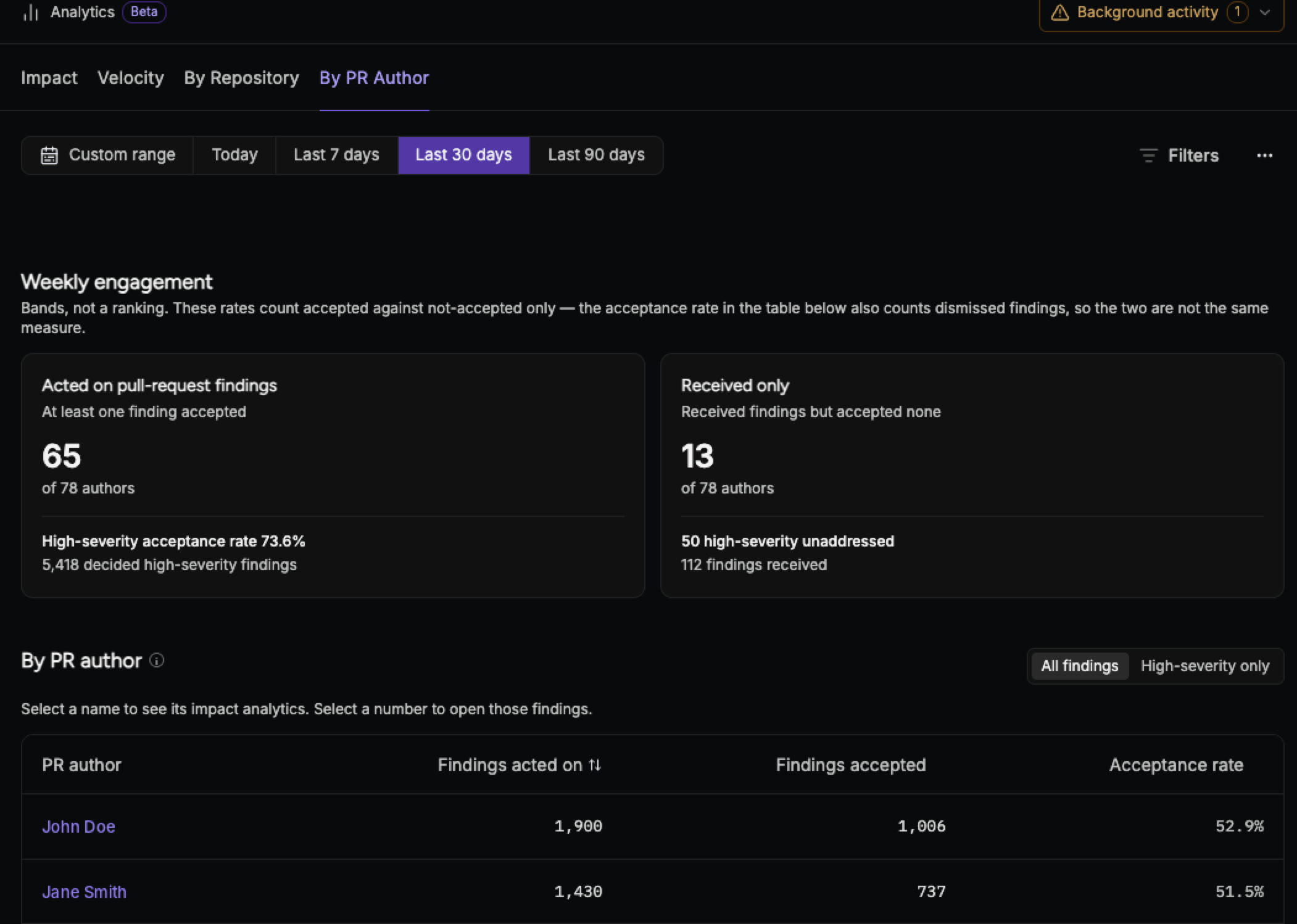 ### Weekly engagement
Track finding response across PR authors week by week. The view shows:
* **Acted on pull request findings:** PR authors who accepted at least one finding.
* **High-severity acceptance rate:** The percentage of high-severity findings that resulted in an accepted code change.
* **Received only:** PR authors who received findings but accepted none.
* **High-severity unaddressed:** High-severity findings that were not addressed.
### Author table
See finding activity and response for each PR author.
The table includes:
* **PR author:** The author of the pull requests where findings were raised.
* **Findings acted on:** The number of the author's findings with a final outcome: accepted, not accepted, or dismissed.
* **Findings accepted:** The number of findings that resulted in an accepted code change.
* **Acceptance rate:** The percentage of the author's findings that were accepted.
Select an author to drill down into their findings and activity.
## Export and share analytics
Use the **⋯** menu at the top of the dashboard to export or share your analytics.
### Export CSV
Download your findings as a CSV file named `findings.csv` for reporting, audits, or analysis in your own tools. Each row represents a single Qodo finding. The export includes up to 10,000 findings. It can also include outdated findings and findings detected after merge, which the dashboard excludes, so CSV totals may not match the dashboard.
| **Column** | **Description** |
| - | - |
| Finding ID | Unique identifier for the finding |
| Title | Short summary of the finding |
| Description | Full explanation of the issue Qodo raised |
| Category | The finding category, such as Correctness or Compliance |
| Action level | The finding's severity, as a raw value: `action_required` (High), `remediation_recommended` (Medium), or `informational` (Low) |
| Finding type | The finding type, such as `bug`, `rule_violation`, or `cross_repo` |
| Attribution status | How the author responded to the finding: `implemented` (accepted), `not_implemented`, `dismissed`, `pending`, `outdated`, or `detected_after_merge` |
| Git organization | The organization that owns the repository |
| Git repository | The repository where the finding was raised |
| PR URL | Link to the pull request |
| PR author | The author of the pull request |
| Git provider | The Git platform, such as GitHub or GitLab |
| Branch | The branch the pull request comes from (the source branch, not the target) |
| Created at | When Qodo raised the finding |
### Share dashboard
Share the current view of the dashboard with others in your organization.
## Analytics cheat sheet
Use this cheat sheet to quickly find the analytics section that answers your question.
### Impact
| **Question** | **Where to look** |
| - | - |
| Is Qodo making a difference in our pull requests? | Accepted findings, Acceptance rate |
| How many findings did Qodo raise, and how many did developers act on? | What was raised and acted on |
| Is Qodo reaching most of our pull requests, or just a few? | Impact across PRs |
| Are developers accepting more findings over time? | Accepted findings: count and rate over time |
| Is Qodo adoption growing across the organization? | Qodo reach over time |
| How many findings are caught before a pull request exists? | Where findings were raised |
| Are developers following our rules? | Accepted findings, filtered by Type: Rule violation |
| Are pull requests meeting their stated requirements? | What was raised and acted on, filtered by Type: Requirement gap |
| Are changes breaking other repositories? | What was raised and acted on, filtered by Type: Cross-repo |
| How are we handling security findings? | Acceptance rate, filtered by Type: Security |
### By repository
| **Question** | **Where to look** |
| - | - |
| Which repositories get the most findings? | The repository table, ranked by findings acted on |
| Which repositories have the most findings with a final outcome? | Findings acted on |
| Which repositories turn findings into code changes? | Findings accepted |
| Where do acceptance rates differ the most? | Acceptance rate |
| Which repositories have high-severity findings that remain unaddressed? | High-severity only |
| Which repositories have the most compliance issues? | Repository, filtered by Category: Compliance |
| Where is architectural drift showing up? | Repository, filtered by Category: Architecture |
### By PR author
| **Question** | **Where to look** |
| - | - |
| How is finding response changing week to week? | Weekly engagement |
| Which authors accept at least one finding? | Acted on pull request findings |
| Are authors addressing high-severity findings? | High-severity acceptance rate |
| Which authors received findings but accepted none? | Received only |
| What high-severity findings remain unaddressed? | High-severity unaddressed |
| Where are finding response patterns different across authors? | Received only, Acceptance rate |
| Which authors have the most accepted findings? | Findings accepted, Acceptance rate |
### Weekly engagement
Track finding response across PR authors week by week. The view shows:
* **Acted on pull request findings:** PR authors who accepted at least one finding.
* **High-severity acceptance rate:** The percentage of high-severity findings that resulted in an accepted code change.
* **Received only:** PR authors who received findings but accepted none.
* **High-severity unaddressed:** High-severity findings that were not addressed.
### Author table
See finding activity and response for each PR author.
The table includes:
* **PR author:** The author of the pull requests where findings were raised.
* **Findings acted on:** The number of the author's findings with a final outcome: accepted, not accepted, or dismissed.
* **Findings accepted:** The number of findings that resulted in an accepted code change.
* **Acceptance rate:** The percentage of the author's findings that were accepted.
Select an author to drill down into their findings and activity.
## Export and share analytics
Use the **⋯** menu at the top of the dashboard to export or share your analytics.
### Export CSV
Download your findings as a CSV file named `findings.csv` for reporting, audits, or analysis in your own tools. Each row represents a single Qodo finding. The export includes up to 10,000 findings. It can also include outdated findings and findings detected after merge, which the dashboard excludes, so CSV totals may not match the dashboard.
| **Column** | **Description** |
| - | - |
| Finding ID | Unique identifier for the finding |
| Title | Short summary of the finding |
| Description | Full explanation of the issue Qodo raised |
| Category | The finding category, such as Correctness or Compliance |
| Action level | The finding's severity, as a raw value: `action_required` (High), `remediation_recommended` (Medium), or `informational` (Low) |
| Finding type | The finding type, such as `bug`, `rule_violation`, or `cross_repo` |
| Attribution status | How the author responded to the finding: `implemented` (accepted), `not_implemented`, `dismissed`, `pending`, `outdated`, or `detected_after_merge` |
| Git organization | The organization that owns the repository |
| Git repository | The repository where the finding was raised |
| PR URL | Link to the pull request |
| PR author | The author of the pull request |
| Git provider | The Git platform, such as GitHub or GitLab |
| Branch | The branch the pull request comes from (the source branch, not the target) |
| Created at | When Qodo raised the finding |
### Share dashboard
Share the current view of the dashboard with others in your organization.
## Analytics cheat sheet
Use this cheat sheet to quickly find the analytics section that answers your question.
### Impact
| **Question** | **Where to look** |
| - | - |
| Is Qodo making a difference in our pull requests? | Accepted findings, Acceptance rate |
| How many findings did Qodo raise, and how many did developers act on? | What was raised and acted on |
| Is Qodo reaching most of our pull requests, or just a few? | Impact across PRs |
| Are developers accepting more findings over time? | Accepted findings: count and rate over time |
| Is Qodo adoption growing across the organization? | Qodo reach over time |
| How many findings are caught before a pull request exists? | Where findings were raised |
| Are developers following our rules? | Accepted findings, filtered by Type: Rule violation |
| Are pull requests meeting their stated requirements? | What was raised and acted on, filtered by Type: Requirement gap |
| Are changes breaking other repositories? | What was raised and acted on, filtered by Type: Cross-repo |
| How are we handling security findings? | Acceptance rate, filtered by Type: Security |
### By repository
| **Question** | **Where to look** |
| - | - |
| Which repositories get the most findings? | The repository table, ranked by findings acted on |
| Which repositories have the most findings with a final outcome? | Findings acted on |
| Which repositories turn findings into code changes? | Findings accepted |
| Where do acceptance rates differ the most? | Acceptance rate |
| Which repositories have high-severity findings that remain unaddressed? | High-severity only |
| Which repositories have the most compliance issues? | Repository, filtered by Category: Compliance |
| Where is architectural drift showing up? | Repository, filtered by Category: Architecture |
### By PR author
| **Question** | **Where to look** |
| - | - |
| How is finding response changing week to week? | Weekly engagement |
| Which authors accept at least one finding? | Acted on pull request findings |
| Are authors addressing high-severity findings? | High-severity acceptance rate |
| Which authors received findings but accepted none? | Received only |
| What high-severity findings remain unaddressed? | High-severity unaddressed |
| Where are finding response patterns different across authors? | Received only, Acceptance rate |
| Which authors have the most accepted findings? | Findings accepted, Acceptance rate |