> ## Documentation Index
> Fetch the complete documentation index at: https://docs.qodo.ai/llms.txt
> Use this file to discover all available pages before exploring further.
# Configure code review with Qodo presets
> Apply a review preset to configure Finding types, Workflow, Context, Remediation, and Display settings out of the box.
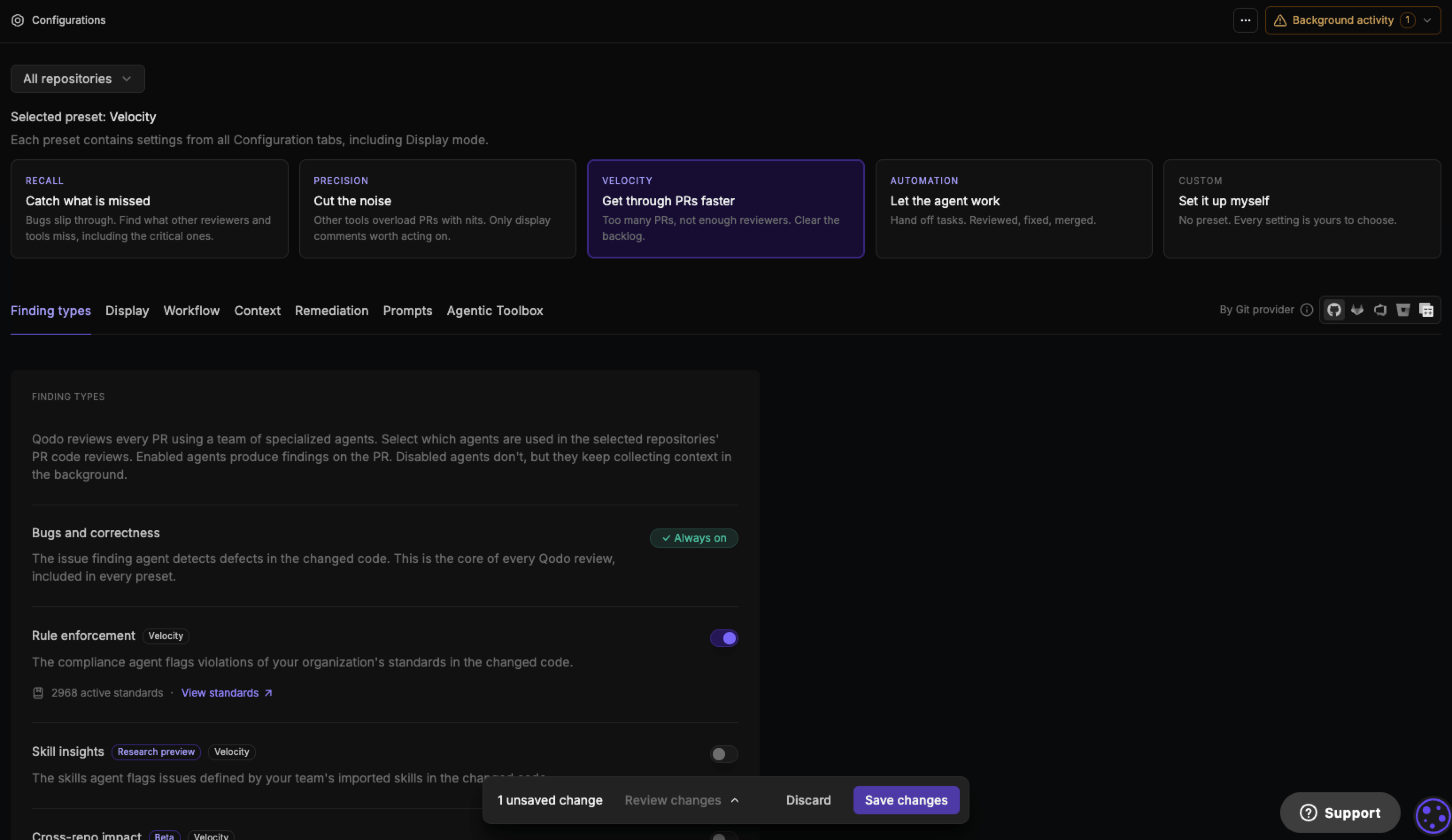
A review preset is a predefined set of code review configurations built for a specific reviewing goal. Qodo offers several, each suited to a different code review experience, covering which finding types run, how and when reviews trigger, which context sources are used, whether Qodo remediates findings automatically, and which display mode presents them in pull requests. Applying one is optional. Your team can keep its current setup, or customize settings individually.
Existing organizations start on the Customization preset. Your current settings are preserved exactly as they were before review presets existed, and nothing changes until you choose to switch. New organizations choose a review preset as part of onboarding, and start from that preset's values on day one. Either way, you can switch presets at any time.
 ## Types of review presets
| Preset | Focus | Description |
| - | - | - |
| **Recall** | Catch what is missed | Bugs slip through. Find what other reviewers and tools miss, including the critical ones. |
| **Precision** | Cut the noise | Other tools overload PRs with nits. Only display comments worth acting on. |
| **Velocity** | Get through PRs faster | Too many PRs, not enough reviewers. Clear the backlog. |
| **Automation** | Let the agent work | Hand off tasks. Reviewed, fixed, merged. |
| **Customization** | Set it up myself | No preset. Every setting is yours to choose. |
## Switch to a preset that suits your needs
1. Navigate to the **Configurations** page in the [Qodo portal](https://app.qodo.ai/).
2. Under **Review preset**, at the top of the page, select a preset card.
3. Review the **Switch to \[Preset]?** confirmation dialog. It names each finding-type agent the preset turns on or off, and summarizes how many other settings change and across which tabs, for example Context and Remediation.
4. Select **Switch preset** to apply the change, or **Cancel** to keep your current configuration.
## Types of review presets
| Preset | Focus | Description |
| - | - | - |
| **Recall** | Catch what is missed | Bugs slip through. Find what other reviewers and tools miss, including the critical ones. |
| **Precision** | Cut the noise | Other tools overload PRs with nits. Only display comments worth acting on. |
| **Velocity** | Get through PRs faster | Too many PRs, not enough reviewers. Clear the backlog. |
| **Automation** | Let the agent work | Hand off tasks. Reviewed, fixed, merged. |
| **Customization** | Set it up myself | No preset. Every setting is yours to choose. |
## Switch to a preset that suits your needs
1. Navigate to the **Configurations** page in the [Qodo portal](https://app.qodo.ai/).
2. Under **Review preset**, at the top of the page, select a preset card.
3. Review the **Switch to \[Preset]?** confirmation dialog. It names each finding-type agent the preset turns on or off, and summarizes how many other settings change and across which tabs, for example Context and Remediation.
4. Select **Switch preset** to apply the change, or **Cancel** to keep your current configuration.
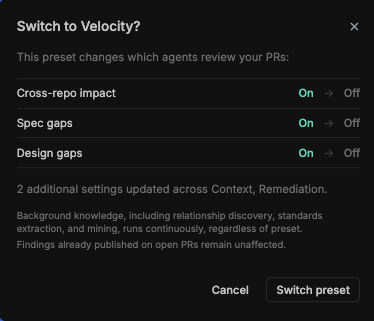 Background knowledge, including relationship discovery, standards extraction, and rule mining, keeps running regardless of which preset is selected. Findings already published on open pull requests are not affected by a preset switch.
Switching a preset applies at whichever configuration level you're currently viewing, organization or repository. See [Configuration levels: organization and repository](/configuration/portal-configuration#configuration-levels-organization-and-repository).
## Configurations by preset
Selecting a preset applies the values below. Any setting not listed here keeps its current value, unaffected by the preset.
### Finding types tab
| Setting | Recall | Precision | Velocity | Automation |
| - | - | - | - | - |
| **Bugs and correctness** | Always on | Always on | Always on | Always on |
| **[Rule violations](/governance/rule-enforcement)** | ✓ | ✓ | ✓ | ✓ |
| **[Skill insights](/governance/manage-skills-across-repositories)** | ✓ | ✗ | ✗ | ✓ |
| **[Cross-repo impact](/governance/cross-repo-code-review)** | ✓ | ✓ | ✗ | ✓ |
| **[Spec agent](/code-review/view-requirement-gaps-in-findings)** | ✓ | ✗ | ✗ | ✓ |
| **[Design gaps](/code-review/view-ux-deviations-in-findings)** | ✓ | ✗ | ✗ | ✓ |
### Workflow tab
| Setting | Recall | Precision | Velocity | Automation |
| - | - | - | - | - |
| **[Code review trigger](/configuration/workflow#code-review)** | Published PRs | Published PRs | Published PRs | Published PRs |
| **[Review every push](/code-review/persistent-review-comments)** | ✓ | ✓ | ✓ | ✓ |
| **[Chat with Qodo](/code-review/chat-with-qodo-in-your-pull-requests)** | ✓ | ✓ | ✓ | ✓ |
### Context tab
| Setting | Recall | Precision | Velocity | Automation |
| - | - | - | - | - |
| **[Use cross-repo knowledge as review context](/governance/cross-repo-code-review)** | ✓ | ✓ | ✗ | ✓ |
| **[Mine rules from code review history](/governance/rule-enforcement/rule-miner)** | ✓ | ✓ | ✓ | ✓ |
| **[Native skills](/governance/manage-skills-across-repositories)** | ✓ | ✗ | ✗ | ✓ |
### Remediation tab
| Setting | Recall | Precision | Velocity | Automation |
| - | - | - | - | - |
| **[Remediation agent](/code-review/remediate-findings-in-prs)** | ✗ | ✗ | ✓ | ✓ |
| **[Auto fix](/code-review/remediate-findings-in-prs#automatically-remediate-findings-at-scale)** | ✗ | ✗ | ✗ | ✓ |
| **[Suggest committable fixes](/code-review/commitable-code-suggestions)** | ✓ | ✓ | ✓ | ✓ |
### Display tab
| Setting | Recall | Precision | Velocity | Automation |
| - | - | - | - | - |
| **[Display mode](/configuration/display#display-modes)** | Balanced | Lean | Lean | Robust |
**Customization** is not in the tables above because it applies no preset. Every setting keeps its existing value, and you configure Finding types, Workflow, Context, Remediation, and Display individually. See [Configure Qodo using the portal](/configuration/portal-configuration) for the full list of settings on each tab.
## Customize settings after applying a preset
Each setting in the **Configurations** page shows whether its value comes from the selected preset or a manual change. A gray badge with the preset's name means the setting still matches it. Changing an individual setting after choosing a preset switches that badge to purple **Customized**, without changing the rest of the preset's values.
Background knowledge, including relationship discovery, standards extraction, and rule mining, keeps running regardless of which preset is selected. Findings already published on open pull requests are not affected by a preset switch.
Switching a preset applies at whichever configuration level you're currently viewing, organization or repository. See [Configuration levels: organization and repository](/configuration/portal-configuration#configuration-levels-organization-and-repository).
## Configurations by preset
Selecting a preset applies the values below. Any setting not listed here keeps its current value, unaffected by the preset.
### Finding types tab
| Setting | Recall | Precision | Velocity | Automation |
| - | - | - | - | - |
| **Bugs and correctness** | Always on | Always on | Always on | Always on |
| **[Rule violations](/governance/rule-enforcement)** | ✓ | ✓ | ✓ | ✓ |
| **[Skill insights](/governance/manage-skills-across-repositories)** | ✓ | ✗ | ✗ | ✓ |
| **[Cross-repo impact](/governance/cross-repo-code-review)** | ✓ | ✓ | ✗ | ✓ |
| **[Spec agent](/code-review/view-requirement-gaps-in-findings)** | ✓ | ✗ | ✗ | ✓ |
| **[Design gaps](/code-review/view-ux-deviations-in-findings)** | ✓ | ✗ | ✗ | ✓ |
### Workflow tab
| Setting | Recall | Precision | Velocity | Automation |
| - | - | - | - | - |
| **[Code review trigger](/configuration/workflow#code-review)** | Published PRs | Published PRs | Published PRs | Published PRs |
| **[Review every push](/code-review/persistent-review-comments)** | ✓ | ✓ | ✓ | ✓ |
| **[Chat with Qodo](/code-review/chat-with-qodo-in-your-pull-requests)** | ✓ | ✓ | ✓ | ✓ |
### Context tab
| Setting | Recall | Precision | Velocity | Automation |
| - | - | - | - | - |
| **[Use cross-repo knowledge as review context](/governance/cross-repo-code-review)** | ✓ | ✓ | ✗ | ✓ |
| **[Mine rules from code review history](/governance/rule-enforcement/rule-miner)** | ✓ | ✓ | ✓ | ✓ |
| **[Native skills](/governance/manage-skills-across-repositories)** | ✓ | ✗ | ✗ | ✓ |
### Remediation tab
| Setting | Recall | Precision | Velocity | Automation |
| - | - | - | - | - |
| **[Remediation agent](/code-review/remediate-findings-in-prs)** | ✗ | ✗ | ✓ | ✓ |
| **[Auto fix](/code-review/remediate-findings-in-prs#automatically-remediate-findings-at-scale)** | ✗ | ✗ | ✗ | ✓ |
| **[Suggest committable fixes](/code-review/commitable-code-suggestions)** | ✓ | ✓ | ✓ | ✓ |
### Display tab
| Setting | Recall | Precision | Velocity | Automation |
| - | - | - | - | - |
| **[Display mode](/configuration/display#display-modes)** | Balanced | Lean | Lean | Robust |
**Customization** is not in the tables above because it applies no preset. Every setting keeps its existing value, and you configure Finding types, Workflow, Context, Remediation, and Display individually. See [Configure Qodo using the portal](/configuration/portal-configuration) for the full list of settings on each tab.
## Customize settings after applying a preset
Each setting in the **Configurations** page shows whether its value comes from the selected preset or a manual change. A gray badge with the preset's name means the setting still matches it. Changing an individual setting after choosing a preset switches that badge to purple **Customized**, without changing the rest of the preset's values.
 See [Save or reset your changes](/configuration/portal-configuration#save-or-reset-your-changes) for how unsaved changes are tracked and saved.
## Next steps
* [Configure Qodo using the portal](/configuration/portal-configuration): The full tab-by-tab settings reference, including display modes.
* [Customize the code review experience](/configuration): The full configuration hierarchy and all available configuration methods.
See [Save or reset your changes](/configuration/portal-configuration#save-or-reset-your-changes) for how unsaved changes are tracked and saved.
## Next steps
* [Configure Qodo using the portal](/configuration/portal-configuration): The full tab-by-tab settings reference, including display modes.
* [Customize the code review experience](/configuration): The full configuration hierarchy and all available configuration methods.