> ## Documentation Index
> Fetch the complete documentation index at: https://docs.qodo.ai/llms.txt
> Use this file to discover all available pages before exploring further.
# Configure Display settings in the Qodo portal
> Controls how findings and review comments are structured and presented in your pull requests, from the Display tab of the Qodo portal's Configurations page.
export const AzureIcon = () => ;
The **Display** tab controls how findings and review comments are structured and presented in your pull requests: counters, labels, grouping, ordering, overflow behavior, per-finding content, comment structure, and notifications. Apply a preset for a ready-made configuration, or configure each setting individually.
## Display presets
New customers who onboard after Presets are introduced in Qodo 2.9 get the default value for each setting. Existing customers keep their configured settings.
Presets let you quickly configure how findings and review comments appear to your team in pull requests, without setting each Display option individually. Choose a preset ranging from a lean, low-noise review to a comprehensive, information-rich one, or select **Custom** to configure each setting yourself. Changing any individual setting after selecting a preset switches the selection to **Custom**.
| Preset | Purpose |
| ----------------- | ----------------------------------------------------------------- |
| **Minimal** | Lighter reviews with fewer comments and less noise. |
| **Standard** | Focused reviews that keep the standard comment structure visible. |
| **Comprehensive** | Every label and group visible, with color-scale badges. |
| **Custom** | Your own combination of settings. |
## Counters
| Setting | Description | Options |
| ------------------------- | --------------------------------------------------------------------------------------- | --------------------------------------------------------------------------------------- |
| **Count by** | Which dimension the findings count in the comment header is broken down by. | • Severity • Finding type (default) • Finding category • Relevance |
| **Show finding counters** | Shows the finding count chips at the top of the review comment. | Enable (default) / Disable |
| **Show zero counters** | Keeps counter chips that have no findings, showing them as zero instead of hiding them. | Enable (default) / Disable |
## Labels
| Setting | Description | Options |
| -------------------- | -------------------------------------------------------------------------------- | ------------------------------------------------------------------------------------------------- |
| **Displayed labels** | Chooses which labels appear on each finding in the review comment. Multi-select. | • Severity • Finding type (default) • Finding category (default) • Relevance |
| **Label style** | How finding type and category labels appear in review comments. | • Icon & Text (default) • Icon only |
## Groups
| Setting | Description | Options |
| ------------------------ | ------------------------------------------------------------------ | -------------------------------------------------------------------------------------------------------------------------------------------------------------------------------------------------- |
| **Group by** | How findings are grouped in the review summary comment. | • Severity (default) • Finding type • Finding category • Relevance |
| **Severity terminology** | The words used for the three severity tiers in the review comment. | • High, Medium, Low (default) • Critical, Warning, Informational • Required, Recommended, Optional • P0, P1, P2 |
| **Group badge** | How group badges look in the review comment. | • Qodo brand (default): Purple badge, no icon • Color scale: Yellow, orange and red reflect increasing importance, no icon • Grayscale with Emoji: Gray badge with the group's emoji |
## Ordering
| Setting | Description | Options |
| ---------------------------------- | ---------------------------------------------------------------------- | --------------------------------------------------------------------------------------- |
| **Order by** | How findings are ordered within each group. | • Severity • Finding type • Finding category • Relevance (default) |
| **Always show new findings first** | New findings from the latest review run stay at the top of each group. | Enable (default) / Disable |
## Overflow
GitHubGitLabAzure DevOps
| Setting | Description | Options |
| ----------------------------------- | -------------------------------------------------------------------------------------------------------------------------------------------------------- | ----------------------------------------- |
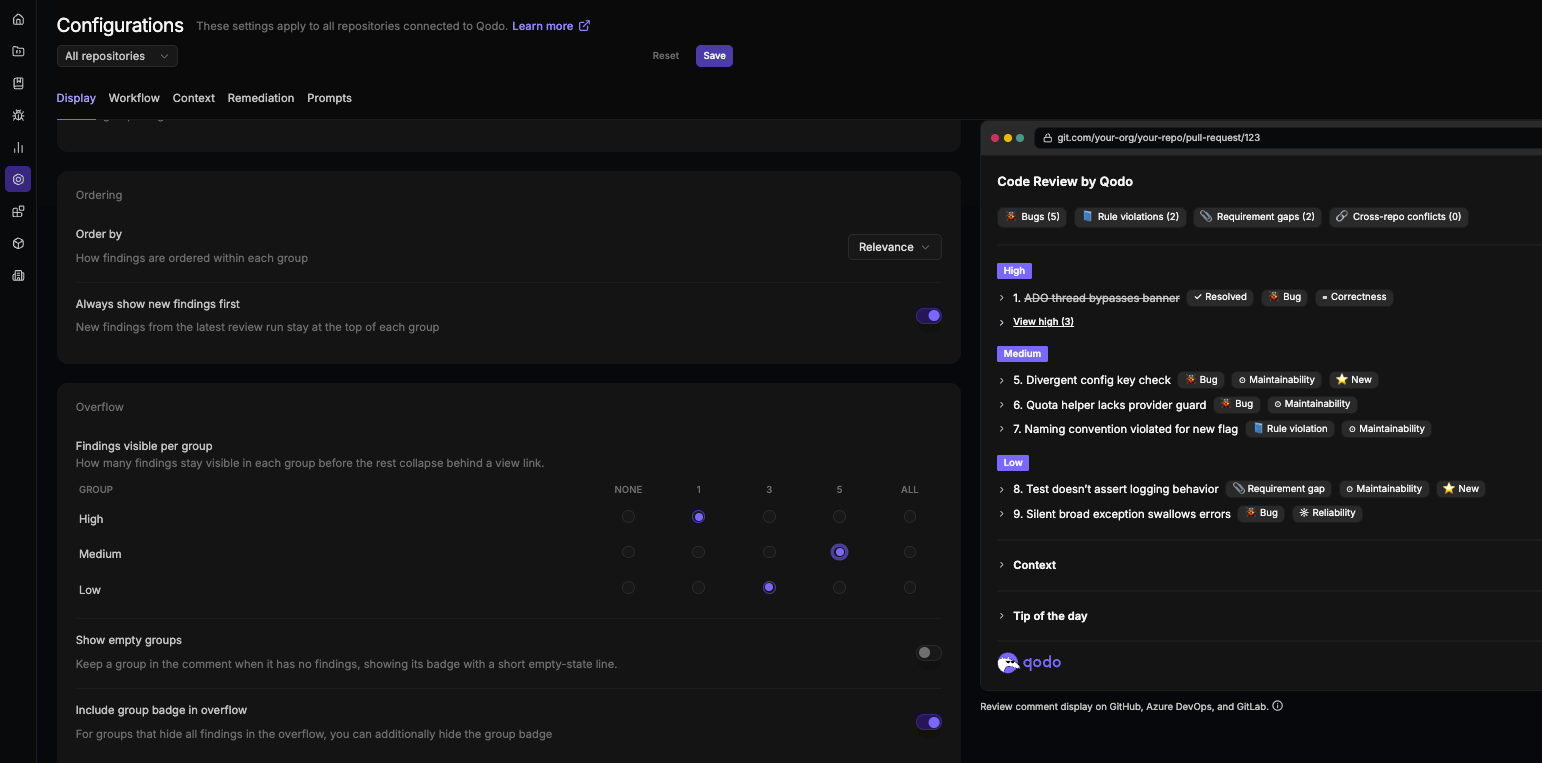
| **Findings visible per group** | How many findings stay visible in each severity group before the rest collapse behind a **View** link. (No default: stays unset until you configure it.) | Set per severity tier: None, 1, 3, 5, All |
| **Show empty groups** | Keeps a group in the comment when it has no findings, showing its badge with a short empty-state line. | Enable / Disable (default) |
| **Include group badge in overflow** | When enabled, the group's badge collapses along with its findings. Disable to keep the badge visible even when none of the group's findings are shown. | Enable (default) / Disable |
## Findings
GitHubGitLabAzure DevOps
| Setting | Description | Options |
| ---------------------------- | ------------------------------------------------------------------------------------------------------------------------------------ | -------------------------------------------------------------------------------------------------------------------------------------------------------------------------------------------------------------------------------------------------------- |
| **Finding content sections** | For each content section of a finding, choose whether it's hidden, shown collapsed, or shown expanded in the PR code review comment. | Each section set individually: • **Description**: Expanded (default) • **Code**: Collapsed (default) • **Relevance**: Collapsed (default) • **Evidence**: Collapsed (default) • **Agent prompt**: Collapsed (default) |
## Comments
| Setting | Description | Options |
| -------------------------------------- | ------------------------------------------------------------------------------------------------------------------------------------- | ------------------------------------------------------------------------- |
| **Comment type** | The comment types used to display review findings. | • Inline only • Summary only • Summary & Inline (default) |
| **Inline comment severity threshold** | Inline comments are published only for findings at or above the selected severity. | • High (default) • Medium • Low |
| **Advanced comment routing overrides** | Routes findings to inline or as a summary comment based on their severity grouping. (No default: stays unset until you configure it.) | Set per severity tier (High, Medium, Low): Inline / Summary / Both / Drop |
## Comment parts
| Setting | Description | Options |
| ----------------------------------------------------------------------------------------------- | ------------------------------------------------------------------------------------------------------------------------ | -------------------------- |
| **Divider lines** | Shows divider lines between the parts of the review comment. When disabled, parts stay separated by a single blank line. | Enable (default) / Disable |
| **Show context** | Disable to hide the "Context sources" section from the review comment. | Enable (default) / Disable |
| **Show tip of the day** | A rotating Qodo tip, shown just above the footer of the review summary comment. | Enable (default) / Disable |
| **[Show previous reviews](/code-review/comment-anatomy#previous-reviews-formerly-audit-trail)** | Shows the collapsible history section, with one entry per reviewed commit. | Enable (default) / Disable |
| **Show comment footer** | Shows the Qodo footer at the bottom of the review comment. | Enable (default) / Disable |
The toggles are listed in the order the parts appear in the review comment.
## Notification comments
| Setting | Description | Options |
| ------------------------------------------------------------------------------------------- | -------------------------------------------------------------------------------------------------------------------------------------------------------------------- | -------------------------- |
| **[Persistent comment notification](/code-review/persistent-review-comments#how-it-works)** | Posts a "Code review by qodo was updated up to the latest commit" message in the pull request each time Qodo updates the persistent review comment for a new commit. | Enable (default) / Disable |
| **In-progress comment** | Publishes a temporary "review in progress" comment while the review runs, then removes it when the review is posted. | Enable (default) / Disable |
| **Show images and animations** | Shows Qodo's illustrations and animations in the loading and empty state review comments. Disable to hide these visuals. | Enable (default) / Disable |
## Display live preview
GitHubGitLabAzure DevOps
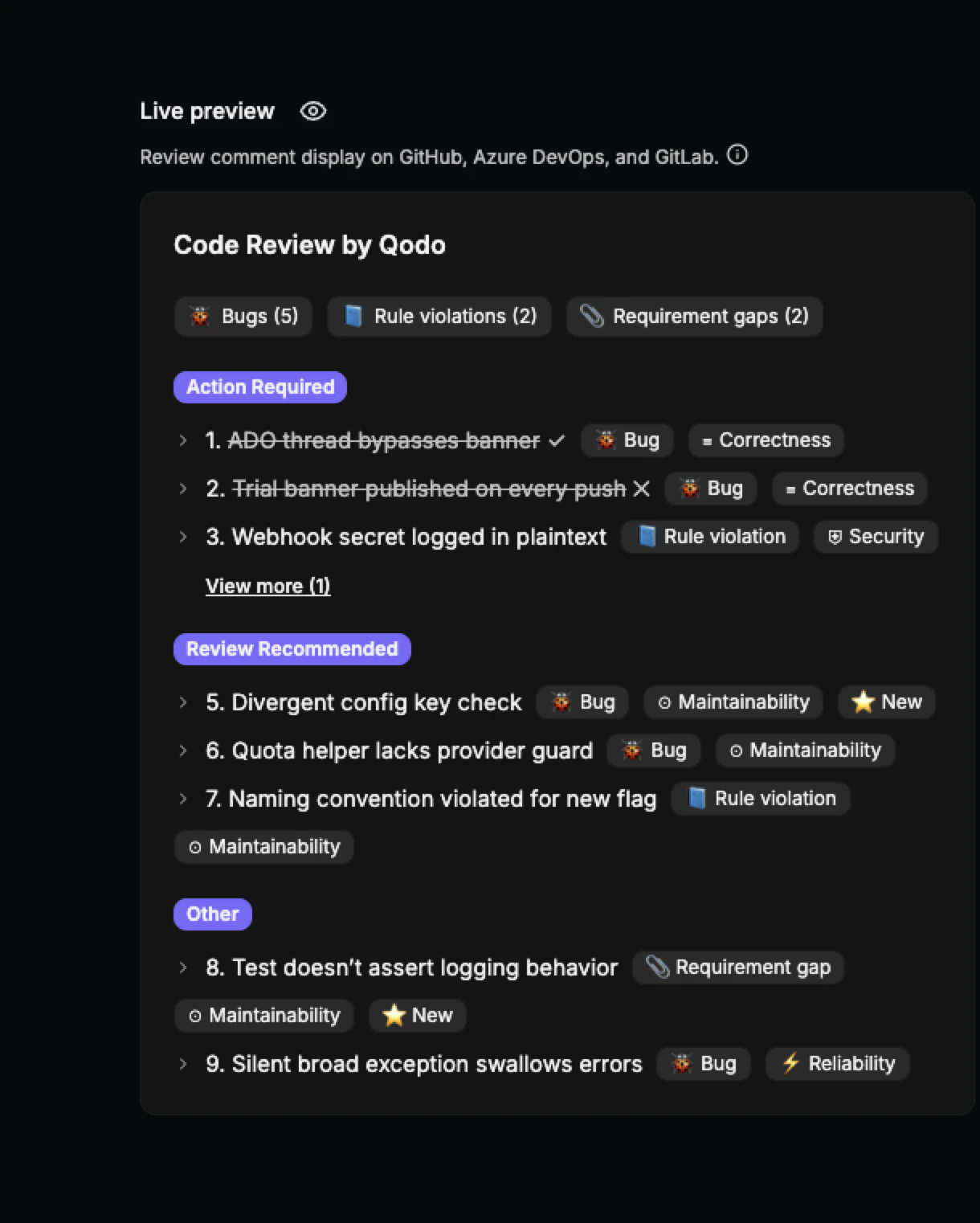
The **Live Preview** pane shows a real-time visual of how review comments will appear in the target Git provider. Changes to display settings update the preview immediately, with no save or refresh required. The preview reflects the Git provider selected using the icons next to the repository selector, so it matches how findings will actually render for that provider.
The top right of the preview includes:
* A **Summary / Inline** dropdown that switches between the full review comment and the inline comment. It switches automatically when you change a setting that affects inline comments.
* A light/dark mode toggle that switches the preview's color scheme. Useful for checking how the review renders on providers that default to light mode.
 ## Display presets