> ## Documentation Index
> Fetch the complete documentation index at: https://docs.qodo.ai/llms.txt
> Use this file to discover all available pages before exploring further.
# View skill-related in your findings
> See how Qodo surfaces skill-related findings in pull requests based on your repository’s `SKILL.md` file
Beta
During a pull request review, Qodo evaluates changes against skills defined in your repository’s `SKILL.md` file and surfaces findings when relevant instructions are not followed.
## Prerequisites
To use Skill insights in pull request findings, a `SKILL.md` file must be located in the root of your repository. This file defines the skills Qodo uses during pull request reviews.
Skills are reusable, agent-agnostic instruction sets that extend what your AI coding agent can do. Each skill is a plain-text file that describes how to complete a specific engineering task, such as enforcing standards, guiding review behavior, or applying domain-specific practices. Skills follow the open Agent Skills standard and are portable across compatible agents.
## How Skill insights are detected
When Qodo reviews a pull request, it identifies skills relevant to the changes and applies the instructions defined in those skills.
If a skill includes constraints, expectations, or review guidance, Qodo evaluates whether the changes comply and surfaces a finding when a mismatch is detected.
Not every skill affects code review. Skills intended only for code generation or workflow automation may not be used during pull request review.
## Understand Skill insights in your findings
When Qodo surfaces a finding, it indicates that the code does not align with instructions defined in a repository skill.
Skill insights are displayed within findings in the pull request as supporting context that explains why a finding was raised. They appear as a Skill insight label inside the finding, alongside other metadata such as severity or category.
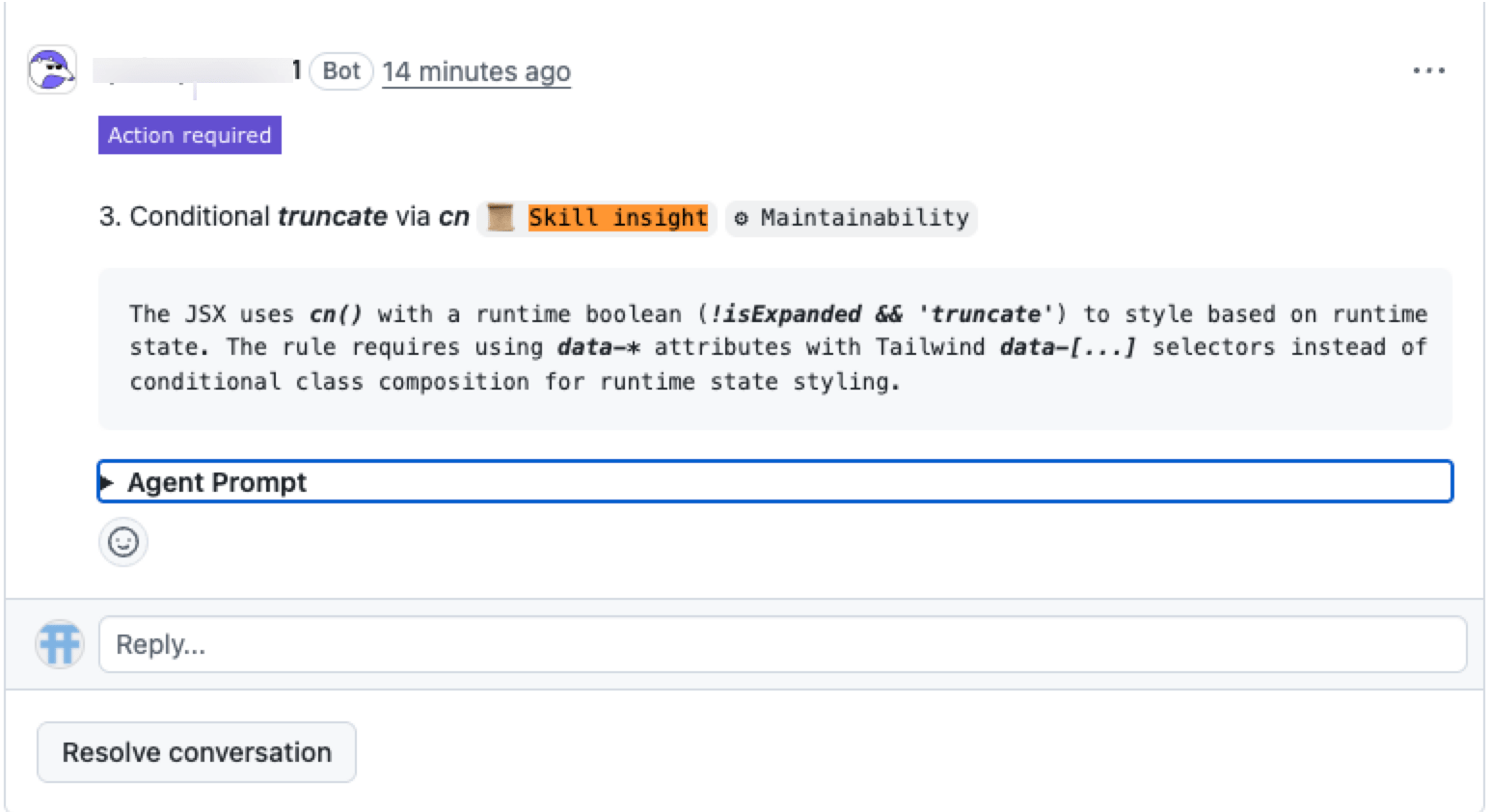 Each insight may include a reference to the skill that influenced it. This provides additional context and helps you understand the reasoning behind the finding.
Skill insights help you understand:
* Why the finding was raised
* Which skill is relevant
* The context behind the feedback
* How it relates to your repository practices
Selecting the skill opens it in the Qodo portal where you can review the full definition.
## Related resources
* [View all skills used in your code review across your repositories](/governance/manage-skills-across-repositories): For admins, view all skills used in code review across your repositories.
Each insight may include a reference to the skill that influenced it. This provides additional context and helps you understand the reasoning behind the finding.
Skill insights help you understand:
* Why the finding was raised
* Which skill is relevant
* The context behind the feedback
* How it relates to your repository practices
Selecting the skill opens it in the Qodo portal where you can review the full definition.
## Related resources
* [View all skills used in your code review across your repositories](/governance/manage-skills-across-repositories): For admins, view all skills used in code review across your repositories.