> ## Documentation Index
> Fetch the complete documentation index at: https://docs.qodo.ai/llms.txt
> Use this file to discover all available pages before exploring further.
# View cross-repository conflicts in your findings
> Learn how cross-repository conflict findings are generated by Qodo's cross-repository code review and how they flag breaking changes against related repositories.
Beta
Multi-tenant
Single-tenant
Cross-repository conflicts are findings generated by Qodo's cross-repository code review that flag a change in a pull request that would break a related repository.
## How cross-repository conflicts are generated
Cross-repository conflicts are generated by Qodo's **cross-repository code review**, which reviews pull requests in repositories that have a defined relationship with other repositories.
When a pull request modifies a component covered by a relationship, such as a shared library, an API contract, or a database schema, the agent reads the related repositories and traces the impact in both directions. If a change would break a related repository, it reports a **cross-repository conflict** finding with a direct link to the affected lines in that repository.
The review runs automatically on any pull request in a repository that has at least one active relationship.
By default, the review compares against the **main branch** of each related repository. If your change has a matching pull request or branch in the related repository, include the related pull request URL or branch name in your pull request description or a linked ticket so the conflict is evaluated against that code. Otherwise, Qodo may flag a conflict that a related, unmerged pull request already resolves. See [Cross-repository code review](/governance/cross-repo-code-review).
For how relationships are defined and how cross-repository review works in depth, see [Cross-repository code review](/governance/cross-repo-code-review).
## Prerequisites
1. Log in to the Qodo portal.
2. Set up a relationship between repositories. For more information, see [Manage cross-repository relationships](/governance/cross-repo-code-review/repository-relationships).
3. In the **Configurations** > **Code review** tab, verify that **Cross-repo context** is enabled.
## View the cross-repository conflict in the findings
Cross-repository code review adds the following finding type to the review output:
🔗 **Cross-repo conflict**: A change in the pull request would break a related repository.
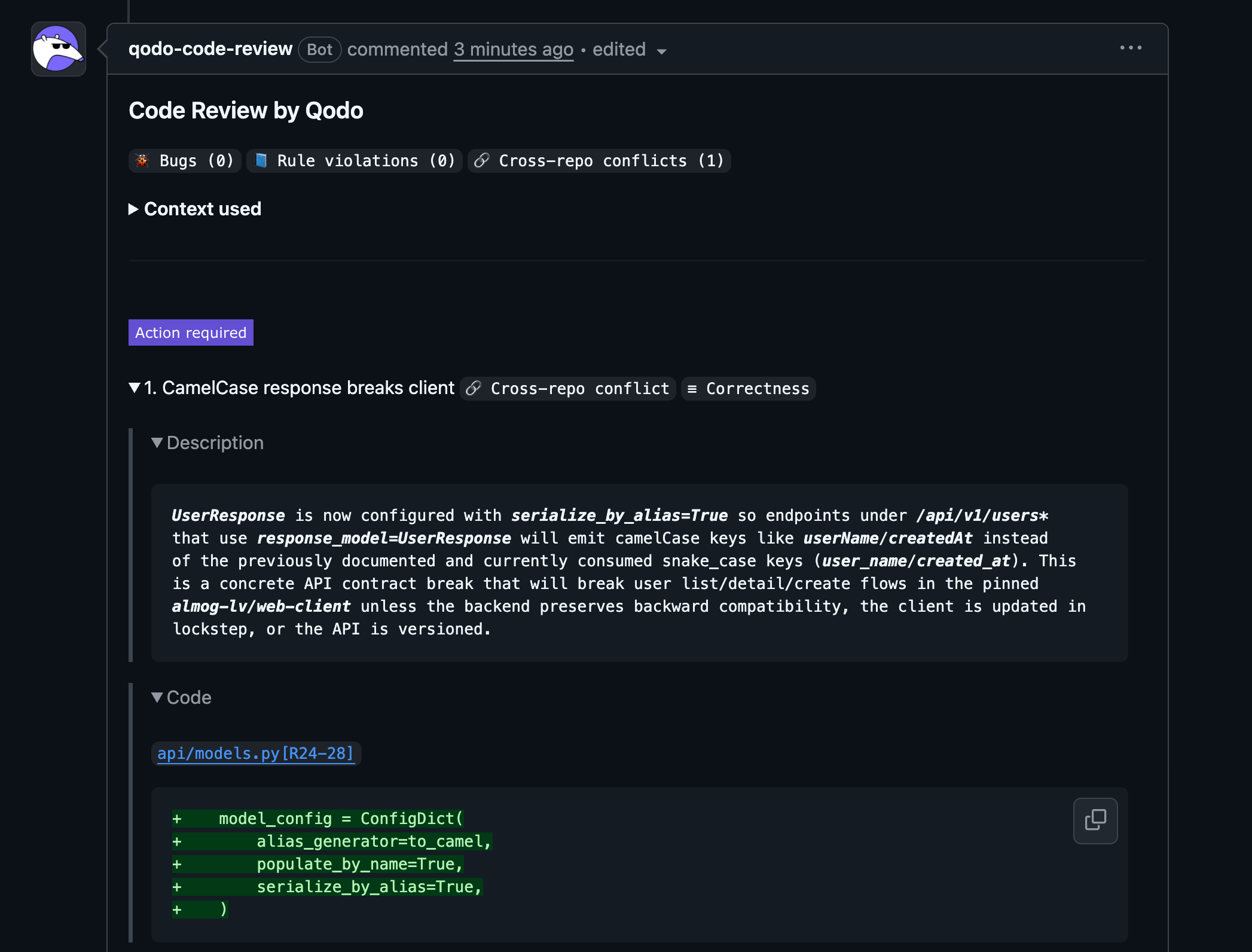 Cross-repository conflicts appear alongside other review findings:
* 🐞 Bugs
* 📘 Rule violations
* 📎 Requirement gaps
All findings are displayed in a unified review comment. Cross-repository conflicts also appear on the [Findings page](/governance/view-all-findings-in-organization) in the Qodo portal, tagged `Cross-repo`.
## Cross-repository conflict details
Each cross-repository conflict finding includes:
* **Description**: Explanation of the breaking change and which related repository is affected
* **Code reference**: Link to the affected lines in the related repository
* **Evidence**: The related repository code used to detect the conflict
* **Agent prompt**: A suggested prompt to help resolve the issue
Cross-repository conflicts appear alongside other review findings:
* 🐞 Bugs
* 📘 Rule violations
* 📎 Requirement gaps
All findings are displayed in a unified review comment. Cross-repository conflicts also appear on the [Findings page](/governance/view-all-findings-in-organization) in the Qodo portal, tagged `Cross-repo`.
## Cross-repository conflict details
Each cross-repository conflict finding includes:
* **Description**: Explanation of the breaking change and which related repository is affected
* **Code reference**: Link to the affected lines in the related repository
* **Evidence**: The related repository code used to detect the conflict
* **Agent prompt**: A suggested prompt to help resolve the issue