> ## Documentation Index
> Fetch the complete documentation index at: https://docs.qodo.ai/llms.txt
> Use this file to discover all available pages before exploring further.
# Optimize AI effort with Review effort mode
> Control the depth of AI code review by letting Qodo automatically match review effort to the risk of each change, or set a fixed mode across all reviews in the repository.
Research Preview
**Research Preview**: Review effort mode is set as Research Preview and is under active development. Functionality and results may evolve as we continue to improve the feature. We recommend reviewing and validating outputs before use, and advise against using these features in production or business-critical workflows.
Review effort mode controls the depth of AI code review. By default, it is set to **Balanced**, which applies a standard level of analysis to every review. You can switch to **Auto** to let Qodo dynamically match review depth to the risk of each change, or choose another fixed mode to apply the same level of analysis to every review in the repository.
Review effort mode helps you:
* Select the optimal review mode for each code change.
* Reduce review time for incremental changes where deeper analysis is not needed.
* Give repository owners the flexibility to choose the appropriate review effort for each repository based on its importance.
## How Review effort mode works
Before starting a full code review, Review effort mode performs a fast analysis of the changes. It goes beyond the size of the diff, evaluating the potential impacrt of the changes, including factors such as:
* The type of code being modified.
* The potential impact of introducing a defect.
* The complexity of the change.
* The level of reasoning required to identify potential issues.
For example:
* A large block of generated code may present a low risk of introducing defects.
* A single-line change to billing logic may have a high impact if incorrect.
Based on this analysis, Review effort mode determines the optimal level of AI scrutiny required for the review.
## Review effort modes
During the Research Preview, Auto mode includes the Deep reviews at no additional cost, and selecing Deep mode directly is disabled.
Review effort mode routes each review into one of these review modes:
| Mode | Description |
| ------------ | ----------------------------------------------------------------------------------------------------------------------------------------- |
| **Auto** | Intelligently selects a fast, balanced, or deep review. |
| **Fast** | Performs a fast review for simple or low-risk changes. |
| **Balanced** | Applies the default review process for typical code changes. This is the default mode. |
| **Deep** | Performs a more comprehensive review using the most advanced model selection and agentic architecture. Disabled in Research Preview mode. |
## Review effort examples
Review effort mode evaluates each code change and selects the most appropriate review effort based on the potential impact of the change. The following examples show how different types of changes can be routed to different review modes.
### Documentation update
A developer updates a documentation file to correct a spelling mistake. Since the change has minimal impact, Review effort mode routes the review to the Fast mode, providing a fast and cost-efficient review.
### Billing logic refactor
A developer modifies billing logic that could affect financial calculations. Even if the change contains only a small number of lines, Review effort mode identifies the potential impact and routes the review to the Deep mode. Multiple review agents analyze the changes to provide deeper coverage.
## Safety-first routing
When Review effort mode cannot confidently determine the appropriate risk level, it prioritizes safety.
Uncertain reviews are not routed to a lower effort mode. Instead, they are promoted to at least the Auto mode to ensure that potentially important changes receive sufficient analysis.
## Change the Review effort mode
By default, the review mode is set to **Balanced**, which applies a standard level of analysis to every review. You can switch to **Auto** for dynamic routing based on risk, or select another fixed mode to apply the same level of analysis to all reviews in the repository.
1. Log in to the Qodo portal.
2. Navigate to the **Code review** tab > **Review effort mode**.
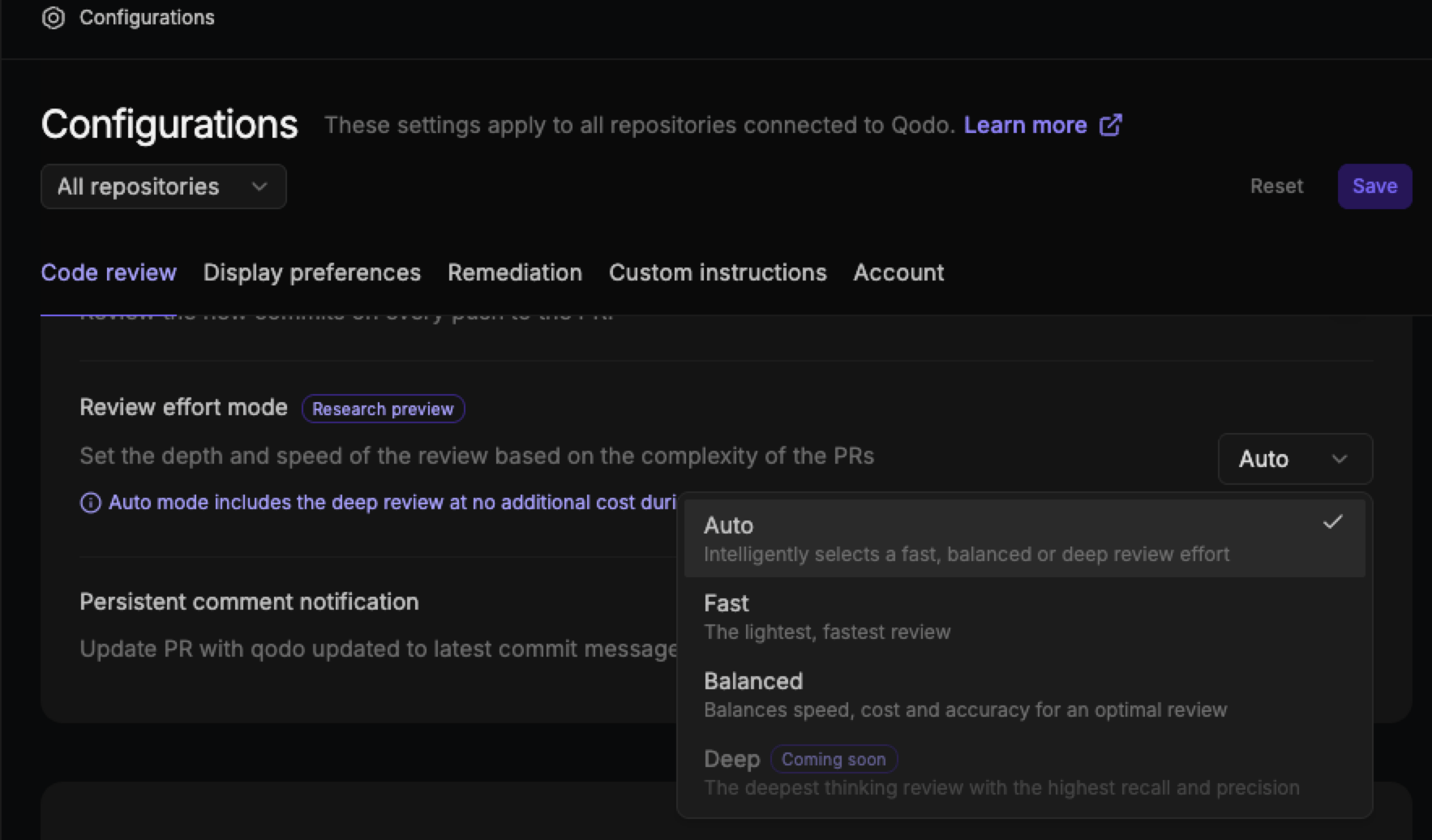 3. Choose from the following review modes:
* **Auto**: Automatically selects the most suitable review mode based on the complexity of the commit.
* **Fast**: Runs the lightest and fastest review for quicker feedback.
* **Balanced**: Balances review speed, cost, and accuracy for an optimal experience. This is the default mode.
4. Click **Save**.
3. Choose from the following review modes:
* **Auto**: Automatically selects the most suitable review mode based on the complexity of the commit.
* **Fast**: Runs the lightest and fastest review for quicker feedback.
* **Balanced**: Balances review speed, cost, and accuracy for an optimal experience. This is the default mode.
4. Click **Save**.