> ## Documentation Index
> Fetch the complete documentation index at: https://docs.qodo.ai/llms.txt
> Use this file to discover all available pages before exploring further.
# Control review verbosity in pull requests
> Verbosity controls how Qodo's findings are surfaced on your pull requests: how findings in lower action levels collapse, and where each action level's findings appear.
Verbosity settings control how Qodo's findings are surfaced on your pull requests. You can tune how findings in lower action levels collapse in the summary comment, and route each action level (Action Required, Review Recommended, and Informational) to a different location.
Configure these settings in the Qodo portal under **Configurations** > **Display preferences** > **Verbosity**. See [Configure using the Qodo portal](/install-and-configure/configuration-overview/portal-configuration#display-preferences).
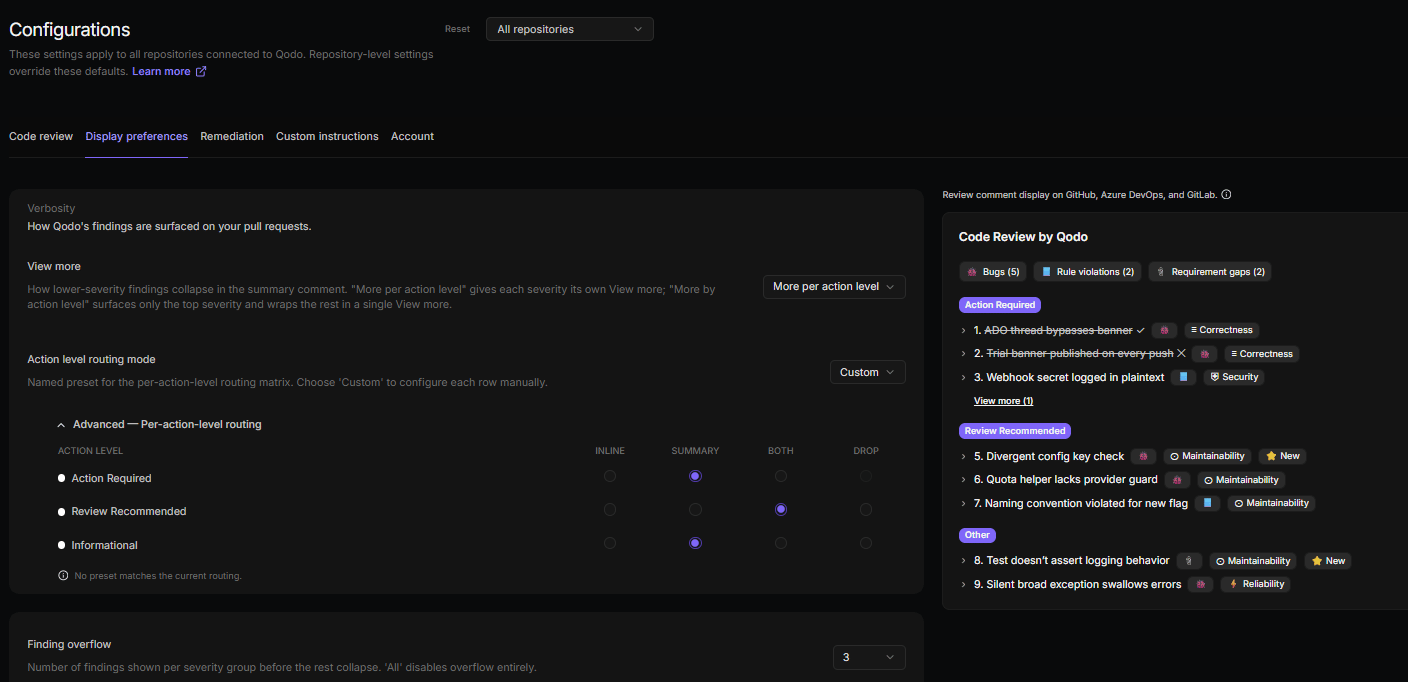 ## Control how findings collapse with View more
The **View more** setting controls how findings in lower action levels collapse in the summary comment.
* **More per action level**: Each action level gets its own **View more** control, so readers can expand each group independently.
* **More by action level**: Only the top action level is surfaced, and the rest are wrapped in a single **View more** control.
## Route findings by action level
By default, every action level appears in the same place. Use **Action level routing mode** to change where findings go:
* **Inline**, **Summary**, or **Both**: a preset that sends every action level to that one destination.
* **Custom**: set a different destination for each action level, using the routing matrix.
In **Custom** mode, the matrix has a row for each action level (Action Required, Review Recommended, and Informational). Select one destination per row:
* **Inline**: Findings appear directly on the relevant lines of code.
* **Summary**: Findings appear in the summary comment.
* **Both**: Findings appear both inline and in the summary comment.
* **Drop**: Findings are not shown (available in Custom mode only).
For a worked example that combines these settings, see [Reduce review noise on pull requests](/code-review/reduce-review-noise).
## Control how findings collapse with View more
The **View more** setting controls how findings in lower action levels collapse in the summary comment.
* **More per action level**: Each action level gets its own **View more** control, so readers can expand each group independently.
* **More by action level**: Only the top action level is surfaced, and the rest are wrapped in a single **View more** control.
## Route findings by action level
By default, every action level appears in the same place. Use **Action level routing mode** to change where findings go:
* **Inline**, **Summary**, or **Both**: a preset that sends every action level to that one destination.
* **Custom**: set a different destination for each action level, using the routing matrix.
In **Custom** mode, the matrix has a row for each action level (Action Required, Review Recommended, and Informational). Select one destination per row:
* **Inline**: Findings appear directly on the relevant lines of code.
* **Summary**: Findings appear in the summary comment.
* **Both**: Findings appear both inline and in the summary comment.
* **Drop**: Findings are not shown (available in Custom mode only).
For a worked example that combines these settings, see [Reduce review noise on pull requests](/code-review/reduce-review-noise).