> ## Documentation Index
> Fetch the complete documentation index at: https://docs.qodo.ai/llms.txt
> Use this file to discover all available pages before exploring further.
# Reduce review noise on pull requests
> Use verbosity settings to keep Action Required findings visible while presenting lower-priority findings more compactly.
Verbosity settings control how prominently Qodo surfaces findings. In pull requests with many findings, **Action Required** findings stay visible everywhere while lower-priority findings appear more compactly.
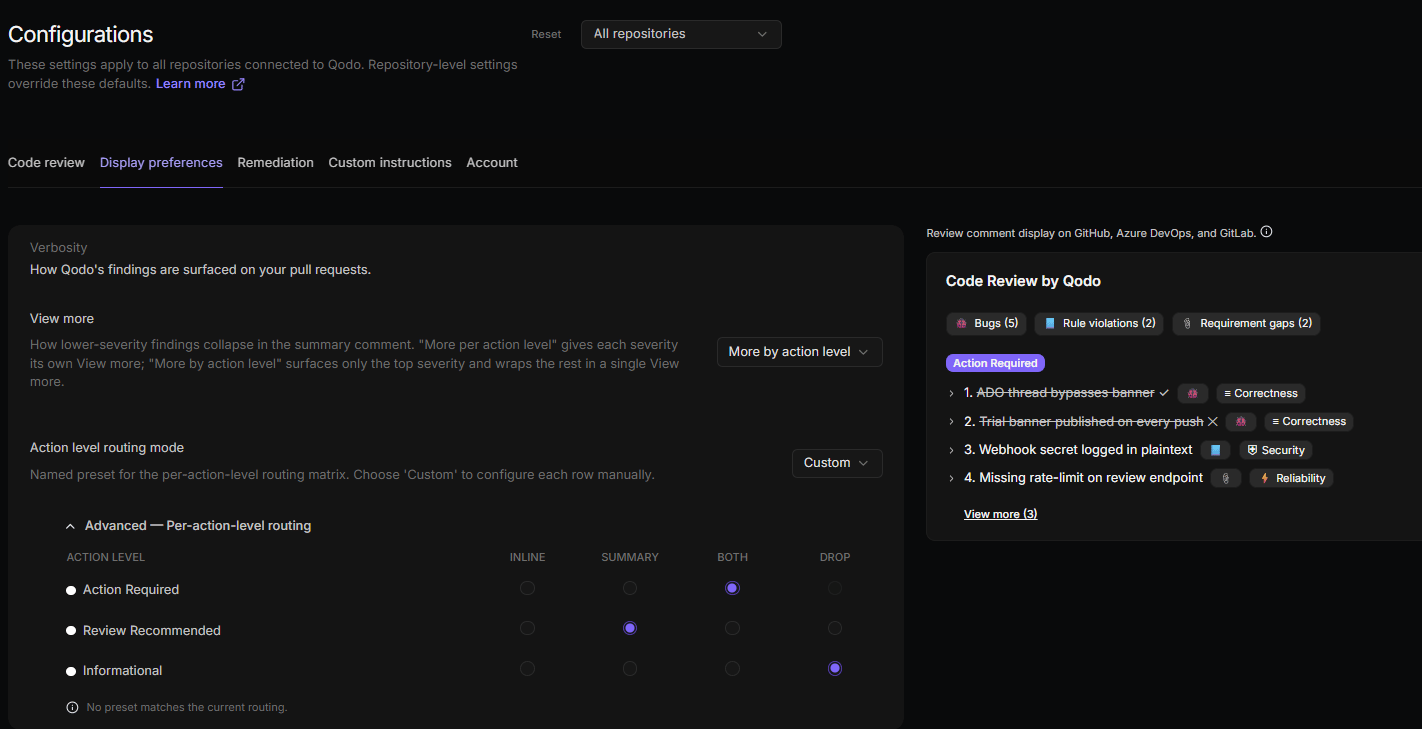
This is a recommended low-noise setup for teams that get a high volume of findings and want to focus on what matters most. Configure these settings on the **Configurations** > **Display preferences** tab in the Qodo portal:
1. Set **View more** to **More by action level** so only the top action level is surfaced and the rest collapse behind a single **View more**.
2. Set **Action level routing mode** to **Custom**.
3. In the routing matrix, set each action level's destination:
| Action level | Destination |
| ------------------ | ----------- |
| Action Required | Both |
| Review Recommended | Summary |
| Informational | Drop |
4. Disable **Show images and animations** to hide Qodo's loading and empty-state illustrations.
5. Use **Per-finding verbosity** to collapse or hide the parts you don't need to see in every finding.
With this setup:
* **Action Required** findings appear inline and in the summary.
* **Review Recommended** findings stay in the summary.
* **Informational** findings are hidden.
* The loading and empty-state illustrations are hidden.
* Each finding shows only the parts you keep expanded.
 See [Control review verbosity](/code-review/review-verbosity) for the full list of verbosity settings.