> ## Documentation Index
> Fetch the complete documentation index at: https://docs.qodo.ai/llms.txt
> Use this file to discover all available pages before exploring further.
# Generate PR labels automatically
GitHub GitLab
The **Generate Labels** feature analyzes the code changes in a pull request and automatically suggests relevant labels. Suggestions are based on a predefined set of labels and their descriptions, helping teams keep PRs consistently categorized with minimal manual effort.
Generated labels can reflect aspects such as the type of change, impacted areas, or the nature of the update, making it easier to triage, review, and track pull requests at scale.
## How to use Generate Labels
### **Manual usage**
You can trigger label generation directly from the pull request using a comment command:
```bash theme={null}
/generate_labels
```
### **Enabling custom labels**
Qodo supports custom labels in three different ways, depending on how you manage configuration in your environment.
**CLI (local configuration file)**
When working from the CLI, custom labels are configured in the [custom\_labels file](https://github.com/Codium-ai/pr-agent/blob/main/pr_agent/settings/custom_labels.toml).
Update this file with your desired label definitions and descriptions so Qodo can use them when generating label suggestions.
**Repository configuration file**
You can enable and configure custom labels directly at the repository level.
To do this, apply the relevant configuration changes in the local `.pr_agent.toml` file in your repository.
**Repository labels page**
**Platforms supported:** GitHub, GitLab
Qodo can also work directly with labels defined in the repository itself.
When enabled, Qodo reads labels from the repository’s labels page and uses them as candidates when suggesting labels for pull requests.
* **GitHub:** `https://github.com/{owner}/{repo}/labels`, or click the **Labels** tab in the issues or PR's page.
* **GitLab:** `https://gitlab.com/{owner}/{repo}/-/labels`, or click **Manage** and then **Labels** from the left menu.
### Custom label format
When defining custom labels, use the following format:
* **Label name**: The name of the custom label.
* **Description**: Start the description with the prefix `pr_agent:`.
The description should be comprehensive and detailed, explaining when Qodo should suggest this label for a pull request.
**Example:**
* **Label name:** `security`
* **Description:** `pr_agent: Suggest this label when the PR introduces authentication/authorization logic, handles secrets, touches crypto, or modifies security-sensitive endpoints.`
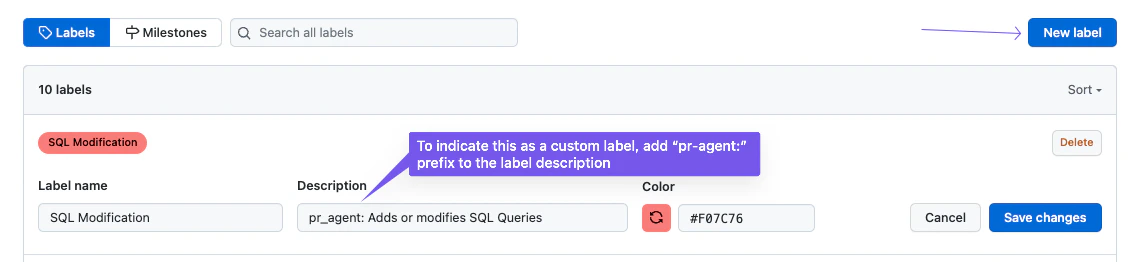 ### Using label generation
After adding custom labels, they become available for use by Qodo’s label generation feature.
* Set `enable_custom_labels` to `True`: This will turn off the default labels and enable the custom labels provided in the `custom_labels.toml` file.
* Add the custom labels. It should be formatted as follows:
```js theme={null}
[config]
enable_custom_labels=true
[custom_labels."Custom Label Name"]
description = "Description of when AI should suggest this label"
[custom_labels."Custom Label 2"]
description = "Description of when AI should suggest this label 2"
```
**Example:**
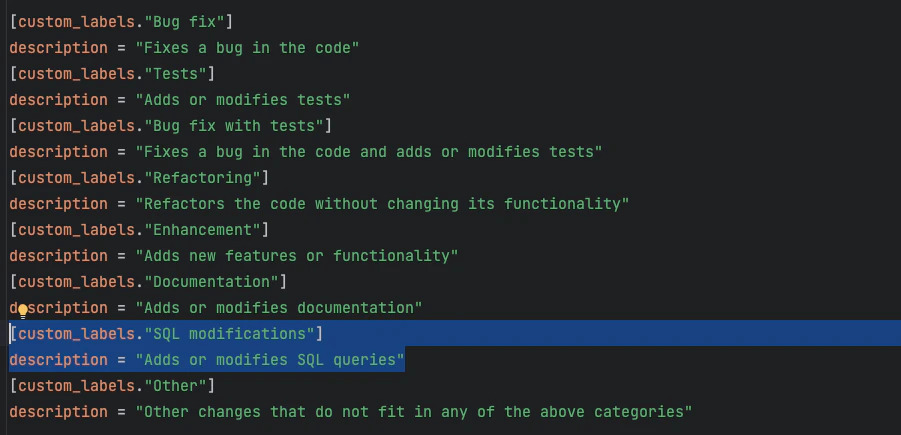
If you want Qodo to detect changes to SQL queries in a pull request, you can add a custom label with a clear description that explains when it should be applied:
### Using label generation
After adding custom labels, they become available for use by Qodo’s label generation feature.
* Set `enable_custom_labels` to `True`: This will turn off the default labels and enable the custom labels provided in the `custom_labels.toml` file.
* Add the custom labels. It should be formatted as follows:
```js theme={null}
[config]
enable_custom_labels=true
[custom_labels."Custom Label Name"]
description = "Description of when AI should suggest this label"
[custom_labels."Custom Label 2"]
description = "Description of when AI should suggest this label 2"
```
**Example:**
If you want Qodo to detect changes to SQL queries in a pull request, you can add a custom label with a clear description that explains when it should be applied:
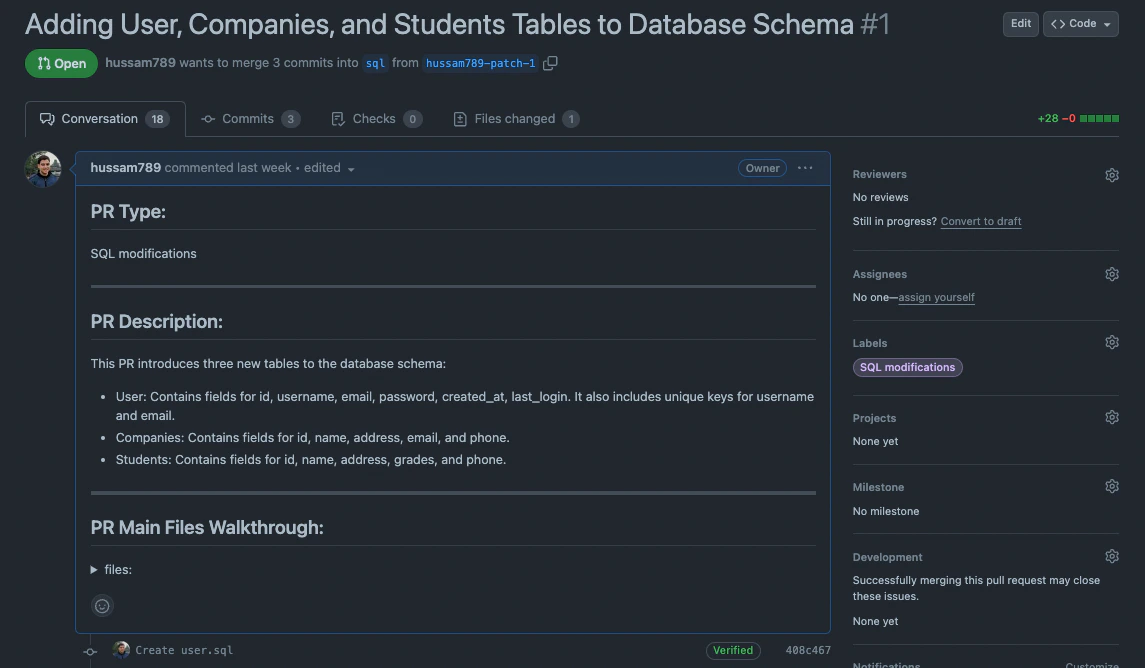
 When the `generate_labels` feature runs on a pull request that includes SQL-related changes, Qodo will automatically suggest this custom label:
 Note that custom labels are not only used by `generate_labels`. They are also taken into account by the PR description feature, helping enrich summaries and classifications.