> ## Documentation Index
> Fetch the complete documentation index at: https://docs.qodo.ai/llms.txt
> Use this file to discover all available pages before exploring further.
# Chat with Qodo in your pull requests
> Chat with Qodo to interact with Qodo directly inside pull requests.
export const AzureIcon = () => ;
Beta
Want to fix a finding without leaving the chat? Use Fix with Chat Agent to remediate issues while you chat with Qodo. Describe the change you want, iterate on the suggestion, and apply it directly to the PR. Available under Research Preview. [Learn more](/code-review/remediate-findings-in-prs)The chat with Qodo is the evolution of the `/ask` command. It retains the simplicity of asking questions in your workflow while adding powerful new capabilities through advanced chat interactions and specialized commands.
Chatting with Qodo makes pull request reviews interactive. Start a conversation by mentioning `@qodo`, `qodo`, or `/qodo` at the beginning of a PR comment, review comment, or inline code comment. You can also address Qodo with a greeting such as `Hey qodo`.
When chatting with Qodo, you can:
* Ask Qodo to explain a finding.
* Dismiss a finding with a reason.
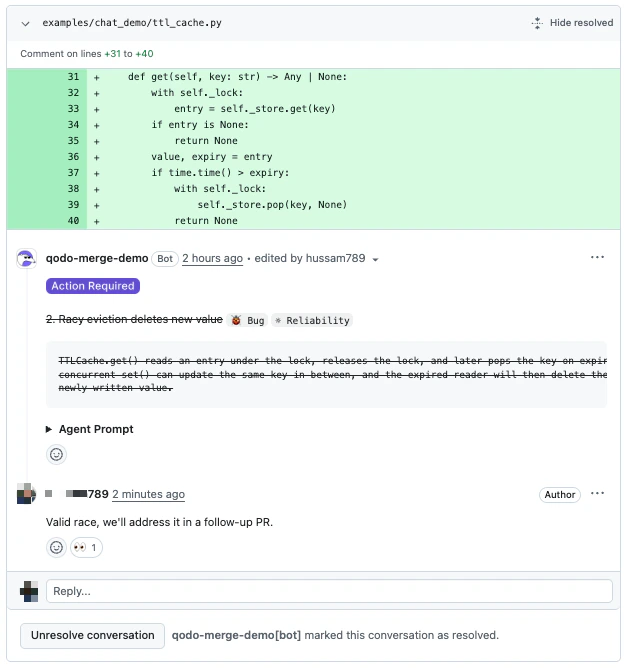
This is the view once dismissed.
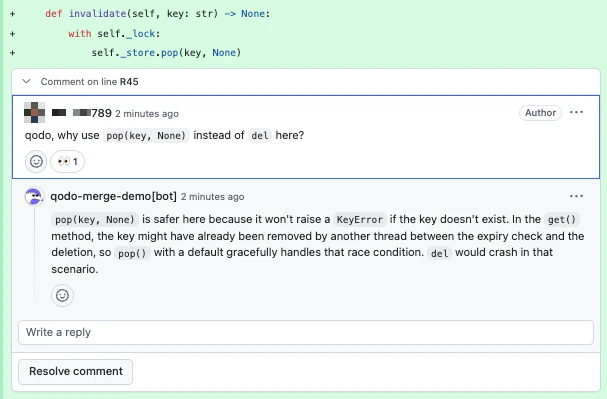
* Discuss a suggestion or ask follow-up questions in natural language.
Qodo only responds when addressed, so reviewer discussions are never interrupted.
## Start the chat
Mention `@qodo` in any PR comment, review comment, or inline code comment. Place `@qodo`, `qodo`, or `/qodo` at the beginning of the comment, or precede it with a greeting such as `Hey qodo`.
Mention `@qodo` (or `/qodo` / `qodo`) each time you want Qodo to respond, including follow-up replies in a thread it has already participated in. Qodo replies only to messages that explicitly address it, so reviewer-to-reviewer discussion in a thread is never interrupted.
### Conversation context
Qodo uses the chat location to understand context for:
* **Inline code finding**: Scoped to the specific finding.
* **Inline code comment**: Scoped to the specific line.
* **PR comment**: Scoped to the entire PR and all findings.
If Qodo cannot determine which finding or PR element you mean, it asks a clarifying question.
## What you can ask Qodo to do
* **Explain a finding**\
Ask why a finding was raised or how the suggested fix works. Qodo replies in natural language.
* **Dismiss a finding**\
Tell Qodo a finding does not apply. Qodo marks it as dismissed with one of three reasons:
* **Rejected**: The finding is incorrect or invalid.
* **Deferred**: The finding is acknowledged, but will be handled outside this PR.
* **Intentional**: The flagged behavior is intended (e.g., kept for backwards compatibility).
When a finding is dismissed, Qodo updates the PR in three coordinated places so reviewers can see at a glance what is still actionable:
* The **PR summary comment** strikes the finding through and tags it `✗ Dismissed`, so the open-vs-closed split is visible without scrolling through every thread.
* The **inline review thread** is marked resolved and collapsed. It can be reopened at any time via **Unresolve conversation**.
* The **inline finding comment** itself is rendered with strikethrough, signalling that the suggestion was acknowledged and closed without requiring a code change.
* **Discuss in natural language**\
Ask follow-up questions, request more detail, or push back on a suggestion. Qodo responds conversationally with the PR diff and thread as context.
## Triggering Qodo
There are no fixed sub-commands inside the Chat. Qodo interprets your message in natural language. To address Qodo, start a message with any of:
| Trigger | Description |
| --------- | --------------------------------------- |
| `@qodo …` | Standard mention. |
| `/qodo …` | Slash-style mention. |
| `qodo …` | Bare mention at the start of a comment. |
Address Qodo in every message you want it to act on, including follow-ups in a thread it has already replied to. Untagged replies are treated as reviewer discussion and left alone.
To dismiss a finding, just tell Qodo in plain language (e.g., *"@qodo this is intentional, we want to keep the legacy behavior"*). Qodo will record the dismissal with the appropriate reason.
## Example conversations
**Developer**
```text theme={null}
@qodo I don't understand why this is flagged as a bug. The function looks correct to me.
```
**Qodo**
```text theme={null}
The returned object is an array, but the code accesses it as if it were a single value on line 42. That will throw a TypeError at runtime.
```
**Developer**
```text theme={null}
@qodo This is intentional, we're keeping the legacy behavior for backwards compatibility.
```
**Qodo**
```text theme={null}
Got it. I've marked this finding as dismissed (intentional) and resolved the thread.
```
**Developer**
```text theme={null}
@qodo Valid point, but we'll address this in a follow-up PR.
```
**Qodo**
```text theme={null}
Understood. I've dismissed this finding as deferred so it won't block this PR.
```
**Developer**
```text theme={null}
@qodo This suggestion is wrong, the field is already validated upstream.
```
**Qodo**
```text theme={null}
Thanks for the context. I've dismissed this finding as rejected.
```
## Guidelines for GitHub users
GitHub does not always update bot responses in real time.
After posting a message:
1. Refresh the page if you do not see the Qodo response indicator.
2. Refresh again after a few seconds if the full response does not appear.
If Qodo still has not responded after a minute or two, post the message again in the same thread.
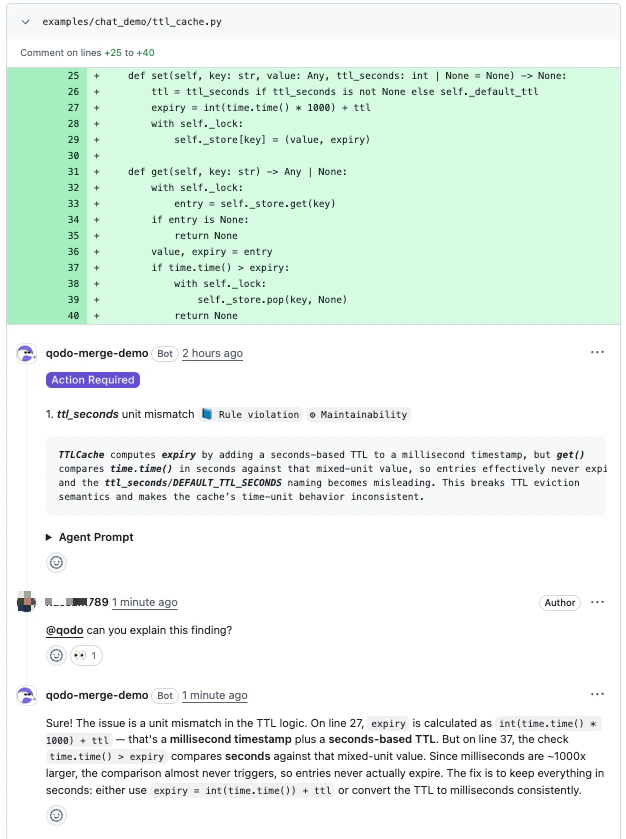 * Dismiss a finding with a reason.
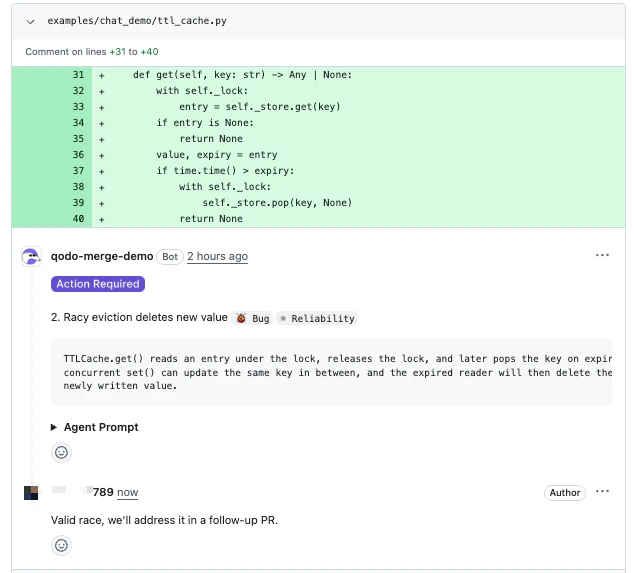 This is the view once dismissed.
 * Discuss a suggestion or ask follow-up questions in natural language.
 Qodo only responds when addressed, so reviewer discussions are never interrupted.
## Start the chat
Mention `@qodo` in any PR comment, review comment, or inline code comment. Place `@qodo`, `qodo`, or `/qodo` at the beginning of the comment, or precede it with a greeting such as `Hey qodo`.
Mention `@qodo` (or `/qodo` / `qodo`) each time you want Qodo to respond, including follow-up replies in a thread it has already participated in. Qodo replies only to messages that explicitly address it, so reviewer-to-reviewer discussion in a thread is never interrupted.
### Conversation context
Qodo uses the chat location to understand context for:
* **Inline code finding**: Scoped to the specific finding.
* **Inline code comment**: Scoped to the specific line.
* **PR comment**: Scoped to the entire PR and all findings.
If Qodo cannot determine which finding or PR element you mean, it asks a clarifying question.
## What you can ask Qodo to do
* **Explain a finding**\
Ask why a finding was raised or how the suggested fix works. Qodo replies in natural language.
* **Dismiss a finding**\
Tell Qodo a finding does not apply. Qodo marks it as dismissed with one of three reasons:
* **Rejected**: The finding is incorrect or invalid.
* **Deferred**: The finding is acknowledged, but will be handled outside this PR.
* **Intentional**: The flagged behavior is intended (e.g., kept for backwards compatibility).
When a finding is dismissed, Qodo updates the PR in three coordinated places so reviewers can see at a glance what is still actionable:
* The **PR summary comment** strikes the finding through and tags it `✗ Dismissed`, so the open-vs-closed split is visible without scrolling through every thread.
* The **inline review thread** is marked resolved and collapsed. It can be reopened at any time via **Unresolve conversation**.
* The **inline finding comment** itself is rendered with strikethrough, signalling that the suggestion was acknowledged and closed without requiring a code change.
* **Discuss in natural language**\
Ask follow-up questions, request more detail, or push back on a suggestion. Qodo responds conversationally with the PR diff and thread as context.
## Triggering Qodo
There are no fixed sub-commands inside the Chat. Qodo interprets your message in natural language. To address Qodo, start a message with any of:
| Trigger | Description |
| --------- | --------------------------------------- |
| `@qodo …` | Standard mention. |
| `/qodo …` | Slash-style mention. |
| `qodo …` | Bare mention at the start of a comment. |
Address Qodo in every message you want it to act on, including follow-ups in a thread it has already replied to. Untagged replies are treated as reviewer discussion and left alone.
To dismiss a finding, just tell Qodo in plain language (e.g., *"@qodo this is intentional, we want to keep the legacy behavior"*). Qodo will record the dismissal with the appropriate reason.
## Example conversations
Qodo only responds when addressed, so reviewer discussions are never interrupted.
## Start the chat
Mention `@qodo` in any PR comment, review comment, or inline code comment. Place `@qodo`, `qodo`, or `/qodo` at the beginning of the comment, or precede it with a greeting such as `Hey qodo`.
Mention `@qodo` (or `/qodo` / `qodo`) each time you want Qodo to respond, including follow-up replies in a thread it has already participated in. Qodo replies only to messages that explicitly address it, so reviewer-to-reviewer discussion in a thread is never interrupted.
### Conversation context
Qodo uses the chat location to understand context for:
* **Inline code finding**: Scoped to the specific finding.
* **Inline code comment**: Scoped to the specific line.
* **PR comment**: Scoped to the entire PR and all findings.
If Qodo cannot determine which finding or PR element you mean, it asks a clarifying question.
## What you can ask Qodo to do
* **Explain a finding**\
Ask why a finding was raised or how the suggested fix works. Qodo replies in natural language.
* **Dismiss a finding**\
Tell Qodo a finding does not apply. Qodo marks it as dismissed with one of three reasons:
* **Rejected**: The finding is incorrect or invalid.
* **Deferred**: The finding is acknowledged, but will be handled outside this PR.
* **Intentional**: The flagged behavior is intended (e.g., kept for backwards compatibility).
When a finding is dismissed, Qodo updates the PR in three coordinated places so reviewers can see at a glance what is still actionable:
* The **PR summary comment** strikes the finding through and tags it `✗ Dismissed`, so the open-vs-closed split is visible without scrolling through every thread.
* The **inline review thread** is marked resolved and collapsed. It can be reopened at any time via **Unresolve conversation**.
* The **inline finding comment** itself is rendered with strikethrough, signalling that the suggestion was acknowledged and closed without requiring a code change.
* **Discuss in natural language**\
Ask follow-up questions, request more detail, or push back on a suggestion. Qodo responds conversationally with the PR diff and thread as context.
## Triggering Qodo
There are no fixed sub-commands inside the Chat. Qodo interprets your message in natural language. To address Qodo, start a message with any of:
| Trigger | Description |
| --------- | --------------------------------------- |
| `@qodo …` | Standard mention. |
| `/qodo …` | Slash-style mention. |
| `qodo …` | Bare mention at the start of a comment. |
Address Qodo in every message you want it to act on, including follow-ups in a thread it has already replied to. Untagged replies are treated as reviewer discussion and left alone.
To dismiss a finding, just tell Qodo in plain language (e.g., *"@qodo this is intentional, we want to keep the legacy behavior"*). Qodo will record the dismissal with the appropriate reason.
## Example conversations